|
|
|
Error Reporting |
- Please report all software bugs, glitches, crash reports, and feature requests in the
eTrex Touch 2
discussion forum.
-
Try to include as much detail as possible when describing each issue you are experiencing, including profile settings, maps enabled, keystrokes, etc.
-
Send a copy of your post to
product.support@Garmin.com and include:
- a copy of the
System.xml file located in the
[eTrex Touch 2]\Garmin\ directory.
-
a copy of the
GarminDevice.xml file located in the
[eTrex Touch 2]\Garmin\ directory.
-
a copy of the
Settings.fit file located in the
[eTrex Touch 2]\Garmin\Settings\ directory.
-
copies of
any related activity profiles (*.fit)
found in the
[eTrex Touch 2]\Garmin\Sports\ directory.
-
any
*.fit files associated with the crash or bug from the
[eTrex Touch 2]\Garmin\Activities\
directory.
-
any
*.fit files associated with the crash or bug from the
[eTrex Touch 2]\Garmin\Courses\
directory.
-
any
*.gpx files associated with the crash or bug from the
[eTrex Touch 2]\Garmin\GPX\
directory.
|
|
|
|
|
|
Status |
- RED: Issue/Feature Request has been reported to Garmin, and is pending response.
-
ORANGE: Garmin has acknowledged a Reported Issue/Feature Request and may be working on a solution.
-
GREEN: Issue has been resolved and no longer exists. Requested Feature has been implemented.
|
|
|
|
|
|
Categories |
-
Bugs (08/05/34): Software issues that result in a system failure or adversely affect intended functionality.
-
Crash Reports (02/00/04): Bugs resulting in unintentional hanging, freezing, resetting or powering down.
-
Hardware Failures (01/00/00): Physical issues and/or failures that limit or inhibit intended function.
-
Missing Features (10/19/21): Feature is available on a similar Garmin product.
-
Requested Features (01/01/01): Request for functionality not present with current firmware version.
|
|
|
|
|
|
Bugs |
|
|
|
1. |
The Bluetooth status icon is not displayed in the Status Bar. |
(2989) |
[122] [408] [409] [509] [604] [707]
[808] |
|
2. |
The Wi-Fi status icon is not displayed in the Status Bar. |
(2989) |
[122] [408] [409] [509] [604] [707]
[808] |
|
3. |
The Wireless Sensor status icon is not displayed in the Status
Bar. |
(2989) |
[122] [408] [409] [509] [604] [707] [808] [905] [906] [1013]
[1107] [1206] [1208] [1307] [1308] |
|
4. |
The LiveTrack status icon is not displayed in the Status Bar. |
(2989) |
[122] [408] [409] [509] [604] [707] [808] [905] [906] [1013]
[1107] [1206] [1208] [1307] [1308] |
|
5. |
Custom Waypoint Symbols are not currently recognized or
displayed. |
|
[122] [408] [409] [509] [604] [707] |
|
6. |
Custom Geocache Symbols are not currently recognized or
displayed. |
(2884) (2886) |
[122] [408] [409] [509] [604] [707] |
|
7. |
While viewing a geotagged photo, selecting 'Menu > View Map'
opens the Map page at the users current location. |
|
[122] [408] [409] [509] [604] [707]
[808] |
|
8. |
Glances with Data Fields do not allow the user to lock the data
fields. |
(1970) |
[122] [408] [409] [509] |
|
9. |
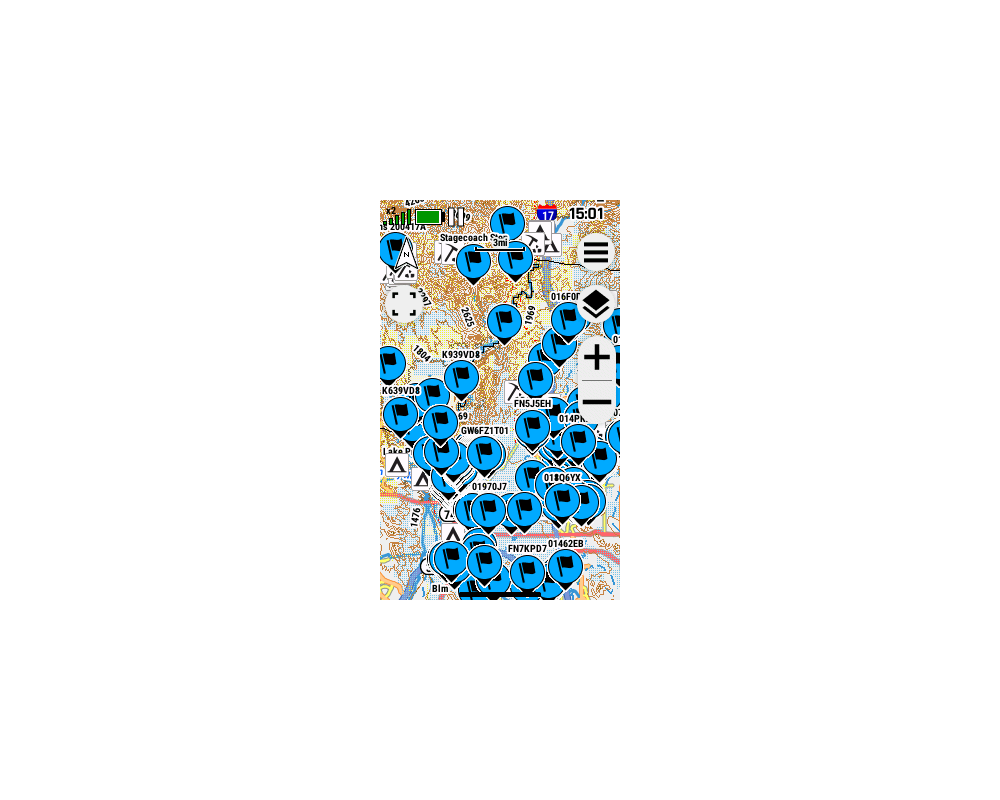
Map page details are obscured by unwanted and unnecessary
large
blue flag balloons. [example] |
|
[122] [408] [409] [509] [604] [707]
[808] |
|
10. |
When 'Auto Pause' is enabled, saving the current activity fails
to create the saved activity files on the device. |
(3685) |
[122] [408] [409]
[509] |
|
11. |
The 'Auto Start' Activity Recording feature frequently fails to
start recording as expected after a power cycle. |
(3817) |
[122] [408] [409] [509]
[604] |
|
12. |
The 'Rolling Tape Compass' does not provide destination bearing
information while navigating. |
(3782) |
[122] [408] [409]
[509] [604] [707] [808] [905] [906] [1013] [1107] [1206] [1208]
[1307] [1308] |
|
13. |
The touchscreen may become active after an alert is displayed
while the device is locked. |
(3780) |
[122] [408] [409] [509] [604]
[707] [808] [905] [906] [1013] [1107] [1206] [1208] [1307]
[1308] |
|
14. |
After saving a new Activity, the user must power cycle the
device before the new activity is populated in the 'Saved' page
list. |
|
[122] [408] [409] [509] [604] [707]
[808] |
|
15. |
The Map page Map Layer Menu may report incorrect status for
third party maps. |
(3912) |
[122] [408] [409] [509] [604] [707]
[808] |
|
16. |
When 'Multicolor' mode is enabled, displayed satellite colors
are continuously rotated through the available color spectrum in
a seemingly random sequence. |
(3886) |
[122] [408] [409] [509]
[604] |
|
17. |
The Map Toggles in the Map Manager page and Custom Maps page are
missing after firmware 5.09 update. |
|
[509] [604] [707] [808] [905] [906] [1013] [1107] [1206] [1208]
[1307] [1308] |
|
18. |
Selecting a Map in the Map Manager Page results in a corrupted /
scrambled screen. |
|
[509] [604] |
|
19. |
Custom Maps (KMZ) are no longer displayed properly in the Map
Layer Menu. |
|
[509] [604] [707] [808] [905] |
|
20. |
Many third party maps are displayed collectively as a
CityNavigator layer in the Map Layer Menu when they should be
listed as individual layers. |
|
[509] [604] |
|
21. |
Barometer Mode setting is reset to 'Variable Elevation' after
each power cycle. [Gr] |
|
[409] [509] [604] [707] |
|
22. |
Removing GCLive Data does not remove additional waypoints
originally loaded with GCLive geocaches. |
|
[122] [408] [409] [509] [604] [707] [808] [905] [906] [1013]
[1107] [1206] [1208] [1307] [1308] |
|
23. |
Map page controls can be very slow to respond to user input. |
|
[509] [604] [707] [808] [905] [906] [1013] [1107] [1206] [1208]
[1307] [1308] |
|
24. |
Map page map rendering can be extremely slow to respond. |
|
[509] [604] [707] [808] [905] [906] [1013] [1107] [1206] [1208]
[1307] [1308] |
|
25. |
Calendar page is slow to respond to user input. |
|
[509] [604] [707] [808] |
|
26. |
The keyboard icon used for the 'Enter' button on the keyboard is
confusing and unintuitive. |
|
[509] [604] [707] [808] [905] [906] [1013] [1107] [1206] [1208]
[1307] [1308] |
|
27. |
The Map page frequently jumps back to the current location
following any user input after panning to a different map
location. |
|
[122] [408] [409] [509] [604] [707]
[808] |
|
28. |
Geocaches logged as 'Found' are not displayed with the
traditional 'Smiley Face' symbol - Instead a large obnoxious
blue flag balloon is shown. |
|
[122] [408] [409] [509] [604] [707]
[808] |
|
29. |
When panning the Map page, the distance to the cursor position
is not updated properly. |
|
[604] [707] [808] |
|
30. |
When panning the Map page, the coordinates for the cursor
position are not updated properly. |
|
[604] [707] [808] |
|
31. |
When panning the Map page, the direction to the cursor position
is not updated properly. |
|
[604] [707] [808] |
|
32. |
When panning the Map page, the direction to the cursor position
does not honor user selected Compass Display settings. |
|
[604] [707] [808] |
|
33. |
Elevation Plot Dashboard may not update properly during
navigation. |
|
[604] [707] [808] [905] [906] [1013]
[1107] [1206] [1208] [1307] [1308] |
|
34. |
Navigation Guidance Text on Map page does not move to the top of
the screen after hiding dashboard. |
|
[604] [707] [808] [905] [906] [1013]
[1107]
[1206] |
|
35. |
Saved Activity details may be incorrect and / or missing. |
|
[604] [707]
[808] |
|
36. |
Altimeter 'Auto Calibration', when enabled, does not survive a
power cycle. [Gr] |
|
[604]
[707] |
|
37. |
Temperature data from a connected Tempe sensor is not included
in recorded activity files. |
|
[604] [707] [808]
[905] |
|
38. |
Changes made to the Geocache list sorting order do not have the
desired effect. |
|
[604] [707]
[808] |
|
39. |
Navigation to geocaches may end prematurely, without user input,
preventing logging actions. |
|
[604] [707]
[808] |
|
40. |
Selecting a geocache to navigate to frequently results in the
device navigating to a nearby waypoint or location that is not
the selected geocache. |
|
[604] [707]
[808] |
|
41. |
Updating coordinates while navigating to a geocache may not
provide expected results. |
|
[604] [707]
[808] |
|
42. |
While navigating to a geocache, the 'Active Geocache' page may
not always be available. |
|
[604] [707]
[808] |
|
43. |
Changes made to the Waypoint list sorting order do not have the
desired effect. |
|
[604] [707]
[808] |
|
44. |
The 'Save Portion' feature added to Activity Recording with
firmware update 7.07 does not work. |
|
[707] [808] [905] [906] [1013] [1107]
[1206] [1208] [1307] [1308] |
|
45. |
The 'Waypoint at Destination' data field is blank or Incomplete when the
destination is coordinates. |
|
[707] [808] [905] [906]
[1013] [1107]
[1206] |
|
46. |
Recorded activities are frequently corrupted by strings of
trackpoints with
Null Island coordinates (0°N
0°E). |
|
[122] [408] [409] [509] [604] [707] [808] [905] [906] [1013]
[1107] [1206] [1208] [1307] [1308] |
|
47. |
Opening the Geocaching page frequently results in a perpetual
"Refreshing Geocaches" message, and is otherwise unusable. |
(5999) |
[1307] [1308] |
|
|
|
|
|
Crash Reports |
|
|
|
1. |
Attempting to view or load Geocache Lists via GCLive results in
a device crash/reboot. |
|
[122] [408] |
|
2. |
Exiting the Map Manager page frequently results in a device
crash. |
|
[509] [604] [707] [808] [905] [906] [1013] [1107] [1206] [1208]
[1307] [1308] |
|
3. |
Viewing the Map page while navigating with the Altimeter
dashboard or Elevation data field displayed can result in a
device crash. |
|
[509] [604] |
|
4. |
Device may randomly, without warning, enter a
continuously repeating boot
loop that can only be resolved by one or more of the following
actions:
Forced USB Mass
Storage Mode to remove / disable IMG maps and / or FIT files
|
|
[509] [604] [707] [808] [905] [906] [1013] [1107] [1206] [1208]
[1307] [1308] |
|
5. |
After choosing a Geocache on the Map page and selecting
'Navigate' may result in a device crash. |
|
[509] [604] [707] [808] |
|
6. |
Attempting to 'Update Coordinates' while navigating to a
geocache may result in a device crash. |
|
[509] [604] [707] [808] |
|
|
|
|
|
Hardware Failures |
|
|
|
1. |
New Spine Mount design is not backwards compatible with any
previous Garmin products. |
|
|
|
|
|
Missing Features |
|
|
|
1. |
The Swissgrid LV95 position format is not available. |
|
[122]
[408] |
|
2. |
Geocache Photos are not currently available or recognized by the
Geocache page/app. |
(2887) |
[122] [408] [409] [509] [604] [707] [808] [905] [906] [1013]
[1107] [1206] [1208] [1307] [1308] |
|
3. |
The Adventures page/app is not currently available in the Main
Menu. |
(3030) |
[122] [408] [409] [509] [604] [707] [808] [905] [906] [1013]
[1107] [1206] [1208] [1307] [1308] |
|
4. |
The Alarm Clock page/app is not currently available in the Main
Menu. |
(3030) |
[122] [408] [409] [509] |
|
5. |
The Calculator page/app is not currently available in the Main
Menu. |
(3030) |
[122] [408] [409] [509] [604] |
|
6. |
The Calendar page/app is not currently available in the Main
Menu. |
(3030) |
[122] [408] [409] [509] |
|
7. |
The Course Planner page/app is not currently available in the
Main Menu. |
(3030) |
[122]
[408] |
|
8. |
The Hunt and Fish page/app is not currently available in the Main
Menu. |
(3030) |
[122]
[408] |
|
9. |
The Man Overboard page/app is not currently available in the Main
Menu. |
(3030) |
[122] [408] [409] [509] |
|
10. |
The Notifications page/app is not currently available in the Main
Menu. |
(3030) |
[122] [408] [409] [509] [604] [707] [808] [905] [906] [1013]
[1107] [1206] [1208] [1307] [1308] |
|
11. |
The Proximity Alarms page/app is not currently available in the
Main Menu. |
(3030) |
[122] [408] [409] [509] |
|
12. |
The Recorded Activities page/app is not currently available in
the Main Menu. |
(3030) |
[122] [408] [409] [509] [604] [707] [808] [905] [906] [1013]
[1107] [1206] [1208] [1307] [1308] |
|
13. |
The Recording Controls page/app is not currently available in the
Main Menu. |
(3030) |
[122] [408] [409] [509] [604] [707] [808] [905] [906] [1013]
[1107] [1206] [1208] [1307] [1308] |
|
14. |
The Route Manager page/app is not currently available in the Main
Menu. |
(3030) |
[122] [408] [409] [509] [604] [707] [808] [905] [906] [1013]
[1107] [1206] [1208] [1307] [1308] |
|
15. |
The Saved Tracks page/app is not currently available in the Main
Menu. |
(3030) |
[122] [408] [409] [509] [604] [707] [808] [905] [906] [1013]
[1107] [1206] [1208] [1307] [1308] |
|
16. |
The Share Wirelessly page/app is not currently available in the
Main Menu. |
(3030) |
[122] [408] [409] [509] [604] [707] [808] [905] [906] [1013]
[1107] [1206] [1208] [1307] [1308] |
|
17. |
The Sight 'N Go page/app is not currently available in the Main
Menu. |
(3030) |
[122] [408] [409] [509] [604] [707] [808] [905] [906] [1013]
[1107] [1206] [1208] [1307] [1308] |
|
18. |
The Sun and Moon page/app is not currently available in the Main
Menu. |
(3030) |
[122]
[408] |
|
19. |
The Track Manager page/app is not currently available in the Main
Menu. |
(3030) |
[122] [408] [409] [509] [604] [707] [808] [905] [906] [1013]
[1107] [1206] [1208] [1307] [1308] |
|
20. |
The Trip Computer page/app is not currently available in the Main
Menu. |
(3030) |
[122] [408] [409] [509] [604] [707] [808] [905] [906] [1013]
[1107] [1206] [1208] [1307] [1308] |
|
21. |
The VIRB Remote page/app is not currently available in the Main
Menu. |
(3030) |
[122] [408] [409] [509] [604] [707] [808] [905] [906] [1013]
[1107] [1206] [1208] [1307] [1308] |
|
22. |
The Waypoint Averaging page/app is not currently available in the
Main Menu. |
(3030) |
[122] [408] [409] [509] [604] [707] [808] [905] [906] [1013]
[1107] [1206] [1208] [1307] [1308] |
|
23. |
The Waypoint Manager page/app is not currently available in the
Main Menu. |
(3030) |
[122] [408] [409] [509] [604] [707] [808] [905] [906] [1013]
[1107] [1206] [1208] [1307] [1308] |
|
24. |
The Where To? page/app is not currently available in the Main
Menu. |
(3030) |
[122] [408] [409] [509] [604] [707] [808] [905] [906] [1013]
[1107] [1206] [1208] [1307] [1308] |
|
25. |
The XERO Locations page/app is not currently available in the
Main Menu. |
(3030) |
[122] [408] [409] [509] [604] [707] [808] [905] [906] [1013]
[1107] [1206] [1208] [1307] [1308] |
|
26. |
The Barometer page/app is not currently available in the Main
Menu. |
(3030) |
[122]
[408] |
|
27. |
Map Settings do not include Zoom Level adjustments for Map
Points, User Waypoints, Geocaches, Street Labels, Land Cover, or
Messages. |
(3607) |
[122] [408] [409] [509] [604] [707]
[808] [905] [906] [1013] [1107] [1206] [1208] [1307] [1308] |
|
28. |
While navigating, there is no option to 'Change Route Activity',
similar to previous eTrex models. |
|
[122] [408] [409] [509] [604] [707] [808] [905] [906] [1013]
[1107] [1206] [1208] [1307] [1308] |
|
29. |
The course review option menu is missing the 'Edit Course'
selection. |
|
[122] [408] [409] [509] [604] [707] [808] [905] [906] [1013]
[1107] [1206] [1208] [1307] [1308] |
|
30. |
The course review option menu is missing the 'Reverse Course'
selection. |
|
[122] [408] [409] [509] [604] [707] [808] [905] [906] [1013]
[1107] [1206] [1208] [1307] [1308] |
|
31. |
The course review option menu is missing the 'Save as Track'
selection. |
|
[122] [408] [409] [509] [604] [707] [808] [905] [906] [1013]
[1107] [1206] [1208] [1307] [1308] |
|
32. |
The course review option menu is missing the 'Save as Route'
selection. |
|
[122] [408] [409] [509] [604] [707] [808] [905] [906] [1013]
[1107] [1206] [1208] [1307] [1308] |
|
33. |
The Map page/app does not currently include the 'Show / Hide
Dashboard' via touch control. |
|
[122] [408] [409] [509] [604] |
|
34. |
The 'Save Activity' operation does not include a 'Save Portion'
option. |
(3635) |
[122] [408] [409] [509] [604]
[707] |
|
35. |
The 'Save Always' option that allows the barometer to
record pressure trends while powered off is not available. [Gr] |
|
[122] [408] [409] [509] [604] [707]
[808] |
|
36. |
Waypoints (GPX) stored on the device cannot be shared wirelessly
with current or previous models. |
(3965) |
[122] [408] [409] [509] [604] [707]
[808] [905] [906] [1013] [1107] [1206] [1208] [1307] [1308] |
|
37. |
Routes stored on the device cannot be shared wirelessly with
current or previous models. |
(3965) |
[122] [408] [409] [509] [604] [707]
[808] [905] [906] [1013] [1107] [1206] [1208] [1307] [1308] |
|
38. |
Tracks stored on the device cannot be shared wirelessly with
current or previous models. |
(3965) |
[122] [408] [409] [509] [604] [707]
[808] [905] [906] [1013] [1107] [1206] [1208] [1307] [1308] |
|
39. |
Photos stored on the device cannot be shared wirelessly with
current or previous models. |
(3965) |
[122] [408] [409] [509] [604] [707]
[808] [905] [906] [1013] [1107]
[1206] |
|
40. |
Custom Maps stored on the device cannot be shared wirelessly
with current or previous models. |
(3965) |
[122] [408] [409] [509] [604] [707]
[808] [905] [906] [1013] [1107]
[1206] |
|
41. |
Geocaching page/app does not provide
'Active
Geocache' feature included on
previous models. |
|
[122] [408] [409] [509] [604] [707]
[808] |
|
42. |
Geocaching page/app does not provide
'Additional
Waypoints' (Child Waypoints)
feature included on previous models. |
|
[122] [408] [409] [509] [604] [707]
[808] |
|
43. |
Geocaching page/app does not provide
'Show
/ Hide Waypoints' feature
included on previous models. |
|
[122] [408] [409] [509] [604] [707] [808] [905] [906] [1013]
[1107] [1206] [1208] [1307] [1308] |
|
44. |
Geocaching page/app does not provide
'Next
Stage' features included on
previous models. |
|
[122] [408] [409] [509] [604] [707]
[808] |
|
45. |
Geocaching page/app does not provide
'chirp'
feature included on previous models. |
|
[122] [408] [409] [509] [604] [707] [808] [905] [906] [1013]
[1107] [1206] [1208] [1307] [1308] |
|
46. |
Geocaching page/app does not provide
'Map
Options' or controls included on
previous models. |
|
[122] [408] [409] [509] [604] [707]
[808] |
|
47. |
Waypoints with proximity alerts do
not display 'alert radius ring' on the map page, like previous
models. [example] |
|
[122] [408] [409] [509] [604] [707] [808] [905] [906] [1013]
[1107] [1206] [1208] [1307] [1308] |
|
48. |
User is unable to add large data fields in Home Screen glances,
only small data fields are provided. |
|
[122] [408] [409] [509] [604] [707] [808] [905] [906] [1013]
[1107] [1206] [1208] [1307] [1308] |
|
49. |
Recorded Data Reset options available on previous models are
no longer available. |
|
[122] [408] [409] [509] [604] [707] [808] [905] [906] [1013]
[1107] |
|
50. |
Waypoint list menus do not include the 'Sort by Symbol' option
available on previous models. |
|
[122] [408] [409] [509] [604] [707] [808] [905] [906] [1013]
[1107] [1206] |
|
|
|
|
|
Requested Features |
|
|
|
1. |
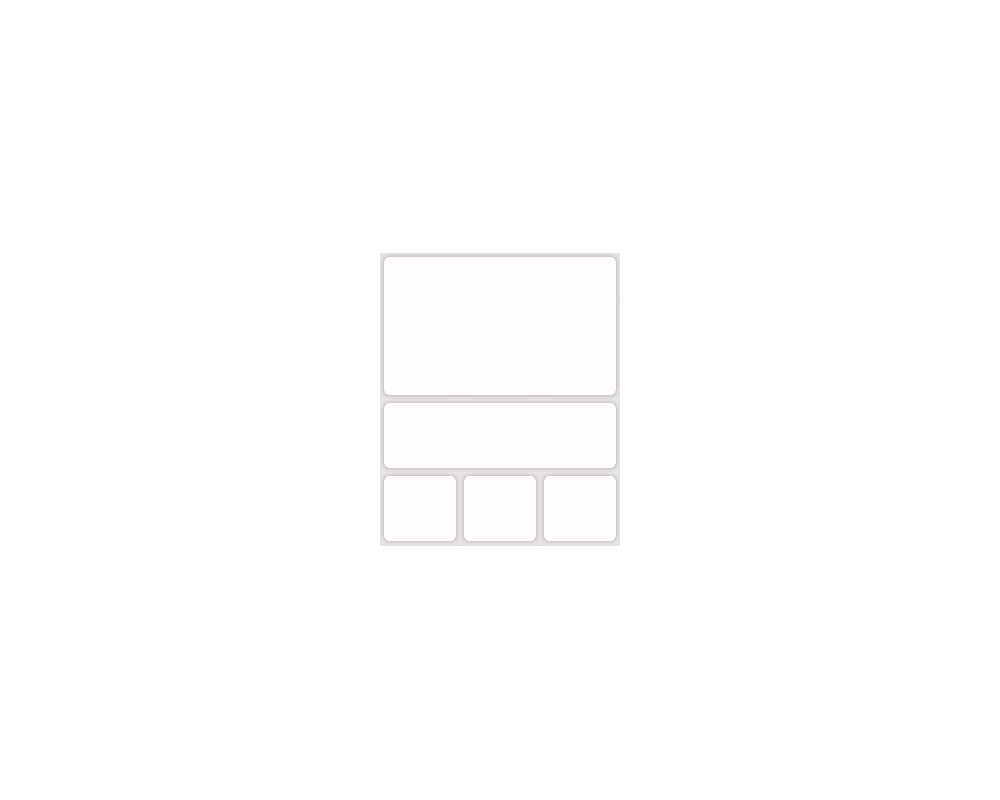
Add additional Home Page configuration with one 3x2, one 3x1,
and three 1x1 Glances. [example] |
(3728) |
[122] [408] [409] [509] [604] [707]
[808] [905] [906] [1013] [1107] [1206] [1208] [1307] [1308] |
|
2. |
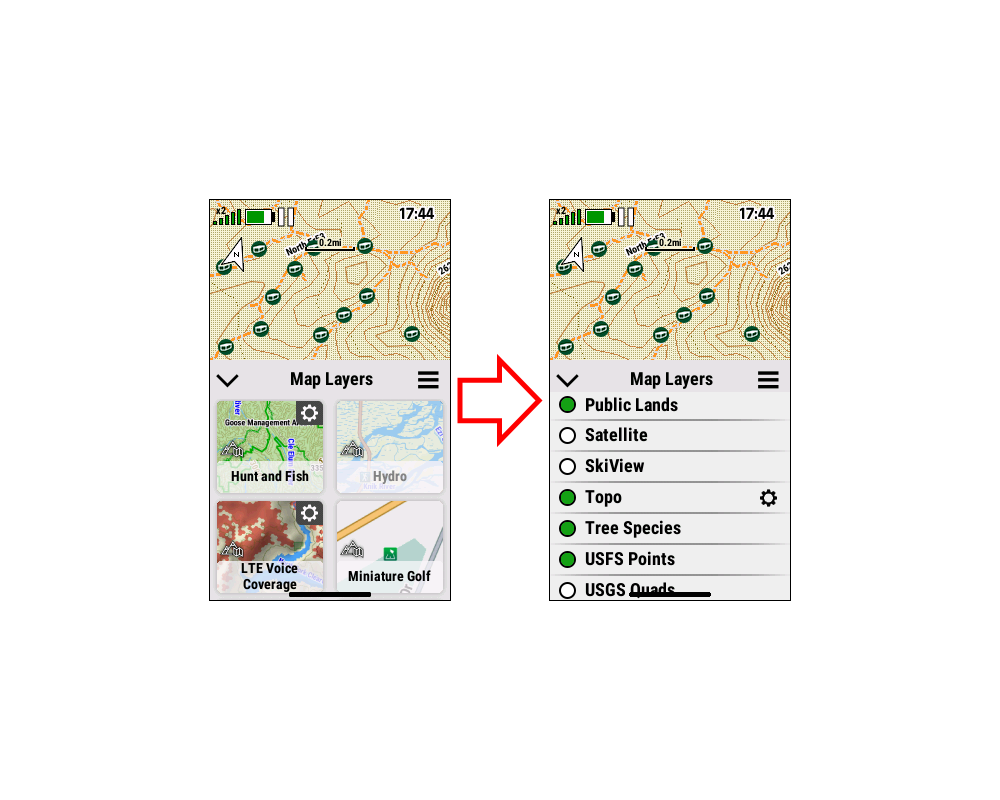
Please improve Map Layer Menu to be
more intuitive and efficient. [example] |
|
[122] [408] [409] [509] [604] [707] [808] [905] [906] [1013]
[1107] [1206] [1208] [1307] [1308] |
|
3. |
Please add option in Map Layer Menu
to enable / disable POI symbols, similar to Waypoints, Messages
and Geocaches. [garmin] |
|
[905] [906] [1013] [1107] [1206] [1208]
[1307] |
|
|
|
|