 |
|
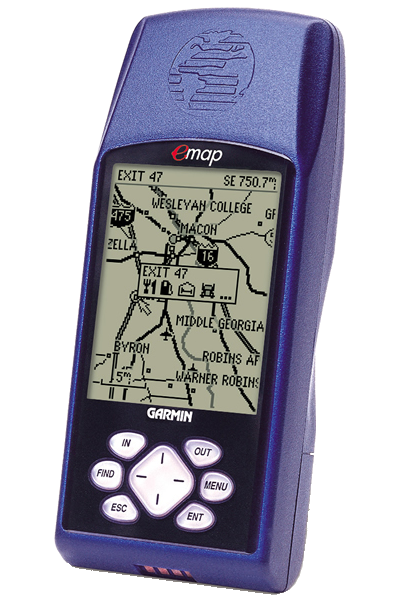
The eMap features an internal basemap containing information on North and South America including state and country boundaries, lakes, rivers, streams, airports, cities, towns, coastlines and U.S., state and interstate highways. In addition, the eMap provides exit information for the federal interstate highway system. With the eMap, you will know when you are near services such as food, lodging and service stations.
The eMap is compatible with Garmin's complete line of downloadable MapSource CD-ROMs including U.S. Roads and Recreation, WorldMap, U.S. Topo and MetroGuide U.S.A. When paired with the MetroGuide U.S.A. CD-ROM, the eMap has the ability to look up address and telephone number information for nearby services and points of interest. The eMAP will store eight or 16 megabytes of downloaded CD-ROM information at a time depending on the size of the cartridge you use in the unit.
Designed with everyone in mind, this unit will take you from the car to the hiking trail to the beach without missing a beat.
- Basemap: Built-in detailed Americas Highway or Atlantic Highway basemap with lakes, rivers, cities, interstates, national/state highways, secondary roads in metro areas, cities, railroads, airports and a detailed exit database for the Federal Highway system in the US only
- MapSource: Compatible with most GARMIN MapSource products including MetroGuide USA, and Fishing Hot Spots. GARMIN data card required.
- Map Scale: Screen-width scale 500 feet to 3,000 miles
- Waypoints: 500 with name and graphic symbol
- Track Log: 2000 track log points plus 10 saved tracks
- TracBack: Navigates saved tracks
- Trip computer: 2 resettable odometers, timers, average and maximum speeds
- Routes: Stores 1000 map points and 500 user-defined waypoints in 50 routes with up to 50 points each
- Map Datums: 108, including one User Datum
- Location Formats: Lat/Lon, UTM/UPS, MGRS, Maidenhead, User grid, and 11 other grids
- Sun and Moon: Sun and moon rise and set times, sun and moon position, and moon phase for any day of the year, anywhere in the world
010-00201-03 (Deluxe with USA MetroGuide CD), 010-00201-05 (Deluxe with Canada MetroGuide CD)
- Corrected problem with the General Setup page when German was the previously selected language.
- Removed French translations.
- Fixed the NEAREST EXIT screens so the MENU key appears in all supported languages.
- Restored transmission of satellites used information in GGA and GSV NMEA sentences.
- Eliminated possible shutoffs and lockups when selecting a street for finding addresses using newer maps.
- Eliminated possible lockups when saving a track back through midnight or noon.
- Eliminated possible shutoffs when repeatedly finding Cities or Points of Interest.
- Improved responsiveness of positioning in shaded conditions.
- Added geocaching user waypoint symbols.
- Allowed entering and finding addresses with alpha-numeric street numbers when supported by the map data.
- Added controlling GEO points and Navaids with the map setup Points of Interest setting.
- Added new Point of Interest types when supported by the map data.
- Display approaching waypoint messages longer when based on distance.
- Always show street number and street name in correct order based on map data.
- Allowed finding duplicately-named cities by name across multiple maps of the same type if supported by the map data.
- Prevented possible corruption of time in GARMIN output format.
- Output correct week number in NMEA output format when operating through the end of a week.
- Added Croatian map datum.
- Changed Taiwan grid title from T67 to TM2.
- Added new Swedish RT 90 location format.
- Changed Swedish and RT 90 location formats to have the northing on top and easting below and to use 'X' and 'Y' to indicate northing and easting instead of 'N' and 'O'.
- Map datums automatically associated with location formats can no longer be changed; only change the map datum when changing to or from a location format that has an automatically associated datum.
- Re-sort waypoint symbol selection list after changing the language.
- Removed displaying the hotel & motel reservation number when reviewing exit services.
- Corrected Spanish translations for Map and Movie Theater.
- Correctly display the navigation information when navigating.
- Eliminated possible shutoffs when turning unit on after navigating.
- Remember the Serial Data Format between power cycles.
- Corrected the Longitude Origin field of the User Grid Setup.
- Corrected the display of the position field on the GPS Info page.
- Correctly indicate the services present at Fishing Hot Spots facilities.
- Added the ability to find streets by each word in the name when supported by the map data.
- Eliminated possible shutoffs when determining next street.
- Eliminated possible shutoffs when computing moon rise and set times for extreme latitudes.
- Eliminated repeated resetting of reference when measuring distance after the menu was exited with the ESC key.
- Eliminated display of unusual symbol after the yards unit symbol in distance fields.
- Eliminated occasional blanks at the end of lists when finding Points of Interest by name.
- Consistently shows either exit or cross road data regardless of the direction of travel on a road.
- Improved appearance of Fishing Hotspots maps.
- Used user-entered magnetic variation if north reference is set to user when transmitting RMC and BOD NMEA sentences.
- Transferred more points to saved tracks when saving short track logs.
- Added indication of datum used by transmitting PGRMM NMEA sentence.
- Added support for addresses and intersections to have more than one city associated with them when finding.
- Added support for diacritic characters in map data.
- Smoothed positioning when operating in areas of heavy shading when user has not entered an altitude.
- Allowed software to run on new revision processor.
- Assigned a valid unit ID to units with a unit ID of zero.
- Improved handling 'None Found' message when there are no user waypoints found.
- Showed 'Goto' and 'Map' buttons instead of 'Goto Exit' button when reviewing Fishing Hotspots Facilities.
- Increased the number of map sections that can be drawn simultaneously.
- Supported using maps that require an unlock code.
- Supported finding exits and cities on maps other than the basemap.
- Supported finding nearest cities and points of interest across multiple maps of the same type.
- Supported finding cities and points of interest by name across multiple maps of the same type if supported by the map type.
- Supported finding Manmade Places, Water Features, and Land Features Points of Interest when available in map data.
- Allowed user to turn route lines off.
- Allowed user to turn Lock to Roads off.
- Allowed the GPS Info page to be displayed even when the GPS is turned off.
- Only displayed maps that were not completely covered by other maps.
- Reported actual available space for maps to MapSource.
- Allowed the unit to automatically choose the map to use for finding.
- Added a menu item to select the map to use for finding when displaying the list of found items.
- Associated Map Datums with Position Formats.
- Added India location formats.
- Changed name of Hu-Tzu-Shan datum to Taiwan.
- Added a new datum named Hu-Tzu-Shan which conforms to the published Taiwan map datum definition.
- Changed to D109 waypoint format.
- Showed unit id on system info page.
- Changed '...moved hundreds of miles|kilometers' to '...moved to another state or country' on the Poor Satellite Reception page.
- Displayed TracBack points as 'BEGIN, TURN 1, TURN 2...END' instead of 'TURN, TURN...'.
- Stored map setup changes when exiting map setup instead of when turning unit off.
- Added highlight timeout when panning on maps.
- Stored Normal or Battery Saver mode when selected after Simulator mode.
- Stored all the track log points specified when saving a track.
- Corrected flash device compatibility problem introduced in version 2.63 when used with certain older flash devices.
- Corrected map drawing when a large number of maps are loaded in one area and the map detail is set to more or most.
- Allowed units to be manufactured with a new flash device.
- Reduced map drawing delays when showing next street in areas of dense map data.
- Eliminated route corruption in routes received through the serial data interface due to duplicately-named waypoints within the route being received.
- Eliminated storing trailing spaces in waypoint names.
- Fixed highlight movement on time setup page when restoring defaults.
- Increased bad block limit to support 64 MB and 128 MB data cards.
- Changed a few German translations.
- Corrected problem in version 2.60 that resulted in loss of bad block information when saving maps from MapSource to a data card.
- Improved saving tracks so first and last points are now saved.
- Added minimum speed to turning criteria to prevent track space waste at slow speeds.
- Added Spanish, Italian, French, and German languages.
- The 'Direction to Go' arow points correctly for all north reference configurations.
- Next exits are now displayed with all types of map data.
- Approaching turn indication time increases as speed increases.
- Improved handling of aborted map transfers.
- Displays railroads out to larger zoom scales.
- In NMEA output, put GSA sat PRN's in same 'slots' as they are in GSV.
- Output all NMEA locations in the configured datum.
- Increased number of maps that can be accessed on a data card from 99 to 525.
- Improved slow speed performance when S/A is off or when differential data is available.
- Updated magnetic variation tables based on the new IGRF 2000 model.
- Trip computer changes: Improved computation of distance and time in weak or shaded environments; reduced moving speed threshold to zero; accumulate trip distance and time while shaded.
- Correctly report to MapSource when there is no data card.
- Restores default waypoints when user erases all user data on power-up.
- Reduced occurrences of premature arrival alarms.
- Incorporates re-initialization capability when an unreasonable position fix is detected.
- Added a nearest exits page option menu item to choose the road on which to search for exits.
- Ensures that times & dates presented in the 'Save Back Through' list are always in reverse chronological order.
- When there are more addresses or intersections found than can be displayed, presents the user with a message suggesting they use the city or postal code fields.
- Transmits routes back to MapSource with the same route waypoint names that were received from MapSource.
- Displays scroll bar on Select Map page if there are more than 5 maps from which to choose.
- Added Dutch map datum.
- Improved scroll bar function on MapSource info page.
- Changed distance and depth symbol from 'mt' to 'm' to conform to international standards.
- In setup pages, move the highlight to the tab when the left or right cursor key is pressed and there is no other field to which the highlight can move, and remember last highlighted field.
- Correct reporting of maximum speed and improve track log recording when in shaded or weak signal environments.
- Eliminated minimum speed requirement for storing track points.
- Display directions using the North Reference and Magnetic Variation settings from the Advanced Setup Page, instead of always using True North.
- The Points of Interest settings no longer control the display of minor contour lines.
- Reduced park symbol clutter (trees) on displayed maps.
- Display the exit description and distance to the exit, instead of the exit number only, when showing next street on an Interstate.
- Display expanded descriptions for Navaids and Obstructions.
- Added yards units, which are identical to Statute units except that distances from 100 feet to 1000 yards are displayed in yards.
- Store waypoints received through NMEA input WPL sentence.
- Improved synchronization between name and list fields on various pages.
- Increased the breadth of waypoint symbols stored when transferring waypoints into the unit in GARMIN format.
- Multiple location formats (including user UTM grid).
- Multiple map datums (including user).
- Multiple north references (True, Magnetic, Grid, and User).
- Multiple direction formats (Cardinal Letters and Numeric Degrees).
- Multiple routes (1000 map points and 500 user waypoints in up to 50 routes with up to 50 points each). NOTE: THE CURRENT ROUTE IN THE EMAP WILL BE DELETED! To save the current route, transfer the route to a PC before performing the upgrade, then transfer back to the emap after performing the upgrade.
- Added Sun and Moon page.
- Removed matching current location to roads on the basemap.
- Removed position pinning.
- Points of Interest with the same name can be listed by distance.
- Seconds in Time To Go field has smaller digits than hours and minutes.
- Added Show Next Street option.
- Review map pages have 'Measure Distance' and 'Setup Map' options.
- MapSource Info page has options to show only specific types of maps if multiple types are present.
- Address and Intersection search results include match quality.
- Track review map labels the begin and end of the track.
- Holding the Find Key displays active goto waypoint, TracBack track, or active route.
- Lists scroll by page when left and right rocker keys are pressed.
- Pressing the left rocker key when editing the left character clears a number field.
- Memory gauge on the main menu page.
- Increased number of maps that can be accessed on a data card from 50 to 99.
- Added A800 PVT data output capability.
- The Tracks and Routes pages now indicate which, if any, track or route is active.
- Limit waypoint identifier names so that the NMEA sentence lengths are not exceeded.
- Added Stored Without Batteries option on the Poor Satellite Reception page.
- Removed matching current location to roads on the basemap.
- Improved map drawing performance.
- Improved performance of the Find feature.
- Improved performance of the 'Save Back Through' feature with a full track log.
- Added a Save As Waypoint option to the map data review pages. NOTE: This option can be found by pressing the MENU key when viewing the information page about a city, business, or other map feature.
- Added support for receiving routes and waypoints in older formats. NOTE: This allows the eMap to receive waypoints and routes from PC programs that can transfer data to other GARMIN units (such as the GPS 48, GPS III, and GPS 12).
- Added ability to review street addresses from the map page.
- Improved the Find Points of Interest category/subcategory selection to offer only those options that are truly available in the map being searched.
- Improved the Find Exits list to be ordered by direction of travel when on the interstate.
- Changed direction-to-go arrow displayed on the map page during navigation to cardinal direction text when not moving.
- Changed to prevent the initialize position request during Autolocate mode.
- Changed terminology for a Serial Data Format option from 'GARMIN Bcn Rcvr' to 'GARMIN DGPS'.
- Corrected a problem with satellite acquisition after returning to Normal mode after being in GPS Off mode.
- Corrected the Find Addresses feature to use the city and postal code specified for limiting and sorting the search results.
- Corrected rare 'extra lines' problem in map drawing.
- Corrected a problem with nearest city searches in Alaska.
- Changed the Track Truncated and Route Truncated messages to require an enter key press to clear them.
- Added support for manufacturing and testing.
- Improved map drawing speed.
- Added a confirmation page for removal of all waypoints from the route.
- Added saving of the Map Page's data fields on/off setting.
- Reordered the Trip Computer page options so Reset Trip is first.
- Changed the time-to-go used for approaching and arrival messages from 30 to 15 seconds.
- Corrected a problem with selecting the Stop Navigation option immediately after starting navigation.
- Corrected a potential for problems during extremely poor satellite visibility.
- Corrected the display of service icons for interstate exits on the map.
- Corrected the direction displayed for labels of one-way streets on the map.
- Corrected the map selection in the Find feature for use with data cards containing multiple MetroGuide maps along with other types of maps.
- Changed labeling of topographic map data to give elevations in the user-selected units.
