- If your Garmin GPSMAP 66sr is exhibiting bad behavior you do not see listed here, please post a new thread about your experience and send a detailed error report to Garmin, as outlined below.
- If you do see your issue listed here, please send your detailed error report to Garmin! They need to hear from all users.
- Please handle all feature requests similarly: Post a new thread if not already listed, and send a copy to Garmin.
- If you see your request is already listed, copy and paste it in an email to Garmin! The more frequently they see the same request, the more likely they are to include it in a future update.
Error Reporting
- Please report all software bugs, glitches, crash reports, and feature requests in the GPSMAP 66sr discussion forum.
- Try to include as much detail as possible when describing each issue you are experiencing, including profile settings, maps enabled, keystrokes, etc.
-
Send a copy of your post to
product.support@Garmin.com
and include:
- a copy of the System.xml file located in the [GPSMAP]\Garmin\ directory.
- a copy of the GarminDevice.xml file located in the [GPSMAP]\Garmin\ directory.
- any *.fit files associated with the crash or bug from the [GPSMAP]\Garmin\Activity\ or [microSD]\Garmin\Activity\ directories.
- any *.gpx files associated with the crash or bug from the [GPSMAP]\Garmin\GPX\ or [microSD]\Garmin\GPX\ directories.
Status
- RED: Issue/Feature Request has been reported to Garmin, and is pending response.
- ORANGE: Garmin has acknowledged a Reported Issue/Feature Request and may be working on a solution.
- GREEN: Issue has been resolved and no longer exists. Requested Feature has been implemented.
Categories
- Bugs (34/06/38): Software issues that result in a system failure or adversely affect intended functionality.
- Crash Reports (01/00/04): Bugs resulting in unintentional hanging, freezing, resetting or powering down.
- Hardware Failures (01/00/00): Physical issues and/or failures that limit or inhibit intended function.
- Missing Features (07/03/01): Feature is available on a similar Garmin product.
- Requested Features (36/02/00): Request for functionality not present with current firmware version.
Bugs
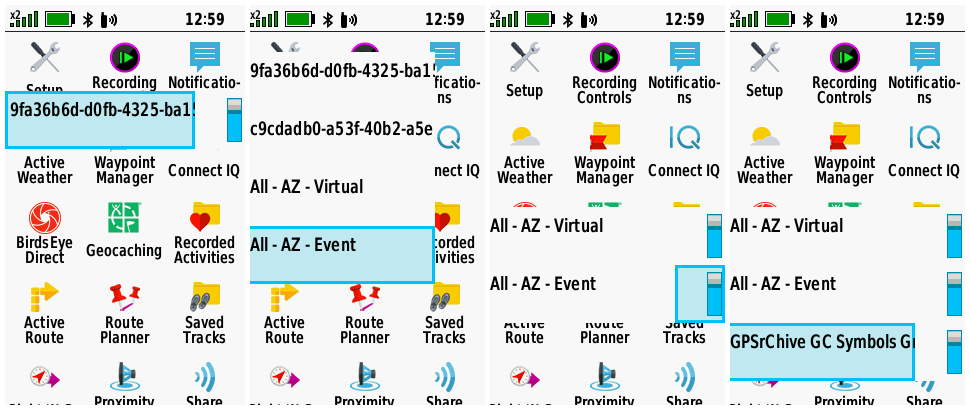
| 1. | The Setup Menu frequently appears in part or whole, interfering with and inhibiting normal device operation (especially when Wi-Fi is enabled but not connected). [example] [example] [Gr] |
(1026) (1027) |
[270] [280] [290] [310] |
| 2. | Device is unable to connect to Wi-Fi networks with hidden SSID. | (1015) | [270] [280] [290] [310] |
| 3. | Geocaches loaded via 'Share Wirelessly' do not include child waypoints. | [270] [280] [290] [310] [330] [340] [360] [380] [490] [520] [540] [550] [570] [580] [600] [610] | |
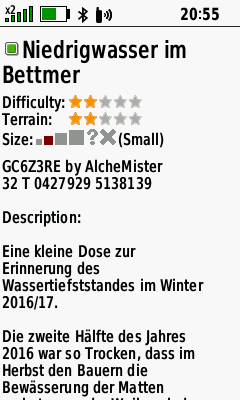
| 4. | While viewing geocache information after selecting it from the Map, no 'Go' button is displayed to allow the user to begin navigation. [example] | [270] [280] | |
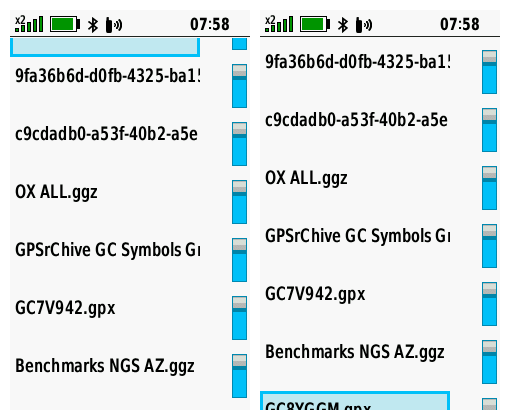
| 5. | The first and last selection in the Geocache Filter Files List are displayed partially off screen after attempting to scroll beyond them. [example] | [270] [280] [290] [310] | |
| 6. | All display brightness settings on GPSMAP 66sr are much brighter when compared to the same setting on a GPSMAP 66s/st. For example, the GPSMAP 66sr brightness at 10% appears identical in brightness to a GPSMAP 66s/st at 60%. | [270] [280] [290] [310] [330] [340] [360] [380] [490] [520] [540] [550] [570] [580] [600] [610] | |
| 7. | 'Use With GPS Off' selection missing from Satellite page option menu. [Garmin: "This is intentional and will not be changed."] | [270] [280] [290] [310] [330] [340] [360] [380] [490] [520] [540] [550] [570] [580] [600] [610] | |
| 8. | Starting the GPSMAP 66sr with geocache proximity alerts enabled while several hundred geocaches are loaded via GGZ files frequently results in a substantially longer boot sequence duration. [Gr] | (1031) | [270] [280] [290] |
| 9. | Geocache Lists downloaded via GCLive are frequently incomplete (missing caches) while the same list will download to other devices without issue. [Gr] | (1033) | [280] [290] [310] [330] [340] [360] [380] [490] [520] [540] [550] [570] [580] [600] [610] |
| 10. | Geocache 'Child Waypoints' are always displayed by 'Code', and never by 'Name', regardless of the user selection in Geocaching Setup. | [280] [290] [310] [330] [340] [360] [380] [490] [520] [540] [550] [570] [580] [600] [610] | |
| 11. | After beginning navigation to a geocache child waypoint, having just selecting the child waypoint from the Geocache page 'Additional Waypoints' menu, the user no longer has access to the parent geocache information from the Geocaching page. Child Waypoints (or 'Additional Waypoints') should always be treated as 'Via Points' when selected from 'Additional Waypoints' menu. | [280] [290] [310] [330] [340] [360] [380] [490] [520] | |
| 12. | Custom Waypoint Symbols loaded to the device with names including a 'Hot Spot' are ignored and not displayed. | (1047) | [270] [280] [290] [310] |
| 13. | Selecting [Share Wirelessly > Send > Photos] can result in an erratic display alternating between the Main Menu page and Share Wirelessly page. | [290] [310] [330] | |
| 14. | Sending and receiving geocaches via Share Wirelessly frequently fails. [groundspeak] | [290] [310] [330] [340] [360] [380] [490] [520] [540] [550] [570] [580] [600] [610] | |
| 15. | Sending and receiving waypoints via Share Wirelessly frequently fails. | [290] [310] [330] [340] [360] [380] [490] [520] [540] [550] [570] [580] [600] [610] | |
| 16. | Sending and receiving tracks via Share Wirelessly frequently fails. [groundspeak] | [290] [310] [330] [340] [360] [380] [490] [520] [540] [550] [570] [580] [600] [610] | |
| 17. | Sending and receiving routes via Share Wirelessly frequently fails. | [290] [310] [330] [340] [360] [380] [490] [520] [540] [550] [570] [580] [600] [610] | |
| 18. | Sending and receiving photos via Share Wirelessly frequently fails. | [290] [310] [330] [340] [360] [380] [490] [520] [540] [550] [570] [580] [600] [610] | |
| 19. | Sending and receiving custom maps via Share Wirelessly frequently fails. | [290] [310] [330] [340] [360] [380] [490] [520] [540] [550] [570] [580] [600] [610] | |
| 20. | Geocache Proximity Alerts only sound for the first geocache approached after each power cycle. [Gr] | [290] [310] | |
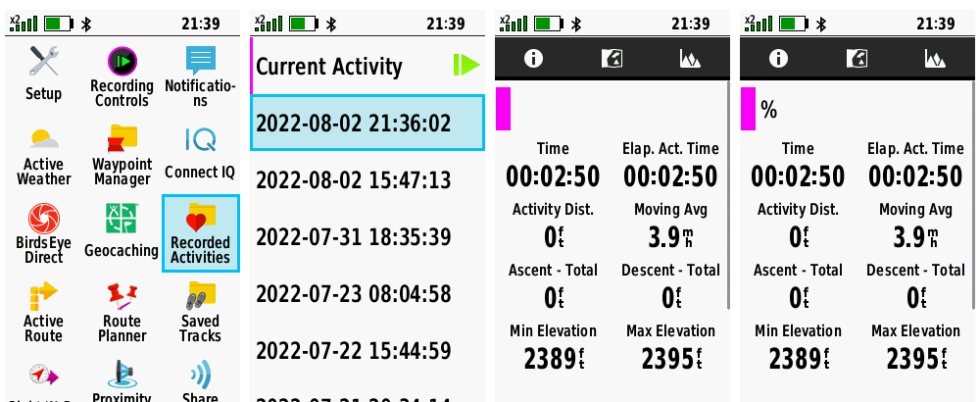
| 21. | The first tab in the Recording Controls page no longer displays the current activity color. [garmin] | (1062) | [290] [310] [330] [340] |
| 22. | FIT files may record/report incorrect or exaggerated Total Ascent values. [garmin] | [290] [310] [330] [340] [360] [380] [490] [520] [540] [550] [570] [580] [600] [610] | |
| 23. | FIT files may record/report incorrect or exaggerated Total Distance values. [garmin] | [290] [310] [330] [340] [360] [380] [490] [520] [540] [550] [570] [580] [600] [610] | |
| 24. | Course (CDI) bearing line remains positioned over the course line during off-course navigation. This behavior is inconsistent with many prior and current generation Garmin GPSr. [garmin.de] | [290] [310] | |
| 25. | Adventures may randomly lose data and/or disappear from the device, and the user may find Adventure data files moved and/or deleted between microSD card and internal memory. | [270] [280] [290] [310] [330] [340] [360] [380] [490] [520] [540] [550] [570] [580] [600] [610] | |
| 26. | Geocaches listed in the Adventure Content Menu may not appear when selected. | [270] [280] [290] [310] [330] [340] [360] [380] [490] [520] [540] [550] [570] [580] [600] [610] | |
| 27. | Returning to the home page for a selected Adventure after viewing any listed content results in the map displaying the users current location instead of the Adventure location. | [270] [280] [290] [310] [330] [340] [360] [380] [380] [490] | |
| 28. | Most, if not all Galileo satellites displayed on the Satellite page and/or dashboard appear to flash indefinitely. | [270] [280] [290] [310] [330] [340] [360] [380] [490] | |
| 29. | Configuring [Setup > Waypoints > Suffix = 0000] results in a value of '10000' being displayed in the setup menu with the next marked waypoint using the next free suffix number counting up from '0000'. [Gr] | [270] [280] [290] [310] | |
| 30. | Geocaches are intermittently not displayed at lower Map page zoom levels regardless of user configuration settings. | [330] [340] | |
| 31. | Geocaches intermittently can not be selected with the cursor on the Map or Geocaching Map pages. | [330] [340] | |
| 32. | After selecting and beginning navigation to a geocache, the Geocache List Tab may be displayed instead of the Active Geocache Tab. | [330] [340] | |
| 33. | The user interface has become noticeably sluggish and slow to respond to user input with firmware version 3.30. | [330] [340] | |
| 34. | GCLive downloads seem to require a substantially longer period of time to complete with firmware version 3.30. | [330] [340] | |
| 35. | With Trip Recording configured for 'During Activity' and Activity Recording paused or inactive, the Recording Controls Activity Plot Tab accumulates 'Total Ascent' data while the Information Tab continues to display no change for the same value. | [330] [340] | |
| 36. | Geocache Photos can not be selected or viewed when no other JPEG images exist on the device or microSD card. | [330] [340] [360] [380] [490] [520] [540] [550] [570] [580] [600] [610] | |
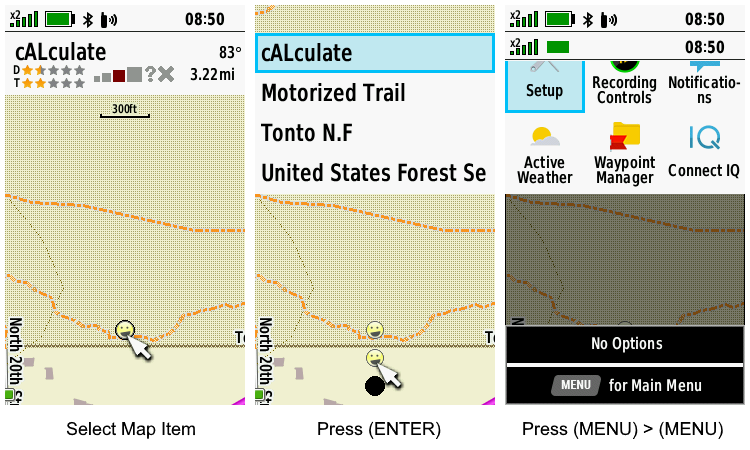
| 37. | After [A.] selecting a data point on the Map page with the cursor and pressing (Enter), the data point, cursor, and shadow are displayed in duplicate below the originals, and the status bar is no longer displayed. When [B.] pressing (Menu) > (Menu) immediately after, the status bar returns in duplicate and the Main Menu is displayed partially off screen. [example] | [330] [340] [360] [380] [380] [490] | |
| 38. | Galileo satellites may not be displayed on the Satellite page for an extended period of time following a device power cycle. | [340] [360] [380] [380] [490] | |
| 39. | Map page waypoint name text does not honor display mode changes. User must disable then enable text display in Map Setup to force correct text display for current display mode. See Montana 7x0 forum post for details. | [310] [330] [340] [360] [380] [490] | |
| 40. | Keyboard language selection is not retained across power cycles. | [310] [330] [340] [360] [380] [490] | |
| 41. | Changing the Route Activity while navigating any route with Via Points results in all Via Points being stripped from the route. | [360] [380] [490] | |
| 42. | Text for 'Area' data field on the 'Recording Controls' and 'Save Activity' pages may be displayed partially off screen. | (1115) | [360] [380] [490] [520] [540] [550] [570] [580] [600] [610] |
| 43. |
While viewing waypoints listed in any Adventure
Content menu;
|
[380] [490] [520] [540] [550] [570] [580] [600] [610] | |
| 44. |
Saved Track and Recording
Controls Elevation Plot Cursor Control Issue - The behavior described below in step 8 should (is expected to) occur following
steps 6 and 7, not the behavior described in step 9:
|
[270] [280] [290] [310] [330] [340] [360] [380] [490] [520] [540] [550] [570] [580] [600] [610] | |
| 45. | Saving an Activity may result in the Recording Controls page being displayed completely blank or empty other than the Track Color. Pressing the D-PAD may add ")" to the display. [Example] [Gr] | [490] [520] | |
| 46. | With [Setup > Units > Pressure = Hectopascals] configured, the Ambient Pressure and Barometric Pressure data fields are displayed in Pascals 'Pa'. | [270] [280] [290] [310] [330] [340] [360] [380] [490] [520] [540] [550] [570] [580] [600] [610] | |
| 47. | After selecting a geocache child waypoint via 'Additional Waypoints', the 'Activity' selection menu does not include the 'Direct' option, and after selecting any option the user is returned to the 'Activity' selection menu with 'Direct' listed again. | [490] [520] | |
| 48. | Attempting BirdsEye Direct satellite imagery downloads always results in 'Waiting for connection to BirdsEye imagery servers.' message being displayed for an abnormally long period of time. | [490] [520] | |
| 49. | Active Weather page may fail to provide forecast information via Wi-Fi or Bluetooth after updating to firmware version 4.90. [Gr] | [490] [520] | |
| 50. | [Setup > Routing > Activity] configuration is not respected when selecting [Where To? > {any course} > Roads & Trails > Go]. | [490] [520] [540] [550] [570] [580] [600] [610] | |
| 51. | Expedition Mode rapidly drains the battery and fails to save expected track points after updating to firmware version 4.90. | [490] [520] | |
| 52. | When resuming from Expedition Mode, the user configured GNSS settings are not remembered or restored. | [270] [280] [290] [310] [330] [340] [360] [380] [490] [520] | |
| 53. | Recently added 'On Track' and 'Off Track' notifications provide no options to disable or configure alert sensitivity. | [490] [520] [540] [550] [570] [580] [600] [610] | |
| 54. | Downloading geocache PQ's and Lists via GCLive (Bluetooth and/or Wi-Fi) frequently fails to complete, and may render the device unresponsive to user input. | [490] [520] [540] [550] [570] [580] [600] [610] | |
| 55. | Tracks recorded while Expedition Mode is active may result in a saved GPX file that does not agree with the FIT file for the same activity. | [520] [540] [550] [570] [580] [600] [610] | |
| 56. | While navigating to any destination, opening the Elevation Plot Tab in the Recording Controls Page, pressing (FIND) and selecting [Stop Navigation] always returns the user to the Elevation Plot Page instead of the Elevation Plot Tab in the Recording Controls Page. | [520] [540] [550] [570] [580] [600] [610] | |
| 57. | The [Setup > Wi-Fi] page may be totally unresponsive to user input following Crash 5. [Gr] | [520] [540] [550] [570] [580] [600] [610] | |
| 58. | After selecting a geocache child waypoint via 'Additional Waypoints' and selecting 'Direct' in the 'Activity' selection menu, the Map page fails to display the magenta route line between the user's current position and the destination. | [520] [540] [550] [570] [580] [600] [610] | |
| 59. | The 'Reverse Course' selection is missing from the Course Planner option menu after updating to firmware version 5.20. | [520] [540] [550] [570] [580] [600] [610] | |
| 60. | Geocaching 'Next Stage' feature fails for geocaches with more than one 'Next Stage'. [Gr] [groundspeak] | [490] [520] [540] | |
| 61. |
A. Open Course Planner, select any course, wait for the course to be
calculated, then select the Map Tab and the selected course is displayed
on the map. B. Press (QUIT), select any other course, and course information for the previously selected course (A) is displayed (no course is calculated). Select the Map Tab and the previously selected course (A) will be displayed on the map. [Gr] |
[520] [540] [550] [570] [580] [600] [610] | |
| 62. | Map page POI's are no longer displayed after updating to firmware version 5.40. | [540] [550] | |
| 63. | Embedded POI information may be displayed incomplete and/or include additional text fragments 'ÿ' and/or no longer be formatted left justified after updating to firmware version 5.50. | [550] [570] | |
| 64. | Total Ascent values appear to be calculated incorrectly, especially when compared to similar models. [Gr] | (1216) | [540] [550] [570] [580] [600] [610] |
| 65. | The CPE.BIN file frequently fails to update when connected to external apps via Bluetooth or USB cable, and always fails to update via Wi-Fi, resulting in a 'CPE: Expired' message displayed in [Setup > About]. [Gr] | [490] [520] [540] [550] [570] | |
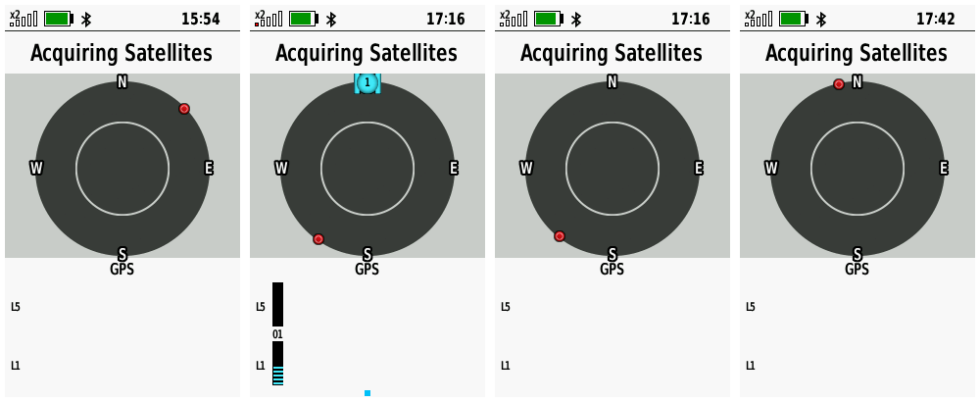
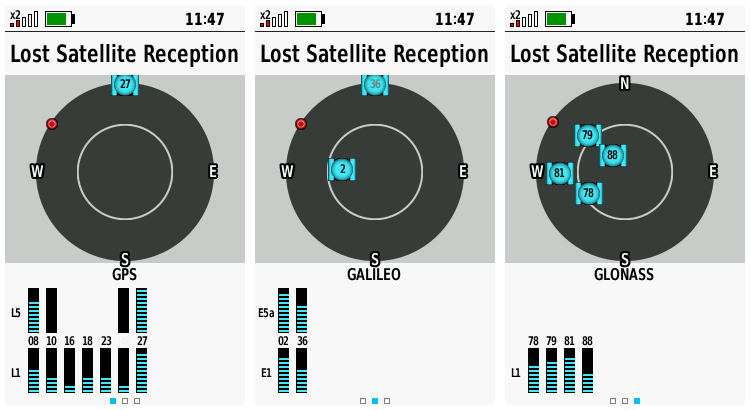
| 66. | The GPSMAP 66sr frequently displays a 'Lost Satellite Reception' message with and/or without satellite signals displayed while failing to calculate the current position for an extended period of time, regardless of CPE status. [Example] [Example] [Gr] [Gr] | [540] [550] [570] | |
| 67. | After selecting the 'Minimize Distance' routing calculation method, the GPSMAP 66sr frequently fails to find the shortest route available, unlike similar Garmin models configured with identical maps and routing preferences. [Gr] | [550] [570] [580] [600] [610] | |
| 68. | Recorded Activities page may load incomplete and/or incorrect activity data and fail to respond to user input. [Example] | [550] [570] [580] [600] [610] | |
| 69. | Data from Garmin Speed Sensor 2 is not included in Tracklog Recordings, nor is it used to update speed related data fields. [Gr] | [520] [540] [550] [570] [580] [600] [610] | |
| 70. | 'GPS only' + 'Multi-Band' configuration is no longer available in [Setup > System > Satellite]. [Gr] | [520] [540] [550] [570] [580] [600] [610] | |
| 71. | An EPO.BIN file may be incorrectly loaded to the device when connected to external apps via Bluetooth, USB or Wi-Fi, resulting in poor satellite reception and the 'CPE: Expired' or 'CPE: Missing' message displayed in [Setup > About]. [Gr] | [520] [540] [550] [570] | |
| 72. | When attempting to send a course via Share Wirelessly, the device instead enters navigation mode. | [490] [520] [540] [550] [570] [580] [600] [610] | |
| 73. | From the Geocaching page List tab, pressing (Menu) and selecting [GC Live Download] > [Download Near] > [A City] always results in a random set of waypoints being displayed. [Gr] | (1235) | [550] [570] |
| 74. | GGZ files may not be properly indexed resulting is lost data that is not available on the device. | [270] [280] [290] [310] [330] [340] [360] [380] [490] [520] [540] [550] [570] [580] [600] [610] | |
| 75. | Selecting (Menu) > [Search Near] > [A City] > (Menu) > [Spell Search] > [Use] from the Geocache List Tab always returns the user to the Main Menu. [Gr] | [570] [580] [600] [610] | |
| 76. | Opening the Geocache page List tab, pressing (Menu) and selecting [GC Live Download] > [GC Code] > {enter code} frequently stalls the device for several minutes and/or fails to complete. [Gr] | [570] [580] [600] [610] | |
| 77. | The 'inReach Remote' page is not available when configuring the Page Ribbon sequence. | (1280) | [270] [280] [290] [310] [330] [340] [360] [380] [490] [520] [540] [550] [570] [580] [600] [610] |
| 78. | The Satellite page may fail to display L5 signals for some GPS satellites. [Gr] | [270] [280] [290] [310] [330] [340] [360] [380] [490] [520] [540] [550] [570] [580] [600] [610] |
Crash Reports
| 1. | Selecting (Find) > [Recorded Activities] > (Enter) > [Current Activity] > (Enter) frequently results in a device crash. [Gr] | [330] [340] [360] | |
| 2. | Selecting (Find) > (Menu) > [Search Near] > [A Map Point] or [A Recent Find] always results in a device crash. | [490] [520] | |
| 3. | Saving an Activity may result in a frozen Recording Controls page followed by a device crash. | [490] [520] | |
| 4. | Attempting to download BirdsEye Direct satellite imagery always results in a device crash. | [490] [520] | |
| 5. | Device may crash after disabling Wi-Fi radio, resulting in Bug 57. [Gr] | [520] [540] [550] [570] [580] [600] [610] |
Hardware Failures
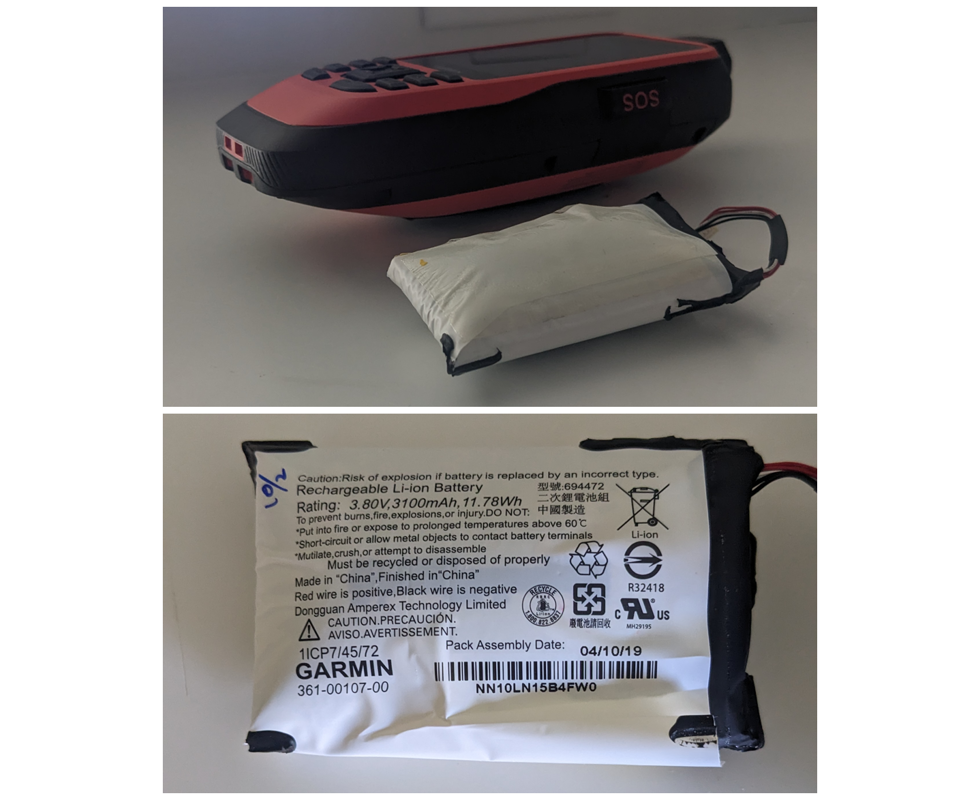
| 1. | The internal Lithium-ion battery pack may experience an off-gassing event that results in over-pressurization of the battery case which can lead to increased temperature, toxic gas emission, and fire. [example] |
Missing Features
| 1. | Geocaching with Photos support seems to be MIA. Most Garmin outdoor models since the Colorado have had this feature, including the GPSMAP 62/64 series. [groundspeak] | (943) | [330] |
| 2. | Shortcuts to the Geocaching and Geocache Filters Pages are missing from the Compass Page (Menu) when active navigation destination is a geocache. [Gr] [groundspeak] | (794) | |
| 3. | Please include the '2 Small Data Fields' dashboard option available with previous GPSMAP series. [Gr] | ||
| 4. | GPSMAP 66sr does not ignore 'shaping points' set to 'will not alert' in routes created/edited in BaseCamp. [Gr] | (838) | |
| 5. | Please return 'Time to Destination' and 'Distance to Destination' data fields to Active Route list, similar to previous Garmin GPSr [eTrex Vista HCx] [Gr] | ||
| 6. | The GPSMAP 66sr currently lacks the 'external power setup menu options' available on other Garmin Outdoor GPSr that can be charged while docked in a powered mount. | ||
| 7. | Map points triggering a Proximity Alert are not highlighted on the Map page display like they are on previous models such as the eTrex Vista HCx. [Gr] | ||
| 8. | User is unable to add Via Points while navigating using Direct Routing. | ||
| 9. | The Photo Viewer page fails to rotate images when held in landscape orientation, unlike previous generation GPSMAP 62/64 series and current generation GPSMAP 65 series devices. | ||
| 10. | Trip Computer data field values are not updated while alerts or messages are displayed on the screen. [Gr] | ||
| 11. | [Waypoint Manager] > (Menu) > [Select Symbol] > {any symbol} > (Menu) > [Delete All] option is not available. |
Requested Features
| 1. | Please include option to auto-upload logs to geocaching.com as a draft ('Field Notes'), allowing the user to edit them at a later time before publishing as a log. [Gr] [groundspeak] | ||
| 2. | Please update the unit firmware to allow battery charging from external power sources while in Expedition Mode (skipping the auto-shutdown process after the external power supply is removed, keeping the unit in Expedition Mode). | ||
| 3. | Please update unit firmware to track and display 'DNF' geocaches using a 'Blue Frown' 'Geocache DNF.bmp' symbol the user can modify via 'CustomSymbols' directory. (Geocaching.com tracks DNF's, so should our GPSr!) | ||
| 4. | Please add an option to disable the automatic power off countdown each time external power is lost (add 'Always {shut down} or {stay powered}' selection - similar to GPSMAP 60 series). [Gr] | ||
| 5. | Please include function to enable review and editing of geocache log notes saved on the device. [Gr] [Gr] | ||
| 6. | Please update Geocache Descriptions to include Attribute information. | ||
| 7. | Please add an option to 'Save Current Filter' in [Geocaching > Menu > Filter > Menu]. | (774) | |
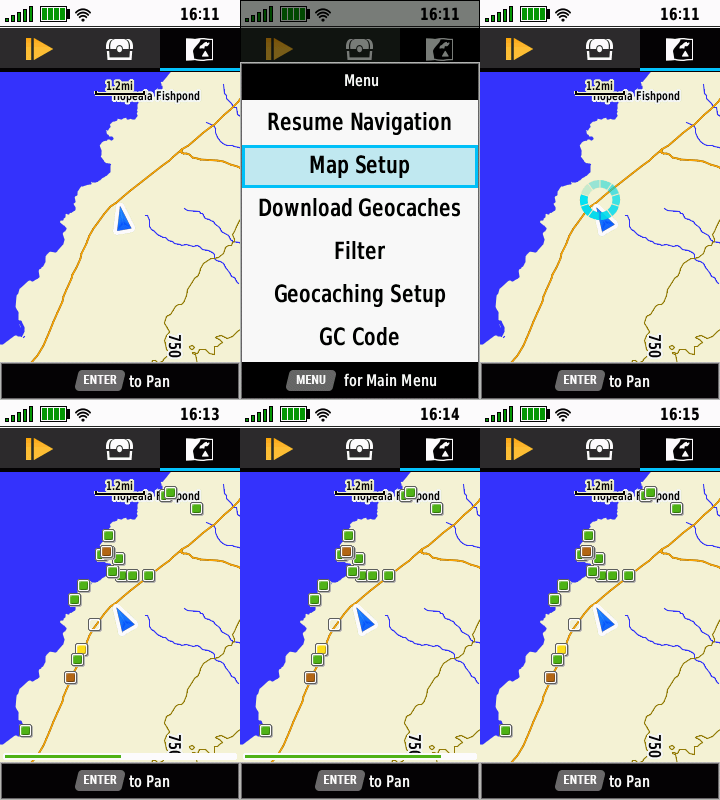
| 8. | Please update the Geocaching page Map Tab display (only - not the primary Map page) to include a progress bar indicating GCLive download progress (not GC List progress). [example] [Gr] | ||
| 9. | Please provide an alternate method (other than the power button) for the user to Lock and Unlock the Keys. [Gr] | ||
| 10. | Please include both hddd°mm.mmm' and hddd°mm.mmmm' options in [Setup > Position Format]. [groundspeak] | (777) | |
| 11. | Please include 'Custom POIs' category when (A) 'changing item order' of the Find Menu icons, and when (B) adding a 'Where To?' category to the Main Menu (Sequence). [Gr] [Gr] | ||
| 12. | Please update firmware to display geocache log dates in format specified by user. [Gr] | ||
| 13. | To minimize battery consumption, please reduce or disable the keyboard and display backlighting that occurs when any button is pressed while the keys are locked. [Gr] | ||
| 14. | With Settings > Display > Battery Save = On, it is impossible for the user to determine if the GPSMAP 66sr is in Battery Save Mode or powered off. Pressing the Power Button either exits Battery Save Mode or starts an undesired boot sequence if powered off. Perhaps the unit could briefly illuminate the key pad buttons when pressed while Battery Save Mode is active, or pulse the Notification LED (two quick pulses every 5 or 10 seconds) to indicate the unit is still powered on? [Gr] | ||
| 15. | Please update Wi-Fi settings to support WPS (WiFi Protected Setup) [Gr] | ||
| 16. | Please incorporate a new 'Satellite Availability' or 'Satellite Visibility' page for current and future models. [examples] | ||
| 17. | Please add Elevation Delta to Map page Info Box (currently only shows direction and distance) for cursor position when panning map. [Gr] | ||
| 18. | Please add 'Full Scale' option to Elevation plot menu to automatically adjust the Y axis such that the top of the graph display is equal to the highest recorded value and the bottom of the graph display is equal to the lowest recorded value. [Gr] | ||
| 19. | Please introduce a simple notepad page that allows the user to create, edit and save geo-tagged alpha-numeric notes for future reference. [Gr] | ||
| 20. | As so many device settings are now global and no longer profile dependent, preventing the device user from creating their own low power consumption and/or high power consumption profiles, please create dedicated profiles for each (not expedition mode), or return control of device settings to the user creating their own profiles. Or compromise, and add an additional 'Global/Profile Dependent' option for settings that are currently Global only. [Gr] | ||
| 21. | Please include a menu option to enable the serial port without the need for the device being externally powered (like older models once did) to allow APRS tracking. [Gr] | ||
| 22. | Please include a menu option to 'Download BirdsEye' in the Map page menu for all devices equipped with BirdsEye Direct. | ||
| 23. | Please include an option to display time as HH:MM:SS in Status Bar. [Gr] | ||
| 24. | The Elevation Plot application currently allows the user to view 'Elevation/Time', 'Elevation/Distance', 'Barometric Pressure', or 'Ambient Pressure' data. Please include option to view 'Temperature', 'Heart Rate', 'Cadence', 'Calories' and other data, when available. [Gr] | ||
| 25. |
Please
include a 'Status Bar Notification Icon' to indicate current 'Recording
Controls' Activity Recording status, similar to inReach Tracking
notification icon on inReach equipped devices (active " ",
paused " ",
paused " ",
and stopped " ",
and stopped " "). "). |
||
| 26. | Improve geocache database functionality to download GCLive data for geocaches already present in GPX/GGZ format, allowing the user to choose between using GCLive or GPX/GGZ files when enabling or disabling 'Live Data' in [Geocaching > Filters > Geocache Files]. | ||
| 27. |
Please enhance POI Alerts to include a 'Flash Display'
option for users that: [Gr]
|
||
| 28. | Please complete FIT file support to provide full import/export/navigation functionality similar to other fitness products. [Gr] | ||
| 29. | Please add 'Download Geocaches' selection to Map page option menu. | ||
| 30. | The Geocache Proximity Alert feature currently only allows the user to 'Dismiss' an alert. Please also include the option to 'Begin Navigation' to the displayed geocache. [Gr] | ||
| 31. | Please include 'Most Recent' selection in Waypoint Manager 'Sort' option menu, similar to the existing Track Manager sort option menu. [Gr] | ||
| 32. | Please add an option allowing the user to configure the total number of geocaches used to populate the Geocache List. [Gr] | ||
| 33. | Please include an option to enable/disable the Barometric Altimeter (similar to Montana 7x0). | ||
| 34. | Please introduce a profile dependent setting to configure the speed when the compass switches from magentic to GPS operation. [Gr] | ||
| 35. | Please add 'Full Scale' option to Elevation plot menu to automatically adjust the Y axis such that the top of the graph display is equal to the highest recorded value and the bottom of the graph display is equal to the lowest recorded value. [Gr] [Gr] | ||
| 36. | Please add 'Ascent to Next', 'Ascent to Dest', 'Descent to Next', and 'Descent to Dest' data fields. [Gr] | ||
| 37. | Please include an option to change the 'Alarm' sound in [Setup > Tones] or in the Alarm Clock page menu. [Gr] | ||
| 38. | Please add support for third party JNX raster maps. |