Hardware
Antenna
H1.) What kind of internal antenna does the Garmin Oregon have?
According to Garmin the Oregon has neither a traditional patch or quad-helix antenna, they refer to is as a 'ceramic antenna' (also known as a 'chip' or 'linear' antenna). Pictures of the internals of the Oregon from the Polish site Garniak show the PCB. In this picture the antenna is the white object near the bottom of the PCB. Note the PCB is actually flipped around and this antenna is at the top of the unit.
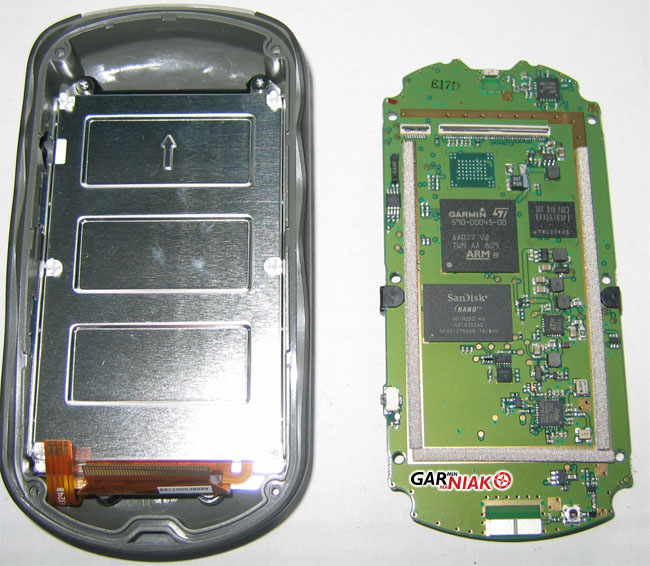 |
| Right side white antenna at bottom of green PCB |
Garmin support described the Oregon antenna as starting just above the screen, wrapping up over the top of the unit under the Garmin logo and down the length of the back. When asked the optimal position to carry the unit they recommended either horizontal facing up or vertical, but not side up or bottom up. Support claims that the performance is not as good as a quad-helix but better than a patch antenna.
H2.) Does the Garmin Oregon support an external antenna?
No.
Memory
H3.) Does the Garmin Oregon support expandable memory?
Yes. The Oregon has a microSD card slot available inside the battery compartment underneath the batteries.
H4.) What is the largest microSD card supported by the Garmin Oregon? What speed card should I buy?
Oregon x00 units support microSD cards up to 4GB (Class 4 to 10). Garmin officially states that the maximum size supported is 4GB and the card should be a "standard speed card for best performance". As the device conforms to the SDHC standard, up to 32GB should be supported by the hardware. At least 16GB is successfully tested by users. The original 4GB limitation is introduced by the file system, because of which only (map) files of up to 4GB can be stored. Larger microSD cards can be fully used with a simple workaround.
Oregon x50 units support microSD cards up to 32GB (Class 4 to 10).
Screen
H5.) My touch screen is not working well. How do I calibrate it?
If you are running software version 3.3 [x50, DK] / 3.7 [x00] or later you can calibrate your screen using Setup > Display > Press to Begin Screen Calibration and follow the instructions.
If you have older software you can turn the Oregon off and power it back on again, holding the power button down as it initializes. After about 30 seconds you will enter a screen calibration page where you can recalibrate the touch screen. This method works also in newer software versions.
H6.) What kind of touch screen does the Garmin Oregon use? Does it require a finger touch or can I use a stylus or pen cap? Can I use it with gloves on?
The Oregon used a resistive touch screen which means it just requires pressure in order to register a key press. The Oregon touchscreen works with a stylus, pen cap, gloves on, etc.
H7.) Is there a screen protector available for the Garmin Oregon? Do I need one?
Yes. See Accessories. After several months of frequent use without a screen protector my Oregon has small scratches up and down the middle of the screen. Mostly likely these are caused by scrolling the screen with dirt on my fingers or gloves. Since many users report little or no change in touch screen sensitivity or brightness I would suggest investing in a screen protector.
Mounts
H8.) Is the Garmin Oregon compatible with Garmin Colorado mounts?
The rail mounting system on the Oregon and Colorado are exactly the same. As a result all of the Garmin Colorado mounting accessories will work on the Oregon. This includes the marine, bike, auto and carabiner mounts.
Miscellaneous
H9.) Can I use a lanyard with the Garmin Oregon?
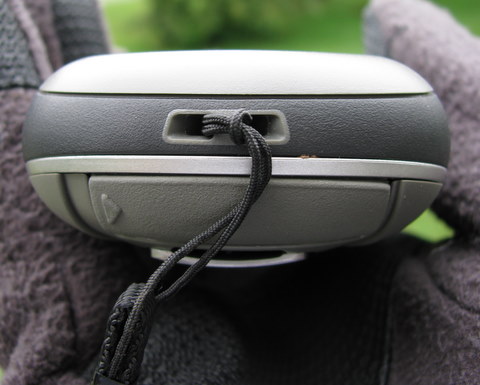
Yes, the Oregon has a dedicated lanyard attachment. See picture below
Issues
Hardware Issues
Issues listed in this section are assumed to be hardware related based on feedback from the user community. If you experience any of these problems it is recommended that you should contact Garmin technical support.
- Battery connector failure: The bent metal contacts on the battery connector can fatigue over time, and snap. There are two types - the connecting bar at the bottom, and the individual feed tabs at the top. The bar could be replaced by Garmin sending out a new piece, however the individual contacts at the top appear to be glued into the case. One of the individual connectors on mine failed after 7 months, and had to be replaced by Garmin under warranty. Tip - be careful when inserting and removing batteries - insert the positive end of the battery first to avoid the hard snap and related stress due to the dimple on the contacts.
