Compass
Images
 |
|
Compass |
FAQ
C1.) How do I calibrate the compass from the compass page?
Press and hold the compass for about 5 seconds and you'll be asked if you want to start the compass calibration. Note to turn off the compass you'll need to goto Main Menu>Setup>Heading>Compass and set this to Off.
C2.) When I have the compass set to "Auto" when does it turn on/off?
In "auto" mode the electronic compass is used to determine your heading when you moving slower than about 1-2mph. If you are moving faster than that the GPS is used to determine your heading.
C3.) What data fields can I view on the Compass page?
See this FAQ.
C4.) How often do I have to calibrate the Compass?
Garmin recommends that you should recalibrate after moving long distances, experiencing temperature changes of more than 20F (11C) or changing batteries.
C5.) Do I have to hold the unit flat in order for the compass to work properly?
Oregon x00 owners have to hold the unit flat to work because the compass in that unit is a 2-axis compass. The 3-axis compass included in the Oregon x50 does not need to be held flat in order to work. If you are not holding the unit flat and the compass is active (e.g. moving <1-2mph) you will see warning on the Compass page to hold the unit flat.
C6.) Why is my compass spinning?
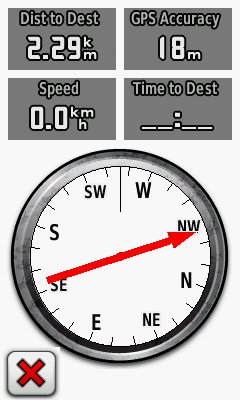
This can be caused by a number of things. First a bit of terminology and background: the red pointer on the compass page is not the compass pointer, it is a bearing pointer which indicates the bearing to your current navigation target. The little black line at "12 o'clock" on the compass is actually the compass pointer which indicates your current direction of travel or heading.
Compass pointer movement (which is actually achieved by rotating of the compass face under the pointer) is controlled differently depending on your speed and compass settings. If you are moving less than 1-2mph AND the compass is set to Auto the electronic compass determines your heading, otherwise your GPS receiver is used to compute your direction of travel over time and hence your heading. The movement of the bearing pointer is influenced by all the same factors above because it is displayed on top of the compass face plus it also depends on your location relative to your navigation target as computed by the GPS receiver.
Because of these somewhat complex dependencies either pointer or both can spin or act erratically if any of the items that contribute to their movement is not working as expected. In order to resolve issues of erratic compass or bearing point movement the first thing to do is check the software release you have loaded. Garmin has tuned compass and GPS receiver behavior several times -- the x00 and x50 Firmware pages can be helpful to determine if there are any know issues.
Next is to make sure that the electronic compass is calibrated and working properly.
- Start by canceling all navigation. This will cause the bearing pointer to disappear so you can focus on the compass pointer.
- Check your compass settings and make sure the compass setting under Setup>Heading>Compass is set to Auto
- Calibrate your compass by holding it level (for the x00) and make should you are not near any objects which could influence the magnetic field around you.
If you remain stationary the compass should now rotate as you turn around and the pointer should correctly indicate your heading. If you are using an x00 Oregon you will have to hold the unit level. If this procedure does not work try power cycling the Oregon and recalibrating again ensuring that your are not near any large metallic objects (i.e. cars or buildings) or anything that could have influence over the magnetic field around you (i.e. overhead power lines). If the compass still does not work you may have a faulty unit, in that case turn the electronic compass off and proceed to the next step.
The final step is to get a stable bearing pointer. The following will be required to do this:
- Correct calibration of the compass as described above.
- The unit must be held horizontal if you are moving less than 1-2mph (x00 Oregon only).
- Good GPS signal (GPS Accuracy in the 20'-30' range is generally good enough). If your location is bouncing because of poor signal quality both your bearing and heading can be influenced. Move to an area where you have better signal reception.
- You need to be >20'-30' from the target of your navigation.Even with good GPS signal high sensitivity receivers like the Oregon have a certain amount of location "bounce" which can be on the order of 10'-20'. If you are getting close to your target (i.e. geocache) this bounce can become the dominating factor in determining your location relative to the target and cause the bearing pointer to move around rapidly. There isn't much you can do about this when you get really close to your target.
If you've taken the steps above and still cannot get a stable bearing pointer try disabling the compass (Setup>Heading>Compass) to see if that helps. This will eliminate 2) as factor but 3) and 4) can still influence the stability of the bearing pointer.
Issues
Bugs
- [x00] (Crash) Unit shuts off randomly under the following conditions: 1) unit is on the map page, 2) compass is set on auto and 3) unit is starting and stopping or moving slowly. Shutoff does not happen if the compass is off. Issue happens with and without the compass calibrated. It is not reproducible at will but it happens fairly frequently the Oregon 400t. (3.12, maybe 3.10)
- [x50] Seen two instances where the compass was constantly spinning. Both instances either started while I was in the car or just as I got out of a car but did not correct themselves after leaving the car. In both cases the compass had been working and correctly calibrated. Heading field was erratic in both cases and moving above 1-2mph "fixed" the problem because the compass was auto-disabled. In both cases recalibration of the compass failed unless I power cycled the unit because it would repeatedly fail on the calibration of the first axis. (2.10)
- [x00] The "Hold Level" warning for the electronic compass should be visible on the map and odometer page if the compass is on and the unit is not being held level. The user can see spinning maps or erratic data fields under these conditions without being able to associate it with the compass. (2.93)
Missing features
- Can't set the "auto-compass-on" trip point speed (i.e. compass turns on below XX mph) (60csx) (2.93)
New feature requests
- Compass arrow should be wider so it is easier to see. (fixed on x50)
Needs Verification
Resolved
- (3.20) (x50: 2.3) Improved compass responsiveness. Compass rotates more smoothly and little slower on the x50.
- (3.12) Fixed issues with thresholds used for auto compass switching.
- (3.10) Improved compass responsiveness in challenging GPS environment . The heading on the Oregon sometimes freezes for about 90 seconds. It happens under the following conditions: 1) compass is set to auto and 2) unit is turned on and locks while stationary but starts moving almost immediately at car speeds. In these situations it appears that the compass does not disable itself and the heading (and compass/map pointers) get stuck. The heading is not completely stuck but tends to move a few degrees even though heading changes can be much larger. The "hold level" indicator in the compass page is visible even though the unit is moving at 20-40mph. Eventually after about 90 seconds the e-compass turns off and the heading returns to normal. Switching the satellite mode between Normal and WAAS will reactivate the problem. (3.10)
- (2.96) Added Sight 'N Go application for the Oregon 300/400i/400c/400t. The Oregon does not support Sight'n Go (projection of a waypoint based on sight with using a bearing). (60csx, CO) (2.93)
