Trip Computer
Images
FAQ
TC1.) How do I change the trip computer dashboard?
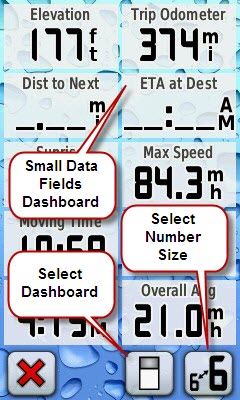
On the trip computer page select the button on the bottom with the rectangular icon (see image above).
TC2.) What dashboards are available and what information do they show?
- Small data fields: 4 small data fields (see image above)
- Large data field: 1 large data field, battery status, time, GPS status
- Geocaching: Closest geocaching, distance, bearing, find count, time since last find
- Automotive: Speed, direction, distance to destination, trip odometer
- Default: Sunrise/Sunset, elevation, trip odometer
TC3.) What does does the "select number size" button do?
It allows you to configure the Trip Odometer below the dashboard to show either 6 small data fields (see image above) or 2 large data fields.
TC4.) How do I reset the Trip Odometer data field?
Setup>Reset>Reset Trip Data . There is not a way to reset the Trip Odometer from the Trip Computer page.
TC5.) How do I reset the Odometer data field?
There is no easy way to reset the Odometer data field. The only way to reset this field is to perform a Master Reset (Setup>Reset>Restore Defaults to Factory Setting). Warning: This resets more than just the Odometer field.
TC6.) What data fields can I display, and what do they mean?
You can choose from among the following data fields to display on the Trip Computer, Map, and Compass pages. To change a data field, touch the field you want to change, and you will be presented with a list of available data fields. Touch a data field in the list to display it on the page.
| Field |
Description |
| Accuracy of GPS |
Your estimated position error (EPE) |
| Battery Level |
Battery charge, in 20% increments |
| Bearing |
Direction, in degrees, to the next waypoint |
| Cadence |
Revolutions of the crank arm per minute (for bicyclists using the cadence accessory) |
| Course |
Direction from the last waypoint to the next waypoint |
| Depth |
Depth of water (requires NMEA input from a sonar device) |
| Distance to Destination |
Distance to final destination |
| Distance to Next |
Distance to the next waypoint or turn |
| Elevation |
Elevation above sea level |
| ETA at Destination |
Estimated time of arrival at final destination |
| ETA at Next |
Estimated time of arrival at next waypoint or turn |
| Glide Ratio |
Ratio of horizontal distance traveled to vertical distance traveled |
| Glide Ratio to Dest |
Glide ratio required to descend from your current position and elevation to the position and elevation of your final destination |
| GPS Signal Strength |
Strength of satellite lock, in 20% increments |
| Heading |
Direction you are currently heading |
| Heart Rate |
Heart rate in beats per minute (using the heart rate monitor accessory) |
| Location (lat/lon) |
Location in ddd mm.mmm format |
| Location (selected) |
Location in format set in Setup > Position Format |
| Odometer |
Total distance traveled for all trips |
| Off Course |
Distance to your desired course (use To Course for direction) |
| Pointer |
Arrow indicating direction to travel to the next waypoint or turn |
| Speed |
Current speed |
| Speed - Maximum |
Maximum speed traveled since last reset |
| Speed - Moving Avg. |
Average speed, not including time stopped, since last reset |
| Speed - Overall Avg. |
Average speed, including time stopped, since last reset |
| Sunrise |
Time of today's sunrise at your current position |
| Sunset |
Time of today's sunset at your current position |
| Temperature - Water |
Water temperature (requires external data acquisition device) |
| Time of Day |
Time at your current position |
| Time to Destination |
Estimated elapsed time until you reach your final destination |
| Time to Next |
Estimated elapsed time until you reach your next waypoint or turn |
| To Course |
Direction to your planned course (use Off Course for distance) |
| Trip Odometer |
Distance since last reset |
| Trip Time - Moving |
Time in motion since last reset |
| Trip Time - Stopped |
Time stopped since last reset |
| Trip Time - Total |
Total time since last reset |
| Turn |
The difference in degrees between the bearing to your destination and your current heading. "L" means turn left; "R" means turn right. |
| Velocity Made Good |
Rate of closure to your destination, based on current speed and course |
| Vertical Speed |
Current rate of ascent or descent |
| Vertical Speed To Dest |
Rate of ascent or descent to your final destination |
| Waypoint at Dest |
Name of final destination waypoint |
| Waypoint at Next |
Name of next destination on the current route |
Issues
Bugs
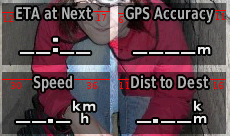
- Trip computer have badly centered columns titles. Note this is not just a cosmetic issue, poor centering limits the number of characters which can be displayed for the data field titles for internationalization (2.97)
Trip computer center bug - Trip odometer has significant errors (sometimes greater than 50%), worst when hiking slowly under tree cover. The actual distance is under reported (3.80).
Missing features
- There should be a way to reset the Elevation fields (total ascent, total descent, max elevation) independent of the Trip Computer data (3.2)
- There should be a way to reset the Odometer (not Trip Odometer) data field. There is no way to accomplish this aside from a reset. The user should have the ability to reset this field independent of other fields in the Trip Odometer or Altimeter. (CO, 60csx) (2.97)
- There is no way to independently reset the Max Speed field from the Trip Odometer (CO, 60csx) (2.97)
- Trip Computer, Compass and Elevation Plot pages should support a "% Grade" data field (Garmin Fitness devices) (2.98)
- Realtime display of Altidude Above Ground "AGL" - (is missing altogether).
New feature requests
- Include option to add "GPS Altitude" information (as in satellite page) as Trip Computer data field.
- Add ability to create additional custom dashboards
-
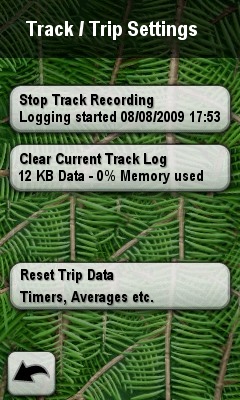
Add a function button at the bottom of the Trip Computer page to allow quick access to a submenu containing the following functions:
• Start/Stop Track Recording
• Clear Current Track (greyed out if no Track Data is available)
• Activate/Stop Trip Computer
• Reset Trip Data (greyed out if no Trip Data is available)
When clearing or resetting data provide an additional confirmation screen which asks "Are you sure you want to reset?". Additional hints about the stored data, like "Delete track started on 16.5.2009 (123 waypoints collected in 12:30 hours)" would be helpful.
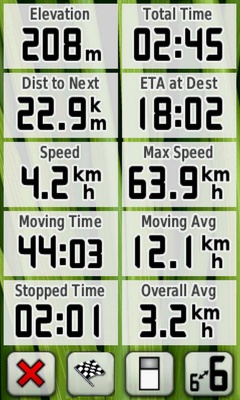
- Data fields should be grouped together in categories (like POIs) when selecting a new data field from the list. Eg. all data fields related to time in one category, all related to distance in another etc. This requires a lot less scrolling up and down and will make the data fields faster and easier to find.
- There should be a "Pace" data field for speed in minutes per kilometer. Both "Current Pace" for the last kilometer and "Average Pace" since the trip computer was reset.
Resolved
- (2.95) Added new trip computer dashboards. No long data fields are available in the trip computer (CO, 60csx) (2.93)
- (2.95) Added big numbers option to the trip computer. Big number mode is not supported (CO, 60csx) (2.93)
- (2.95) Added new trip computer dashboards. The trip computer should support a "no-dashboard" option to allow the user to configure the maximum number of data fields. (CO, 60csx) (2.93)
- (Not an issue) If the trip computer odometer field goes over 1000 miles it starts to report incorrect data (2.2)
