|
|
|
Error Reporting |
- Please report all software bugs, glitches, crash reports, and feature requests in the
GPSMAP H1
discussion forum.
-
Try to include as much detail as possible when describing each issue you are experiencing, including profile settings, maps enabled, keystrokes, etc.
-
Send a copy of your post to
product.support@Garmin.com and include:
- a copy of the
System.xml file located in the
[GPSMAP]\Garmin\ directory.
-
a copy of the
GarminDevice.xml file located in the
[GPSMAP]\Garmin\ directory.
-
a copy of the
Settings.fit file located in the
[GPSMAP]\Garmin\Settings\ directory.
-
copies of any related activity
profiles (*.fit)
found in the
[GPSMAP]\Garmin\Sports\ directory.
-
any
*.fit files associated with the crash or bug from the
[GPSMAP]\Garmin\Activities\ or [microSD]\Garmin\Activities\ directories.
-
any
*.fit files associated with the crash or bug from the
[GPSMAP]\Garmin\Courses\ or [microSD]\Garmin\Courses\ directories.
-
any
*.gpx files associated with the crash or bug from the
[GPSMAP]\Garmin\GPX\ or [microSD]\Garmin\GPX\ directories.
|
|
|
|
|
|
Status |
- RED: Issue/Feature Request has been reported to Garmin, and is pending response.
-
ORANGE: Garmin has acknowledged a Reported Issue/Feature Request and may be working on a solution.
-
GREEN: Issue has been resolved and no longer exists. Requested Feature has been implemented.
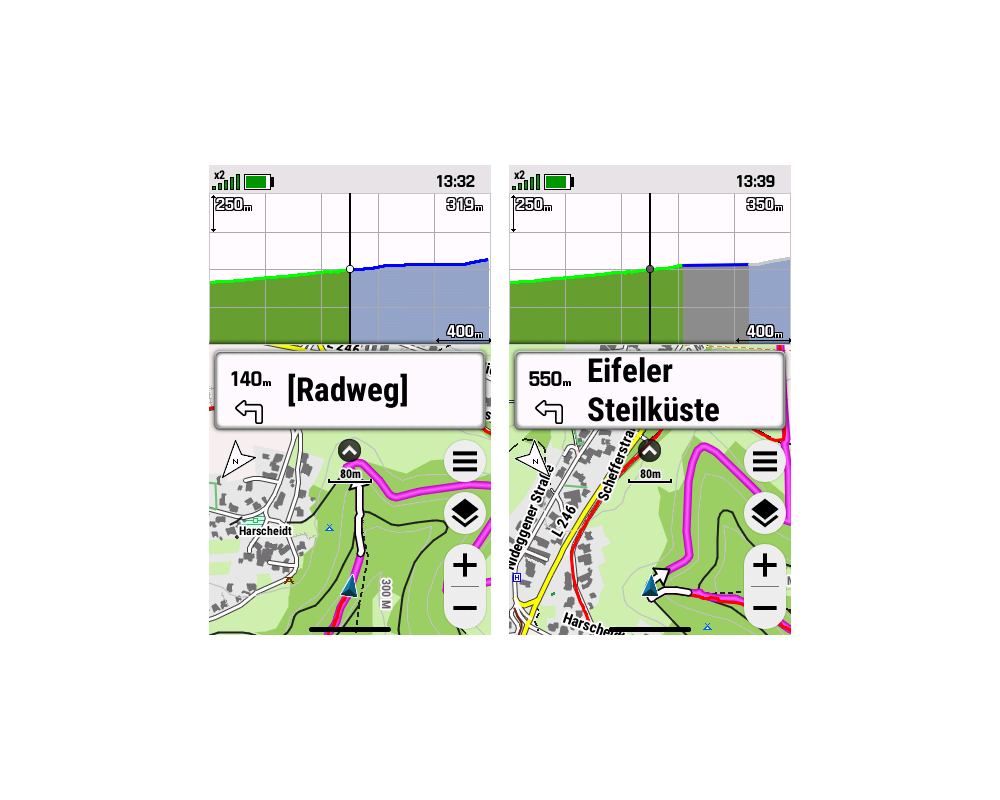
|
|
|
|
|
|
Categories |
-
Bugs (13/05/49): Software issues that result in a system failure or adversely affect intended functionality.
-
Crash Reports (03/00/05): Bugs resulting in unintentional hanging, freezing, resetting or powering down.
-
Hardware Failures (02/00/00): Physical issues and/or failures that limit or inhibit intended function.
-
Missing Features (14/22/25): Feature is available on a similar Garmin product.
-
Requested Features (01/01/02): Request for functionality not present with current firmware version.
|
|
|
|
|
|
Bugs |
|
|
|
1. |
The Bluetooth status icon is not displayed in the Status Bar. |
(2989) |
[304] [408] [409] [509] [604] [707]
[808] |
|
2. |
The Wi-Fi status icon is not displayed in the Status Bar. |
(2989) |
[304] [408] [409] [509] [604] [707]
[808] |
|
3. |
The Wireless Sensor status icon is not displayed in the Status
Bar. |
(2989) |
[304] [408] [409] [509] [604] [707] [808] [905] [906] [1013]
[1107] [1206] [1208] [1307] [1308] |
|
4. |
The LiveTrack status icon is not displayed in the Status Bar. |
(2989) |
[304] [408] [409] [509] [604] [707] [808] [905] [906] [1013]
[1107] [1206] [1208] [1307] [1308] |
|
5. |
Outdoor Maps+ does not include the IGN France Topo raster map
download option. [Gr] |
|
[304] [408] [409] |
|
6. |
Custom Waypoint Symbols are not currently recognized or
displayed. |
|
[304] [408] [409] [509] [604] [707] |
|
7. |
Custom Geocache Symbols are not currently recognized or
displayed. |
(2884) (2886) |
[304] [408] [409] [509] [604] [707] |
|
8. |
While viewing a geotagged photo, selecting 'Menu > View Map'
opens the Map page at the users current location. |
|
[304] [408] [409] [509] [604] [707]
[808] |
|
9. |
Glances with Data Fields do not allow the user to lock the data
fields. |
(1970) |
[304] [408] [409] [509] |
|
10. |
After reviewing details for any item on the Map page, selecting
'Back' or 'Quit' returns the map to the users current position. |
|
[304] [408] [409] [509] [604] [707]
[808] |
|
11. |
Pressing the Power Button to wake the display can be so slow to
respond, the user may press the Power Button again thinking the
first request was not received, resulting in the display waking
and immediately going back to sleep. |
|
[304] [408] [409] [509] [604] [707]
[808] [905] [906] [1013] [1107] [1206] [1208] [1307] [1308] |
|
12. |
After Crash 1 occurs, the GCLive registration is lost, and the
user may no longer be able to re-register the device. |
|
[304]
[408] |
|
13. |
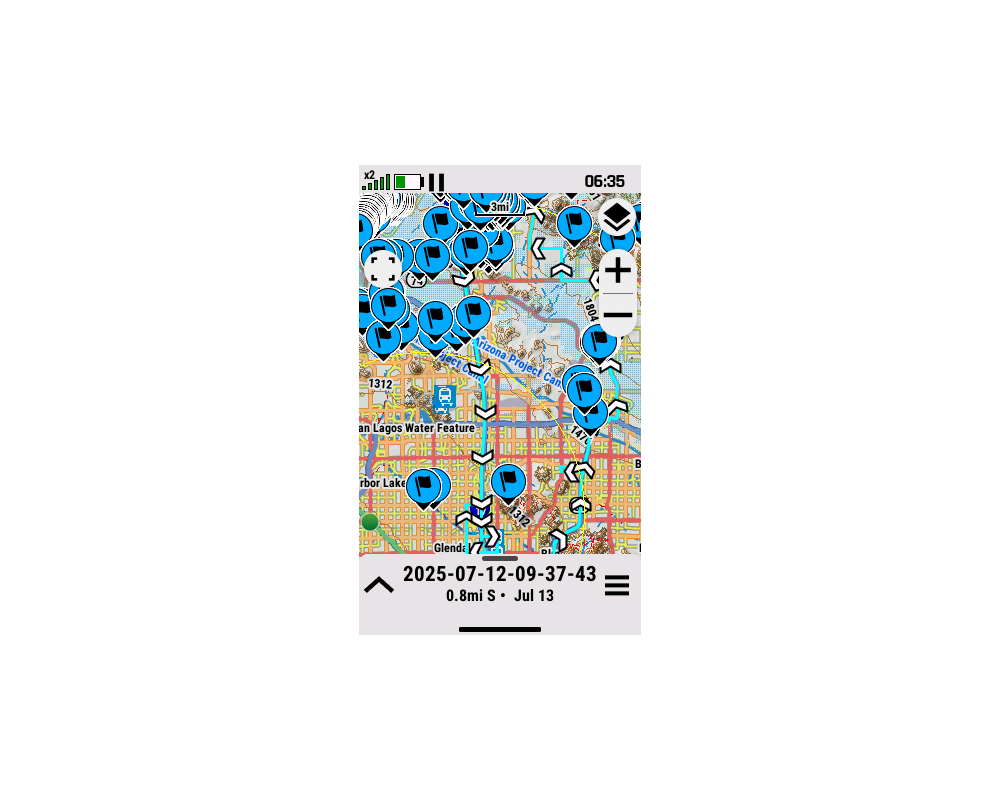
Map page details are obscured by unwanted and unnecessary
large
blue flag balloons. [example]
[Gr]
[Gr] |
|
[304] [408] [409] [509] [604] [707]
[808] |
|
14. |
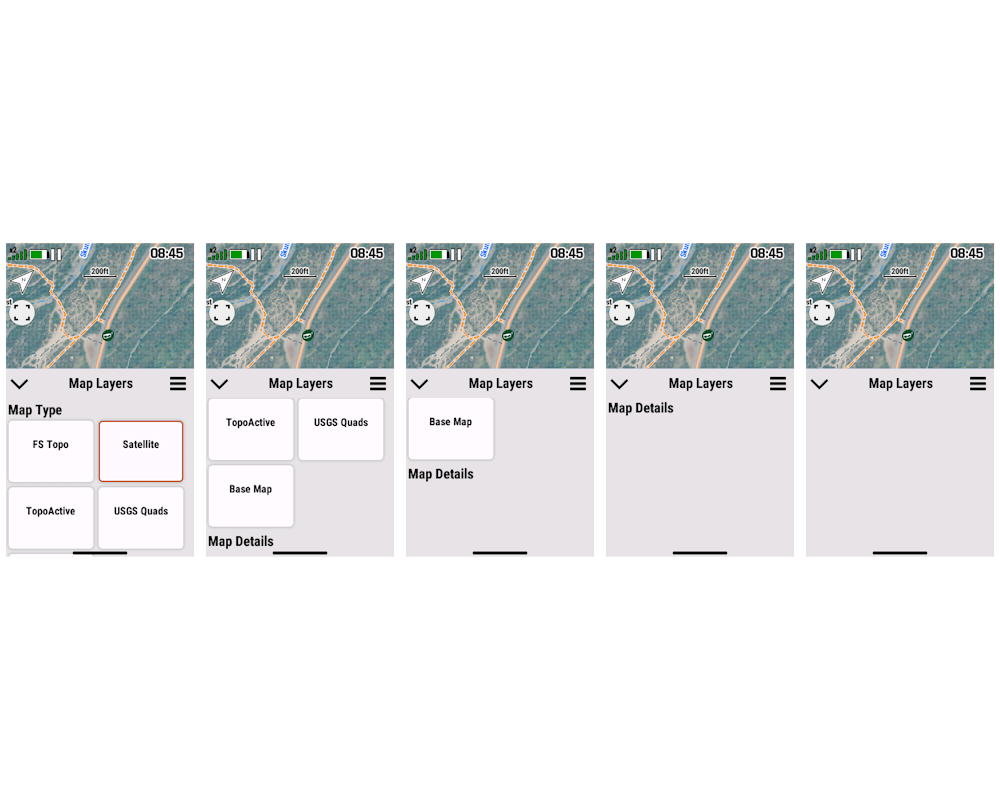
Map Details options in the Map page Map Layers Menu are not
always displayed. [example] |
|
[304] [408] [409] [509] [604] [707]
[808] |
|
15. |
Incorrect Dashboard may be displayed while configuring Data
Fields. [Gr] |
|
[304] [408] [409] [509] [604] [707] [808] [905] [906] [1013]
[1107] [1206] [1208] [1307] [1308] |
|
16. |
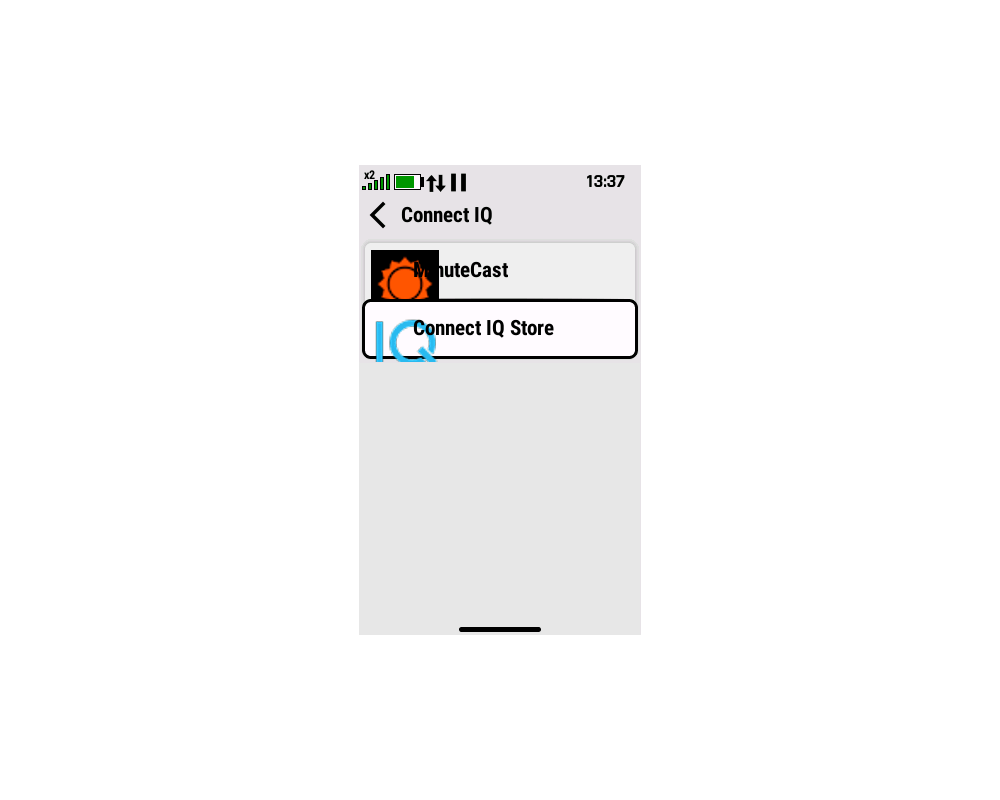
Connect IQ page/app icons and titles overlap each other. [example] |
|
[304] [408] [409] [509] [604] [707]
[808] |
|
17. |
Camera photos are saved to 'Internal Storage' when
configured for 'Save Photos To > Data Card (If Present)'. |
|
[304] [408] [409] [509] [604] [707]
[808] |
|
18. |
User is unable to assign simulated location when using Satellite
Demo Mode. [Gr] |
|
[304] [408] [409] [509] [604] [707] [808] [905] [906] [1013]
[1107] [1206] [1208] [1307] [1308] |
|
19. |
Changing the color of a course always results in the course
being displayed in the default cyan color. [Gr] |
|
[304] [408] |
|
20. |
Changing the color of an activity always results in the activity
being displayed in the default cyan color. [Gr] |
|
[304] [408] |
|
21. |
Selecting the Barometer Glance always opens the Altimeter page
with no Barometer plots available. |
|
[304] [408] |
|
22. |
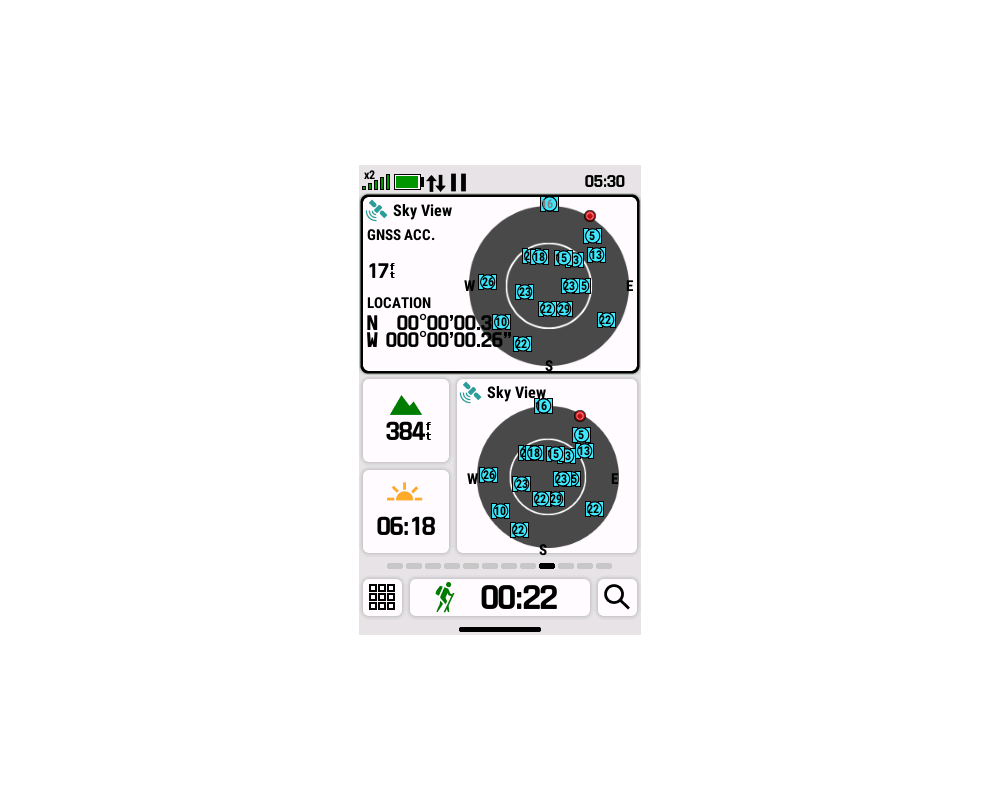
Location coordinates always overlap other data in the SkyView
Glance. [example] |
(3987) |
[304] [408] [409] [509]
[604] |
|
23. |
Location coordinates are always displayed beyond the small data
field boundary. [example]
|
(4018) |
[304] [408] [409] [509]
[604] |
|
24. |
MTP mode may fail when microSD cards larger than 32GB are
installed. [Gr] |
(3692) |
[304] [408] [409]
[509] |
|
25. |
The power on boot sequence may fail when microSD cards larger
than 32GB are installed. |
(3692) |
[304] [408] [409]
[509] |
|
26. |
When 'Auto Pause' is enabled, saving the current activity fails
to create the saved activity files on the device. |
(3685) |
[304] [408] [409]
[509] |
|
27. |
The touchscreen may remain active while the device is locked,
potentially leading to unintentional manipulation. |
|
[304] [408] [409] [509] [604] [707] [808] [905] [906] [1013]
[1107] [1206] [1208] [1307] [1308] |
|
28. |
The 'Auto Start' Activity Recording feature frequently fails to
start recording as expected after a power cycle. |
(3817) |
[122] [208] [304] [408] [409] [509]
[604] |
|
29. |
The 'Rolling Tape Compass' does not provide destination bearing
information while navigating. |
(3782) |
[304] [408]
[409] [509] [604] [707] [808] [905] [906] [1013] [1107] [1206]
[1208] [1307] [1308] |
|
30. |
The touchscreen may become active after an alert is displayed
while the device is locked. |
(3780) |
[304] [408] [409]
[509] [604] [707] [808] [905] [906] [1013] [1107] [1206] [1208]
[1307] [1308] |
|
31. |
After saving a new Activity, the user must power cycle the
device before the new activity is populated in the 'Saved' page
list. |
|
[122] [208] [304] [408] [409] [509]
[604] [707]
[808] |
|
32. |
The Map page Map Layer Menu may report incorrect status for
third party maps. [Gr]
[Related: Bug 65] |
(3912) |
[122] [208] [304] [408] [409]
[509] [604] [707] [808] [906]
[1013] |
|
33. |
When 'Multicolor' mode is enabled, displayed satellite colors
are continuously rotated through the available color spectrum in
a seemingly random sequence. |
(3886) |
[122] [208] [304] [408] [409] [509]
[604] |
|
34. |
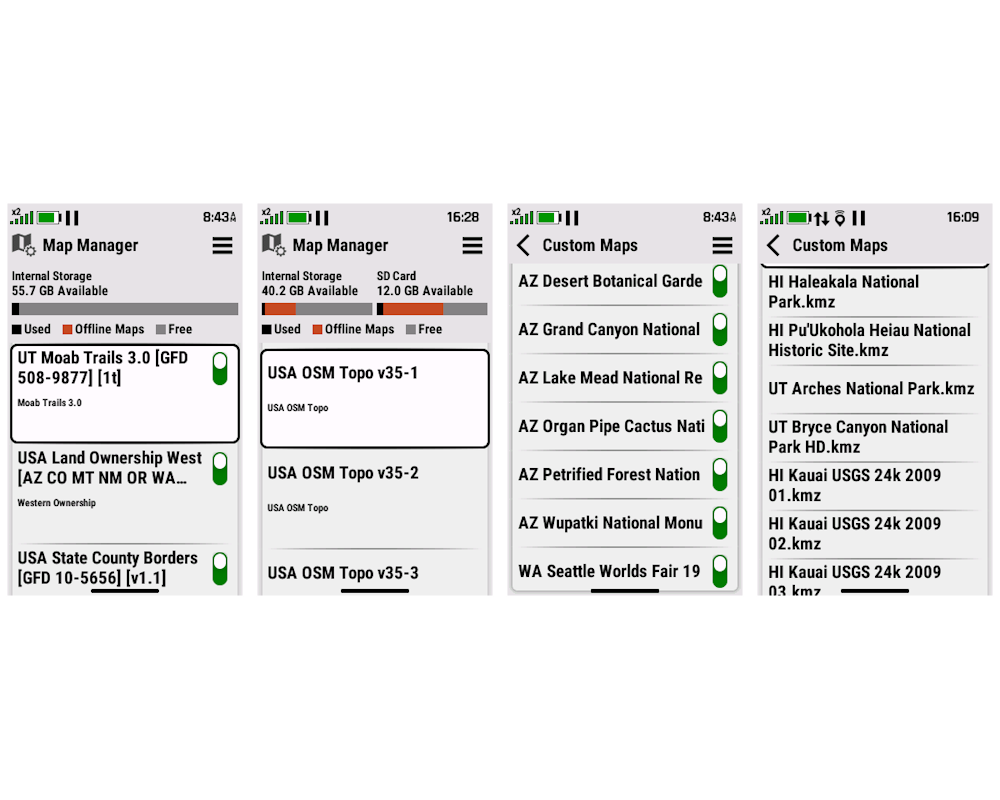
The Map Toggles in the Map Manager page and Custom Maps page are
missing after firmware 5.09 update. [example] [Gr] |
|
[509] [604] [707] [808] [905] [906] [1013] [1107] [1206] [1208]
[1307] [1308] |
|
35. |
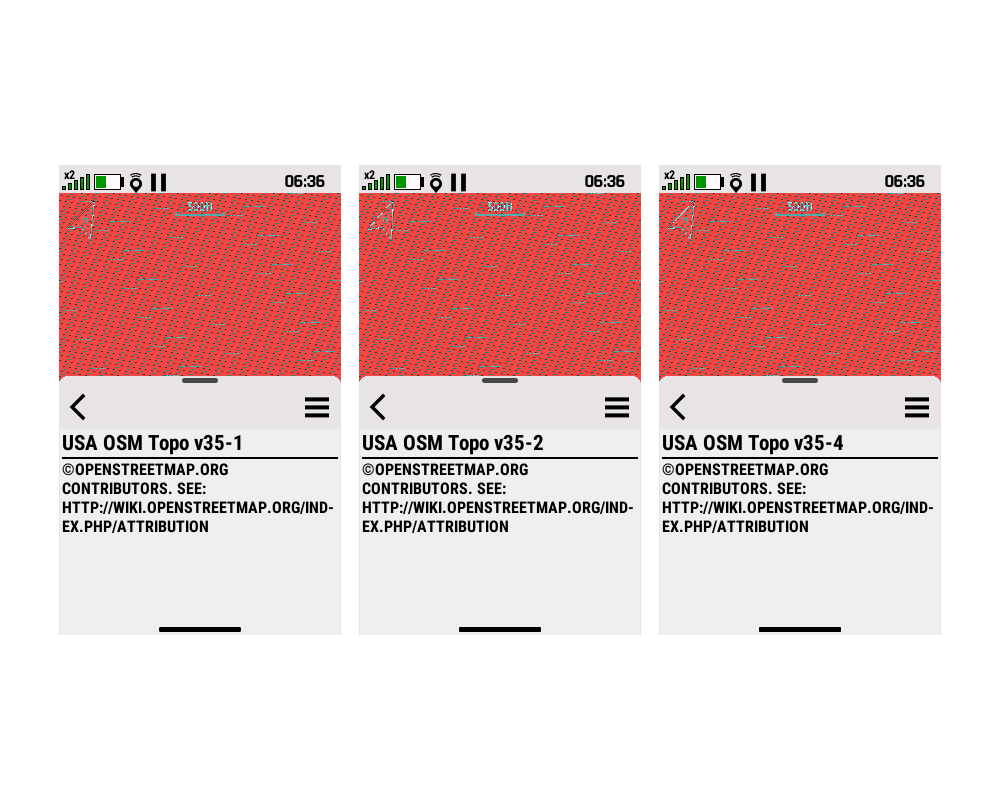
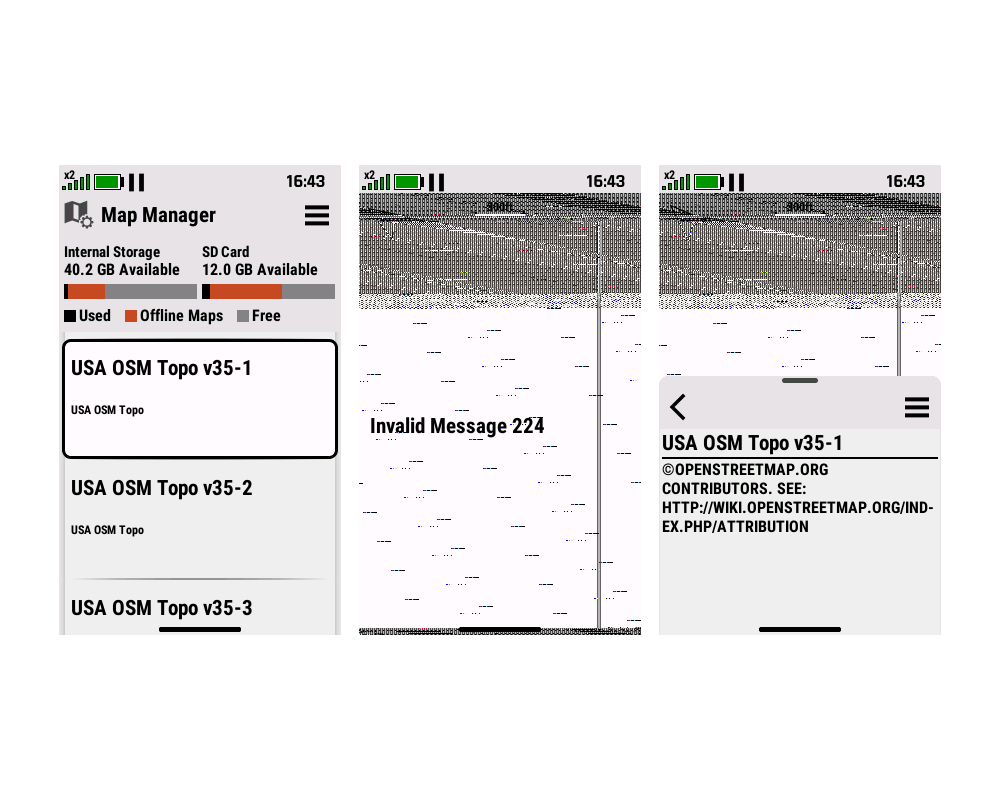
Selecting a Map in the Map Manager Page results in a corrupted /
scrambled screen. [example]
[example]
|
|
[509] [604] |
|
36. |
Custom Maps (KMZ) are no longer displayed properly in the Map
Layer Menu. [Gr]
[garmin] |
|
[509] [604] [707] [808] [905] |
|
37. |
Custom Maps (KMZ) are always displayed on the Map page,
regardless of Map Layer Menu selection. [Gr]
[garmin] |
|
[509] [604] [707] [808] [905] [906] [1013] [1107] [1206] [1208]
[1307] [1308] |
|
38. |
Many third party maps are displayed collectively as a
CityNavigator layer in the Map Layer Menu when they should be
listed as individual layers. [Gr] [garmin] |
|
[509] [604] |
|
39. |
microSD cards may not be recognized / usable unless they are
removed and reinserted after each power on event. [Gr] |
|
[509] [604] [707] [808] [905] [906] [1013] [1107] [1206] [1208]
[1307] [1308] |
|
40. |
Barometer Mode setting is reset to 'Variable Elevation' after
each power cycle. |
|
[408] [409] [509] [604]
[707] |
|
41. |
Removing GCLive Data does not remove additional waypoints
originally loaded with GCLive geocaches. [Gr] |
|
[122] [208] [304] [408] [409] [509]
[604] [707] [808] [905] [906] [1013] [1107] [1206] [1208] [1307]
[1308] |
|
42. |
Map page controls can be very slow to respond via touch. |
|
[509] [604] [707] [808] [905] [906] [1013] [1107] [1206] [1208]
[1307] [1308] |
|
43. |
Map page map rendering can be extremely slow to respond. |
|
[509] [604] [707] [808] [905] [906] [1013] [1107] [1206] [1208]
[1307] [1308] |
|
44. |
Calendar page is slow to respond to user input. [Gr] |
|
[509] [604] [707] [808] |
|
45. |
The keyboard icon used for the 'Enter' button on the keyboard is
confusing and unintuitive. [Gr] |
|
[122] [208] [304] [408] [409] [509]
[604] [707] [808] [905] [906] [1013] [1107] [1206] [1208] [1307]
[1308] |
|
46. |
The Map page frequently jumps back to the current location
following any user input after panning to a different map
location. [Gr] |
|
[122] [208] [304] [408] [409] [509]
[604] [707]
[808] |
|
47. |
Geocaches logged as 'Found' are not displayed with the
traditional 'Smiley Face' symbol - Instead a large obnoxious
blue flag balloon is shown. [Gr] |
|
[122] [208] [304] [408] [409] [509]
[604] [707]
[808] |
|
48. |
When panning the Map page, the distance to the cursor position
is not updated properly. [Gr] |
|
[604] [707]
[808] |
|
49. |
When panning the Map page, the coordinates for the cursor
position are not updated properly. |
|
[604] [707]
[808] |
|
50. |
When panning the Map page, the direction to the cursor position
is not updated properly. [Gr] |
|
[604] [707]
[808] |
|
51. |
When panning the Map page, the direction to the cursor position
does not honor user selected Compass Display settings. |
|
[604] [707]
[808] |
|
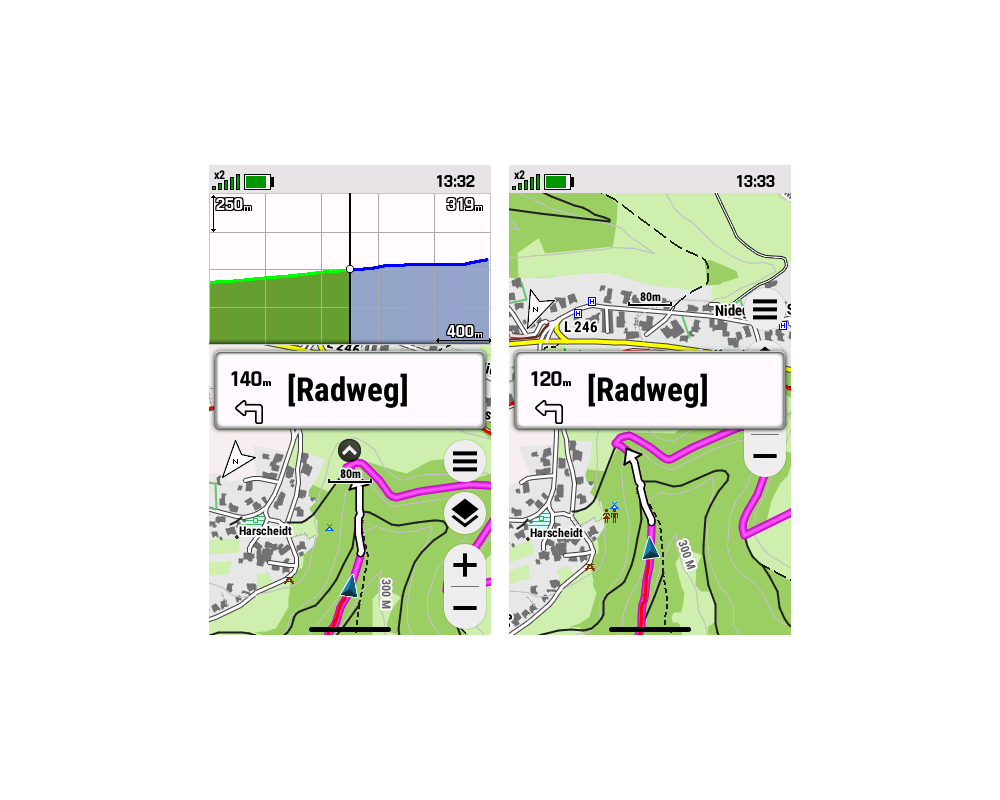
52. |
Elevation Plot Dashboard may not update properly during
navigation. [example]
[garmin] |
|
[604] [707] [808] [905] [906] [1013]
[1107] [1206] [1208] [1307] [1308] |
|
53. |
Navigation Guidance Text on Map page does not move to the top of
the screen after hiding dashboard. [example]
[garmin] |
|
[604] [707] [808] [905] [906] [1013]
[1107]
[1206] |
|
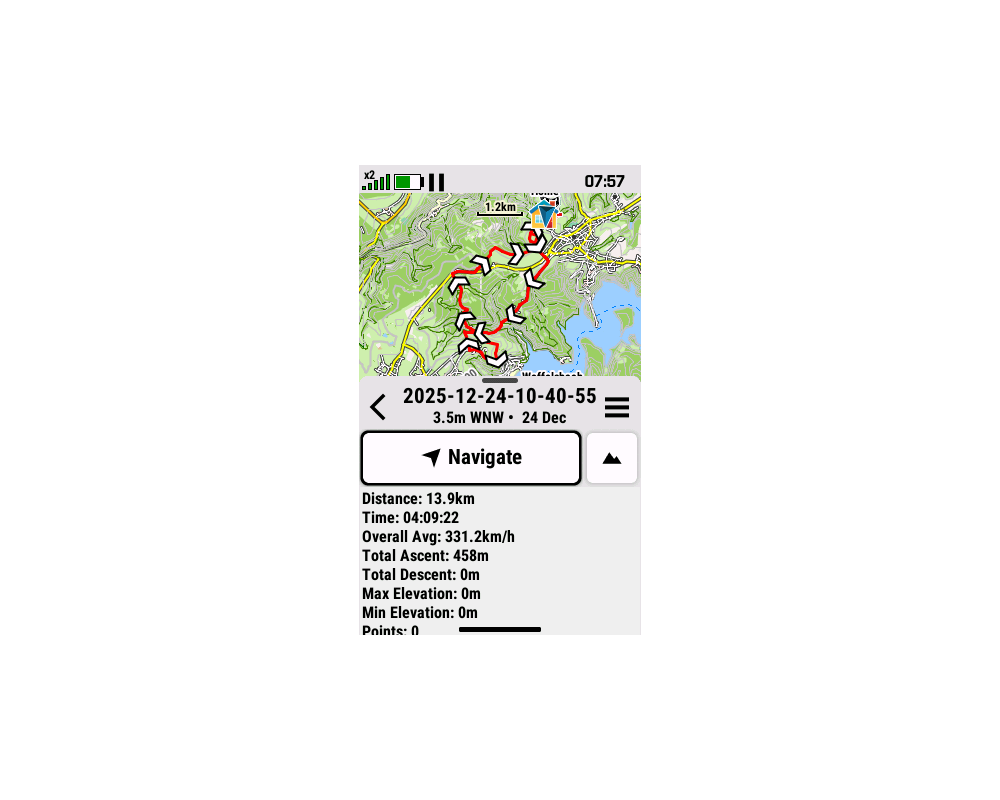
54. |
Saved Activity details may be incorrect and / or missing. [example]
[garmin] |
|
[604] [707]
[808] |
|
55. |
Altimeter 'Auto Calibration', when enabled, does not survive a
power cycle. [garmin] |
|
[604]
[707] |
|
56. |
Temperature data from a connected Tempe sensor is not included
in recorded activity files. [Gr] |
|
[604] [707] [808]
[905] |
|
57. |
Changes made to the Geocache list sorting order do not have the
desired effect. [Gr] |
|
[604] [707]
[808] |
|
58. |
Navigation to geocaches may end prematurely, without user input,
preventing logging actions. [Gr] |
|
[604] [707]
[808] |
|
59. |
Selecting a geocache to navigate to frequently results in the
device navigating to a nearby waypoint or location that is not
the selected geocache. |
|
[604] [707]
[808] |
|
60. |
Updating coordinates while navigating to a geocache may not
provide expected results. |
|
[604] [707]
[808] |
|
61. |
While navigating to a geocache, the 'Active Geocache' page may
not always be available. |
|
[604] [707]
[808] |
|
62. |
Changes made to the Waypoint list sorting order do not have the
desired effect. [Gr] |
|
[604] [707]
[808] |
|
63. |
The 'Save Portion' feature added to Activity Recording with
firmware update 7.07 does not work. |
|
[707] [808] [905] [906] [1013] [1107]
[1206] [1208] [1307] [1308] |
|
64. |
The 'Waypoint at Destination' data field is blank or incomplete when the
destination is coordinates. [Gr] |
|
[707] [808] [905] [906]
[1013] [1107]
[1206] |
|
65. |
Third party maps that have been disabled by the user are
frequently re-enabled following power cycle. [Gr]
[Related: Bug 32] |
|
[906]
[1013] |
|
66. |
Recorded activities are frequently corrupted by strings of
trackpoints with
Null Island coordinates (0°N
0°E). |
|
[122] [208] [304] [408] [409] [509]
[604] [707] [808] [905] [906] [1013] [1107] [1206] [1208] [1307]
[1308] |
|
67. |
Opening the Geocaching page
frequently results in a perpetual "Refreshing Geocaches"
message, and is otherwise unusable. [Gr] |
(5999) |
[1307] [1308] |
|
|
|
|
|
Crash Reports |
|
|
|
1. |
Attempting to view or load Geocache Lists via GCLive results in
a device crash/reboot. [Gr] |
|
[304] [408] |
|
2. |
Selecting a geocache stored in a GGZ file may result in the
device freezing and/or crashing. [Gr] |
|
[304] [408] [409] [509] [604] [707] [808] [905] [906] [1013]
[1107] [1206] [1208] [1307] [1308] |
|
3. |
Adding the 'Automotive Turn' data field to a home page data
glance always results in a device crash. [Gr] |
|
[304] [408] [409] [509] |
|
4. |
Exiting the Map Manager page frequently results in a device crash. [Gr] |
|
[509] [604] [707] [808] [905] [906] [1013] [1107] [1206] [1208]
[1307] [1308] |
|
5. |
Viewing the Map page while navigating with the Altimeter
dashboard or Elevation data field displayed can result in a device crash. [Gr] |
|
[509] [604] |
|
6. |
Device may randomly, without warning, enter a continuously repeating boot
loop that can only be resolved by one or more of the following
actions: [Gr]
[garmin]
|
|
[509] [604] [707] [808] [905] [906] [1013] [1107] [1206] [1208]
[1307] [1308] |
|
7. |
After choosing a Geocache on the Map page and selecting
'Navigate' may result in a device crash. |
|
[509] [604] [707] [808] |
|
8. |
Attempting to 'Update Coordinates' while navigating to a
geocache may result in a device crash. [Gr] |
|
[509] [604] [707] [808] |
|
|
|
|
|
Hardware Failures |
|
|
|
1. |
New Spine Mount design is not backwards compatible with any
previous Garmin products. [Gr] |
|
2. |
The recessed design of the microSD card slot can make memory
card removal extremely difficult. |
|
|
|
|
|
Missing Features |
|
|
|
1. |
The Swissgrid LV95 position format is not available. [Gr] |
|
[304]
[408] |
|
2. |
Geocache Photos are not currently available or recognized by the
Geocache page/app. |
(2887) |
[304] [408] [409] [509] [604] [707] [808] [905] [906] [1013]
[1107] [1206] [1208] [1307] [1308] |
|
3. |
The Adventures page/app is not currently available in the Main
Menu. |
(3030) |
[304] [408] [409] [509] [604] [707] [808] [905] [906] [1013]
[1107] [1206] [1208] [1307] [1308] |
|
4. |
The Alarm Clock page/app is not currently available in the Main
Menu. |
(3030) |
[304] [408] [409] [509] |
|
5. |
The Calculator page/app is not currently available in the Main
Menu. |
(3030) |
[304] [408] [409] [509] [604] |
|
6. |
The Calendar page/app is not currently available in the Main
Menu. |
(3030) |
[304] [408] [409] [509] |
|
7. |
The Course Planner page/app is not currently available in the
Main Menu. |
(3030) |
[304] [408] |
|
8. |
The Hunt and Fish page/app is not currently available in the Main
Menu. |
(3030) |
[304] [408] |
|
9. |
The inReach Utilities page/app is not currently available in the
Main Menu. |
(3030) |
[304] [408] [409] [509] [604] [707] [808] [905] [906] [1013]
[1107] [1206] [1208] [1307] [1308] |
|
10. |
The inReach Weather page/app is not currently available in the
Main Menu. |
(3030) |
[304] [408] [409] [509] [604] [707] [808] [905] [906] [1013]
[1107] [1206] [1208] [1307] [1308] |
|
11. |
The Man Overboard page/app is not currently available in the Main
Menu. |
(3030) |
[304] [408] [409] [509] |
|
12. |
Pressing and Holding the FIND button does not initiate the Man
Overboard feature. |
(3030) |
[304] [408] [409] [509] |
|
13. |
The Music Control page/app is not currently available in the Main
Menu. |
(3030) |
[304] [408] [409] [509] [604] [707] [808] [905] [906] [1013]
[1107] [1206] |
|
14. |
The Notifications page/app is not currently available in the Main
Menu. |
(3030) |
[304] [408] [409] [509] [604] [707] [808] [905] [906] [1013]
[1107] [1206] [1208] [1307] [1308] |
|
15. |
The Proximity Alarms page/app is not currently available in the
Main Menu. |
(3030) |
[304] [408] [409] [509] |
|
16. |
The Recorded Activities page/app is not currently available in
the Main Menu. |
(3030) |
[304] [408] [409] [509] [604] [707] [808] [905] [906] [1013]
[1107] [1206] [1208] [1307] [1308] |
|
17. |
The Recording Controls page/app is not currently available in the
Main Menu. |
(3030) |
[304] [408] [409] [509] [604] [707] [808] [905] [906] [1013]
[1107] [1206] [1208] [1307] [1308] |
|
18. |
The Route Manager page/app is not currently available in the Main
Menu. |
(3030) |
[304] [408] [409] [509] [604] [707] [808] [905] [906] [1013]
[1107] [1206] [1208] [1307] [1308] |
|
19. |
The Saved Tracks page/app is not currently available in the Main
Menu. |
(3030) |
[304] [408] [409] [509] [604] [707] [808] [905] [906] [1013]
[1107] [1206] [1208] [1307] [1308] |
|
20. |
The Share Wirelessly page/app is not currently available in the
Main Menu. |
(3030) |
[304] [408] [409] [509] [604] [707] [808] [905] [906] [1013]
[1107] [1206] [1208] [1307] [1308] |
|
21. |
The Sight 'N Go page/app is not currently available in the Main
Menu. |
(3030) |
[304] [408] [409] [509] [604] [707] [808] [905] [906] [1013]
[1107] [1206] [1208] [1307] [1308] |
|
22. |
The Sun and Moon page/app is not currently available in the Main
Menu. |
(3030) |
[304] [408] |
|
23. |
The Track Manager page/app is not currently available in the Main
Menu. |
(3030) |
[304] [408] [409] [509] [604] [707] [808] [905] [906] [1013]
[1107] [1206] [1208] [1307] [1308] |
|
24. |
The Trip Computer page/app is not currently available in the Main
Menu. |
(3030) |
[304] [408] [409] [509] [604] [707] [808] [905] [906] [1013]
[1107] [1206] [1208] [1307] [1308] |
|
25. |
The VIRB Remote page/app is not currently available in the Main
Menu. |
(3030) |
[304] [408] [409] [509] [604] [707] [808] [905] [906] [1013]
[1107] [1206] [1208] [1307] [1308] |
|
26. |
The Waypoint Averaging page/app is not currently available in the
Main Menu. |
(3030) |
[304] [408] [409] [509] [604] [707] [808] [905] [906] [1013]
[1107] [1206] [1208] [1307] [1308] |
|
27. |
The Waypoint Manager page/app is not currently available in the
Main Menu. |
(3030) |
[304] [408] [409] [509] [604] [707] [808] [905] [906] [1013]
[1107] [1206] [1208] [1307] [1308] |
|
28. |
The Where To? page/app is not currently available in the Main
Menu. |
(3030) |
[304] [408] [409] [509] [604] [707] [808] [905] [906] [1013]
[1107] [1206] [1208] [1307] [1308] |
|
29. |
The XERO Locations page/app is not currently available in the
Main Menu. |
(3030) |
[304] [408] [409] [509] [604] [707] [808] [905] [906] [1013]
[1107] [1206] [1208] [1307] [1308] |
|
30. |
The Camera page/app does not allow the user to select Photo
Resolution. |
|
[304] [408] [409] [509] [604] [707] [808] [905] [906] [1013]
[1107] [1206] [1208] [1307] [1308] |
|
31. |
The Camera page/app does not allow the user to adjust the zoom
level. |
|
[304] [408] [409] [509] [604] [707] [808] [905] [906] [1013]
[1107] [1206] [1208] [1307] [1308] |
|
32. |
The Flashlight page/app does not include a Strobe function. |
|
[304] [408] [409] [509] |
|
33. |
The Flashlight page/app does not include an SOS function. |
|
[304] [408] [409] [509] |
|
34. |
Map Settings do not include Zoom Level adjustments for Map
Points, User Waypoints, Geocaches, Street Labels, Land Cover, or
Messages. [Gr] |
(3607) |
[304] [408] [409] [509] [604] [707]
[808] [905] [906] [1013] [1107] [1206] [1208] [1307] [1308] |
|
35. |
While navigating, there is no option to 'Change Route Activity',
similar to previous GPSMAP models. [Gr] |
|
[304] [408] [409] [509] [604] [707] [808] [905] [906] [1013]
[1107] [1206] [1208] [1307] [1308] |
|
36. |
The course review option menu is missing the 'Edit Course'
selection. |
|
[304] [408] [409] [509] [604] [707] [808] [905] [906] [1013]
[1107] [1206] [1208] [1307] [1308] |
|
37. |
The course review option menu is missing the 'Reverse Course'
selection. [Gr] |
|
[304] [408] [409] [509] [604] [707] [808] [905] [906] [1013]
[1107] [1206] [1208] [1307] [1308] |
|
38. |
The course review option menu is missing the 'Save as Track'
selection. |
|
[304] [408] [409] [509] [604] [707] [808] [905] [906] [1013]
[1107] [1206] [1208] [1307] [1308] |
|
39. |
The course review option menu is missing the 'Save as Route'
selection. |
|
[304] [408] [409] [509] [604] [707] [808] [905] [906] [1013]
[1107] [1206] [1208] [1307] [1308] |
|
40. |
The Barometer page/app is not currently available in the Main
Menu. |
(3030) |
[304] [408] |
|
41. |
The Map page/app does not currently include the 'Show / Hide
Dashboard' via touch control. |
(3730) |
[304] [408] [409] [509]
[604] |
|
42. |
The 'Save Activity' operation does not include a 'Save Portion'
option. |
(3635) |
[304] [408] [409] [509] [604]
[707] |
|
43. |
The 'Link With Recording'
option is missing from the inReach Tracking setup menu. |
(3734) |
[304] [408] [409] [509] [604] [707]
[808] [905] [906] [1013] [1107] [1206] [1208] [1307] [1308] |
|
44. |
The 'Save Always' option that allows the barometer to
record pressure trends while powered off is not available. |
|
[304] [408] [409] [509] [604] [707]
[808] |
|
45. |
Waypoints (GPX) stored on the device cannot be shared wirelessly
with current or previous models. |
(3965) |
[304] [408] [409] [509] [604] [707]
[808] [905] [906] [1013] [1107] [1206] [1208] [1307] [1308] |
|
46. |
Routes stored on the device cannot be shared wirelessly with
current or previous models. |
(3965) |
[304] [408] [409] [509] [604] [707]
[808] [905] [906] [1013] [1107] [1206] [1208] [1307] [1308] |
|
47. |
Tracks stored on the device cannot be shared wirelessly with
current or previous models. |
(3965) |
[304] [408] [409] [509] [604] [707]
[808] [905] [906] [1013] [1107] [1206] [1208] [1307] [1308] |
|
48. |
Photos stored on the device cannot be shared wirelessly with
current or previous models. |
(3965) |
[304] [408] [409] [509] [604] [707]
[808] [905] [906] [1013] [1107]
[1206] |
|
49. |
Custom Maps stored on the device cannot be shared wirelessly
with current or previous models. |
(3965) |
[304] [408] [409] [509] [604] [707]
[808] [905] [906] [1013] [1107]
[1206] |
|
50. |
Geocaching page/app does not provide
'Active
Geocache' feature included on
previous models. |
|
[304] [408] [409] [509] [604] [707]
[808] |
|
51. |
Geocaching page/app does not provide
'Additional
Waypoints' (Child Waypoints)
feature included on previous models. |
|
[304] [408] [409] [509] [604] [707]
[808] |
|
52. |
Geocaching page/app does not provide
'Show
/ Hide Waypoints' feature
included on previous models. |
|
[304] [408] [409] [509] [604] [707] [808] [905] [906] [1013]
[1107] [1206] [1208] [1307] [1308] |
|
53. |
Geocaching page/app does not provide
'Next
Stage' features included on
previous models. |
|
[304] [408] [409] [509] [604] [707]
[808] |
|
54. |
Geocaching page/app does not provide
'chirp'
feature included on previous models. |
|
[304] [408] [409] [509] [604] [707] [808] [905] [906] [1013]
[1107] [1206] [1208] [1307] [1308] |
|
55. |
Geocaching page/app does not provide
'Map
Options' or controls included on
previous models. |
|
[304] [408] [409] [509] [604] [707]
[808] |
|
56. |
Powered Mount settings are not available. |
|
[304] [408] [409] [509] [604] [707] [808] [905] [906] [1013]
[1107] [1206] [1208] [1307] [1308] |
|
57. |
Waypoints with proximity alerts do not display 'alert radius
ring' on the map page, like previous models. [example] |
|
[304] [408] [409] [509] [604] [707] [808] [905] [906] [1013]
[1107] [1206] [1208] [1307] [1308] |
|
58. |
User is unable to add large data fields in Home Screen glances,
only small data fields are provided. [Gr] |
|
[304] [408] [409] [509] [604] [707] [808] [905] [906] [1013]
[1107] [1206] [1208] [1307] [1308] |
|
59. |
Recorded Data Reset options available on previous models are
no longer available. [Gr] |
|
[304] [408] [409] [509] [604] [707] [808] [905] [906] [1013]
[1107] |
|
60. |
Available in the routing options on previous models, 'Course
Alerts' are not found on the GPSMAP H1. [Gr] |
|
[304] [408] [409] [509] [604] [707] [808] [905] [906] [1013]
[1107] [1206] [1208] [1307] [1308] |
|
61. |
Waypoint list menus do not include the 'Sort by Symbol' option
available on previous models. [Gr] |
|
[304] [408] [409] [509] [604] [707] [808] [905] [906] [1013]
[1107] [1206] |
|
|
|
|
|
Requested Features |
|
|
|
1. |
Please include additional options for the Action Button. [Gr] |
(3647) |
[304] [408] [409]
[509] |
|
2. |
Add additional Home Page configuration with one 3x2, one 3x1,
and three 1x1 Glances. [example] |
(3728) |
[304] [408] [409] [509] [604] [707]
[808] [905] [906] [1013] [1107] [1206] [1208] [1307] [1308] |
|
3. |
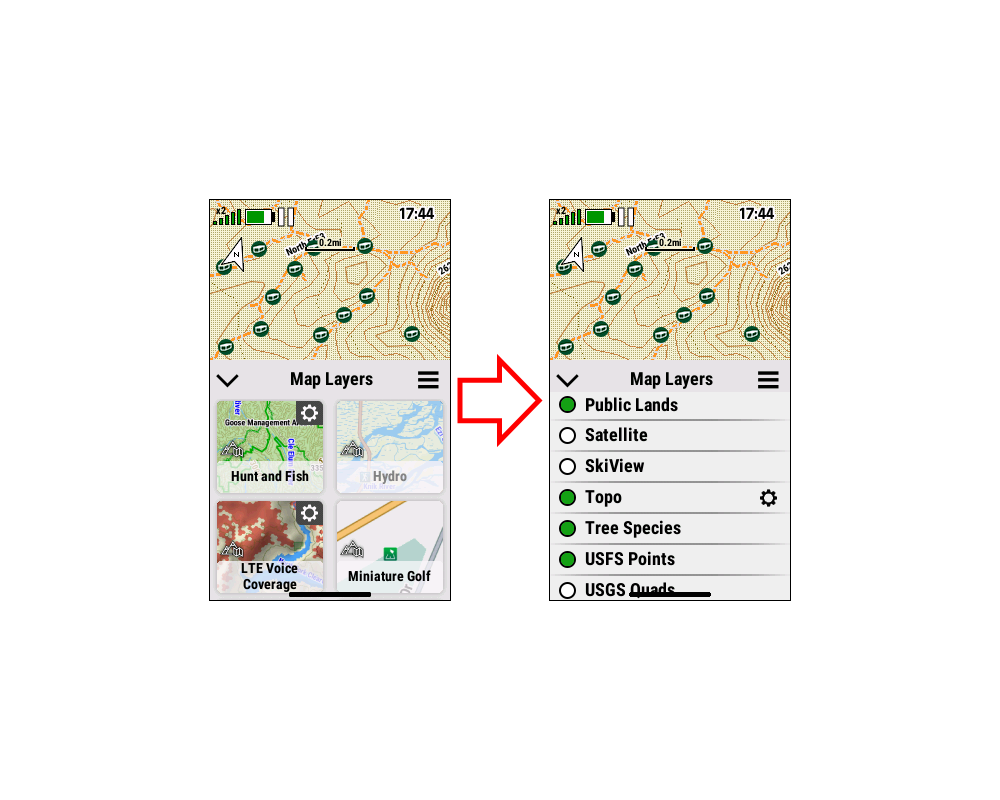
Please improve Map Layer Menu to be
more intuitive and efficient. [example] |
|
[304] [408] [409] [509] [604] [707] [808] [905] [906] [1013]
[1107] [1206] [1208] [1307] [1308] |
|
4. |
Please add option in Map Layer Menu to enable / disable POI
symbols, similar to Waypoints, Messages and Geocaches. [Gr] [garmin] |
|
[905] [906] [1013] [1107] [1206] [1208]
[1307] |
|
|
|
|