Firmware Installation
inReach Sync
All updates for your inReach SE+/Explorer+ are managed with the inReach Sync application. Versions for both PC and Mac are available in Software.|
○ Connect the inReach device via micro-USB cable. ○ Launch the inReach Sync application on your computer. ○ Enter inReach account credentials for device when prompted. ○ inReach Sync will automatically detect your device and begin syncing. ○ Newer firmware versions will be installed. ○ Contacts, Quick Text and Preset Messages are updated. ○ Available map updates are transferred to the device. ○ The inReach device is restarted. ○ Close inReach Sync when the sync process is complete. |
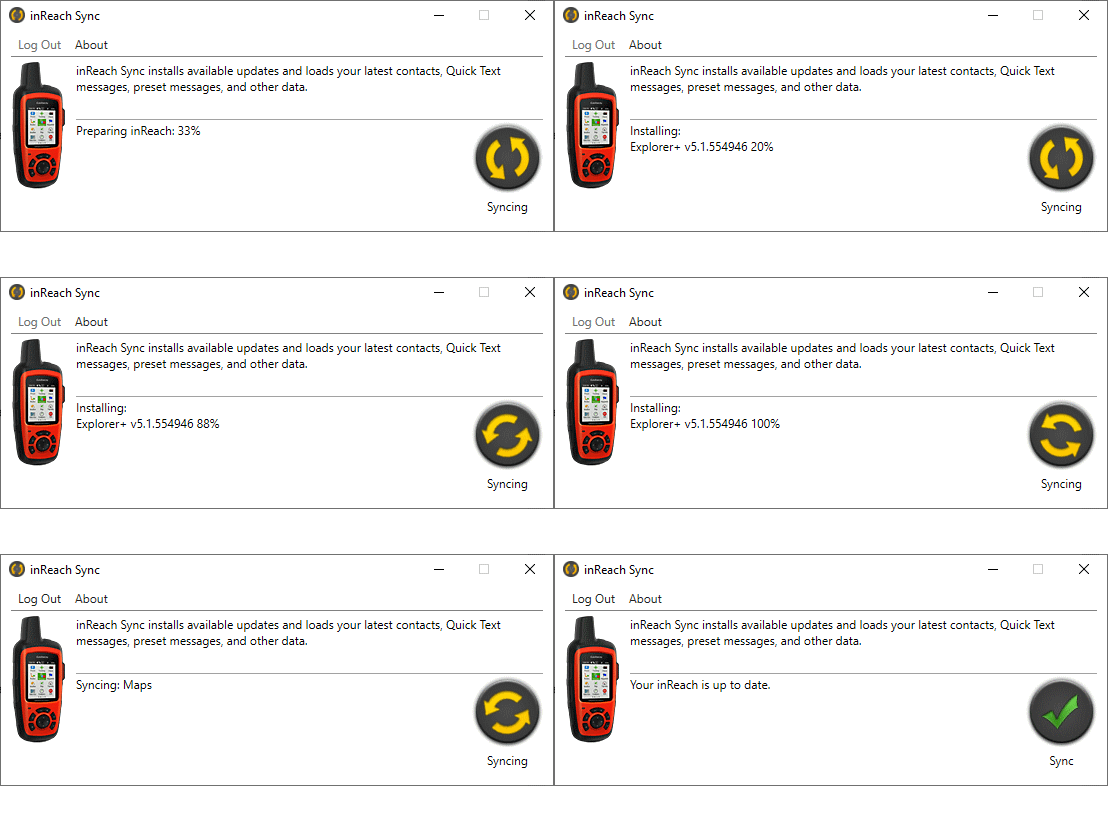
|
inReach SE+/Explorer+ Firmware Update History
Notes:
- The inReach SE+/Explorer+ Firmware Updates provide inReach satellite communicators with new features and capabilities.
- Firmware updates must be
done via a computer and cannot be done using the Earthmate application.
Change History:
Firmware 5.6 - Released September 3, 2024:
- New
- Removed social contacts: Facebook and Twitter
- Removed social contacts: Facebook and Twitter
- Fixes
- Fixed interaction between Unsent Items page and power button
Firmware 5.5 - Released July 20, 2023:
- Fixes
- Fixed Issue with potentially displaying incorrect map scale units on detail views
Firmware 5.2 - Released September 2, 2021:
- Fixes
- Fixed possible issue with sending forms messages for professional users
Firmware 5.1 - Released August 5, 2021:
- New
- Support for forwarding text messages.
- Support for updating the address of a message received from an unknown address.
- Support for retrying weather requests.
- Fixes
- Displaying incorrect UTM zone letters in the southern hemisphere.
- Entering or editing UTM coordinates that are near the equator.
- Data use counts not resetting at the start of a new year.
- Down arrow press moving too quickly to the done button when composing a message.
- Map not drawing properly after marking a waypoint.
- Check page not updating properly when a check completes.
Firmware 4.2 - Released April 24, 2020:
- New
- Removed power on confirmation screen.
- Removed power on confirmation screen.
- Fixes
- Improved display of weather icons.
- Improved performance when receiving multiple inReach messages.
- Applied Bluetooth security patches.
- Adjusted default mail check behavior for professional customers.
- Fixed problem with creation dates for edited waypoints.
- Fixed editing and displaying UTM/UPS and USNG/MGRS coordinates.
- Fixed incorrect tracking intervals after checking for a Plan Update.
Firmware 4.1 - Released September 2018:
- New
- Changes to support manufacturing (Units built prior to 9/18 will not have this firmware version and do not require it).
Firmware 4.0 - Released August 10, 2018:
- New
- Added new SOS info message when a user
declares SOS. This will show the user and emergency services if the inReach
or a paired app declared the SOS.
- Added new SOS info message when a user
declares SOS. This will show the user and emergency services if the inReach
or a paired app declared the SOS.
- Fixes
- Improved Mailbox Check performance when device is idle.
Firmware 3.8 - Released November 29th, 2017:
- New
- SMS and Email linking within incoming
messages.
- SMS and Email linking within incoming
messages.
- Fixes
- Improved display of Parcel data.
- Backlight remains on during device activation.
- Improvements to magnetic course.
- Improvements to display of GPS Track Log on Map page.
- Improvements to font size for high speeds.
- Corrected long waypoint name issue.
- Improvements to unsent message dialog on shutdown.
- Notification text improvements.
Firmware 3.6 - Released May 22nd, 2017:
- New
- Enable future firmware updates to be done with the Earthmate app over Bluetooth connection.
- Added ability for users to skip activation prompts on first power up.
- Users can now turn off map data that was preloaded on the device.
- Added Barometer to the list of available Info Fields.
- Added ability to switch between True and
Magnetic North to the Bearing Info Field.
- Fixes
- Various improvements to multiple language support.
- Improved back light behavior during activation screens.
- Prevent possible issue when utilizing hundreds of address codes.
- Route lines on the Map page will display more reliably.
- Fixed rare issue with Weather forecasts being marked as "unread" after you viewed them.
Firmware 3.5 - Released April 28th, 2017:
- New
- Added XT icon for Extended Tracking.
- Added ANT+ logo in the status bar when using inReach Remote.
- Improved ANT+ wireless performance for range and reliability.
- Modified Auto On / Auto Off behavior.
- Added meters per second as an available unit for reporting wind speed.
- Disabled GPS logging by default. This will apply to new devices and factory reset devices (Setup → Tracking → Log Interval).
- Updated text strings for various languages.
- Fixes
- Resolved numerous inReach Remote issues when using ANT+ connected devices.
- Fixed issue on the Weather page and home screen where condition icon and precipitation chance may be wrong.
- Improved Extended Tracking warning message to better explain what gets turned off.
Firmware 3.4 - Released February 6th, 2017:
- New
- Ability to reorder all of the icons on the Home Screen.
- Added Customizable Data Fields on the Map, Compass, and Trip Info pages.
- Improved Message notification system for new messages and alerts.
- Ability to navigate toward any point selected from the map.
- Improved map scanning and loading performance for Explorer+ devices.
- Multiple improvements to the Weather page User Interface.
- Improved power on behavior for better user feedback.
- Auto backlight is now brighter at default settings.
- Added support for additional maps types.
- Various small tweaks throughout the UI.
- Fixes
- Improved Route display on Map page.
- Improved language selection.
- Improved device activation process.
- Improved Dark Mode display.
- Improved Waypoint name display process.
- Improved Bluetooth.
