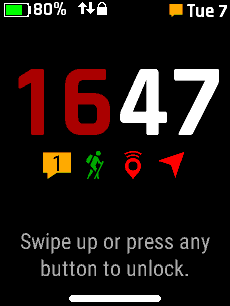
Lock Screen
Press the power button to open the Lock Screen, or
Press the back button repeatedly until the Lock Screen is displayed
The Lock Screen is automatically displayed when
Auto Lock
is activated
Open
Main Menu
Return to previous page
Press and Hold to open
Voice Command
Press and Hold to open the
Action Menu
Press and Hold to open
Controls
The Lock Screen displays:
Battery Status
inReach Modem Activity
Device Lock Status
Message Notification
Current Date
Current Time
Status Icons