 |
|
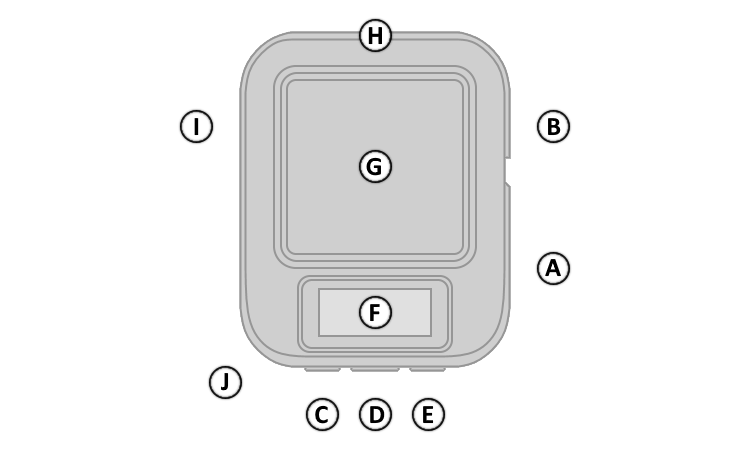
| A. | Power Button |
| B. | SOS Button (Under Cover) |
| C. | Left Button |
| D. | OK Button |
| E. | Right Button |
| F. | Display |
| G. | GNSS + Iridium Antenna |
| H. | MIL STD 810F Housing |
| I. | USB-C Port (Under Cover) |
| J. | Lanyard Attachment |
|
|
|
| A. | Power Button |
| B. | SOS Button (Under Cover) |
| C. | Left Button |
| D. | OK Button |
| E. | Right Button |
| F. | Display |
| G. | GNSS + Iridium Antenna |
| H. | MIL STD 810F Housing |
| I. | USB-C Port (Under Cover) |
| J. | Lanyard Attachment |
| A. Power Button | D. OK Button | |
| 1. Press and hold to power device on or off. | 1. Press and release to confirm menu selections. | |
| 2. Press and release to open Power Menu. | 2. Press and release to acknowledge messages. | |
| 3. Press and release to unlock buttons (when locked). | 3. Press and release to open Action Menu in Home Page. | |
| B. SOS Button | E. Right Button | |
| 1. Lift protective cover. | 1. Press and release to select next page or menu item. | |
| 2. Press and hold to initiate or cancel an SOS Rescue. | 2. Press and hold to save a screen capture (when enabled). | |
| C. Left Button | ||
| 1. Press and release to select previous page or menu item. | ||
| 2. Press and hold to exit/return to the Home Page. |
 |
inReach data transfer active | |
 |
Sounds muted | |
 |
Unread messages | |
 |
Tracking active | |
 |
TracBack active | |
 |
Battery charge level | |
 |
Battery charging | |
 |
Battery fully charged | |
 |
Reverse charging enabled | |
 |
Approaching minimum operating temperature | |
 |
Approaching maximum operating temperature |
