Maximizing Battery Life
The eTrex x2x can provide up to 25 hours of power from a single pair of AA batteries. Alkaline batteries loose a significant amount of their capacity as temperature decreases. Use only lithium batteries when operating the eTrex x2x in sub-zero temperatures. If not planning to use the eTrex x2x for an extended period of time, store the device with the batteries removed. Several options are available to extend battery life:- Turn the Backlight off when not absolutely needed
- Decrease Backlight Brightness
- Reduce Backlight Timeout
- Enable Battery Save Mode
- Disable ANT+ Sensors
- Disable the magnetic compass
- Disable GLONASS
- Disable WAAS/EGNOS
- Configure Altimeter - Pressure Trending for 'Save When Power On'
- Set Map Orientation to 'North Up', not 'Track Up'
- When permissible, use the Compass or Trip Computer pages while navigating, not the Map page
Hot Swap
On occasion, you may encounter situations where your eTrex x2x battery reserve is running low and you need to replace the batteries without rebooting the GPSr. For example, when [Setup > Altimeter > Pressure Trending = Save Always] is selected, the device displays "WARNING: Do not remove batteries while this feature is active."In these circumstances, a Hot Swap can be accomplished using any device with a powered USB port. On grid, this may be a home or laptop computer, an AC to USB adapter, or similar devices. Off grid, a portable computer or auxiliary power source designed to power/recharge USB enabled mobile devices should be sufficient (Our favorite off grid solutions). If connecting to a device capable of communicating with the eTrex x2x, a non-data power only USB cable will be required to prevent the eTrex x2x from entering Mass Storage Mode.
Performing the Hot Swap is a quick and easy process:
- Remove the battery cover
- Connect external USB power source
- Allow the GPSr several seconds to register the external power source
- Carefully remove and replace the GPSr batteries
- Ensure replacement batteries are properly seated and oriented
- Remove external USB power source
- Select [Stay On] when prompted
- Replace the battery cover
- Check GPSr for proper function
Battery Display
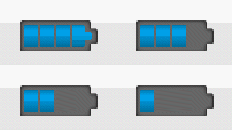
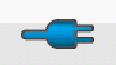
- The eTrex x2x battery icon provides information about the current power source and battery charge level.
- Remaining battery capacity is updated dynamically based on current battery load conditions.
- A reduction of indicated battery capacity may be observed while using high current draw features (see Power Consumption).
- The eTrex x2x battery icon reports current power information in the Status Page, Small Data Field, and Large Data Field:
 |
 |
|
|---|---|---|
| Remaining Battery Capacity |
External Power Source |
Power Options
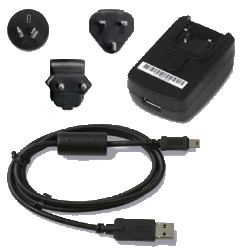
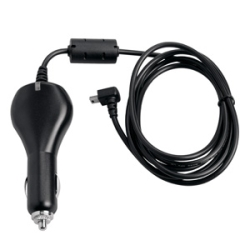
- Multiple options are available to help keep your eTrex x2x running for as long as you are:
| Rechargeable NiMH |
||
|---|---|---|
|
|
|
|
| Alkaline |
||
|
|
|
|
| Lithium |
||
|
|
|
|
| External AC |
||
|
|
|
|
| External DC |
||
|
|
|
|



Power Consumption
- Calculate your eTrex x2x battery consumption by selecting one value from each applicable category and adding them together.
- Estimated total run time (in hours) = (Battery Capacity mAh / Calculated Consumption mA).
- Garmin eTrex x2x measured energy consumption figures:
*** Future battery consumption test results will be displayed here
***
Battery Test
First, a word about battery consumption testing. Outside of a precisely controlled laboratory environment, no battery test result can be absolute. In real world scenarios (where we like to use our GPSr) many variables can and will affect battery consumption rates, and therefore two seemingly identical units with identical settings and identical batteries may not exhibit identical performance.For the purpose of these tests, a eTrex x2x was adjusted for minimal operational status (Our test simulated using the GPSr primarily for tracking purposes) in an attempt to record best case scenario results. Combining this information with the power consumption chart above, one can approximate the useful lifespan for a chosen power source.
During each battery test, the following conditions were observed:
- Ambient Temperature: 80ºF
- GPS lock active
- GLONASS disabled
- WAAS/EGNOS disabled
- Backlight disabled
- ANT+ disabled (32x)
- Display turned off (Battery Save enabled)
- Compass disabled (32x)
- Track Log Recording enabled
At the beginning of each test, brand new or freshly charged batteries are installed, the current track log is reset, and a new track log recording is initiated at a rate of one track point per minute. During each test period, the eTrex x2x is checked periodically for activity. When it is discovered the GPSr has stopped functioning, the batteries are removed, the Current.gpx track log file is imported into BaseCamp, and the total run time is recorded.
eTrex 22x Battery Test Results:
*** Future battery test results will be displayed here
***
eTrex 32x Battery Test Results:
*** Future battery test results will be displayed here ***
