 |
|
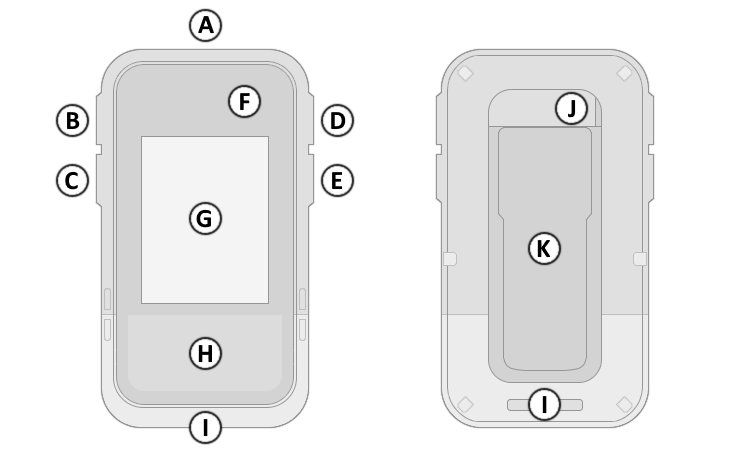
| A. | Power Button |
| B. | Up Button |
| C. | Down Button |
| D. | OK Button |
| E. | Back Button |
| F. | GNSS Antenna |
| G. | Display |
| H. | Solar Cell |
| I. | Lanyard Attachment |
| J. | USB-C Port (Under Cover) |
| K. | Spine Mount |
|
|
|
| A. | Power Button |
| B. | Up Button |
| C. | Down Button |
| D. | OK Button |
| E. | Back Button |
| F. | GNSS Antenna |
| G. | Display |
| H. | Solar Cell |
| I. | Lanyard Attachment |
| J. | USB-C Port (Under Cover) |
| K. | Spine Mount |
| A. Power Button | D. OK Button | |
| 1. Press and hold to power device on. | 1. Press and release to confirm current selection. | |
| 2. Press and hold to open Power Menu. | 2. Press and release to acknowledge messages. | |
| 3. Press and hold to unlock buttons (when locked). | 3. Press and release to open page menu. | |
| 4. Press and release to cycle backlight on/off. | 4. Press and hold to Mark Waypoint. | |
| B. Up Button | 5. Press and hold with Back button to Save Screenshot. | |
| 1. Press and release to select previous page or menu item. | E. Back Button | |
| 2. Press and hold to scroll pages or menu items. | 1. Press and release to cancel current selection. | |
| C. Down Button | 2. Press and release to return to previous menu or page. | |
| 1. Press and release to select next page or menu item. | 3. Press and hold to view Glances. | |
| 2. Press and hold to scroll pages or menu items. | 4. Press and hold with OK button to Save Screenshot. | |
 |
GNSS Signal Strength | |
 |
Multi-Band GNSS Signal Strength | |
 |
GNSS Disabled (Demo Mode) | |
 |
Battery Charge Remaining | |
 |
Battery Charging via USB | |
 |
Battery Charge Infinite | |
 |
Current Time (12 hour) | |
 |
Current Time (24 hour) | |
 |
Activity Recording Paused | |
 |
Solar Intensity | |
 |
Battery Temperature Warning (unable to charge) |
