|
|
||
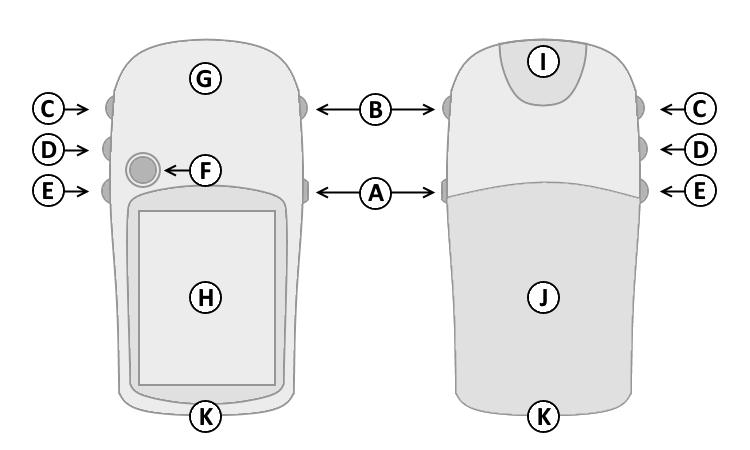
| A. | Power | |
| B. | Quit | |
| C. | Up | |
| D. | Down | |
| E. | Menu/Find | |
| F. | Select/Enter/Mark | |
| G. | GPS Antenna | |
| H. | Color Display | |
| I. | Power/USB Data Port | |
| J. | Battery Cover | |
| K. | Lanyard Attachment | |
|
|
||
| A. | Power | |
| B. | Quit | |
| C. | Up | |
| D. | Down | |
| E. | Menu/Find | |
| F. | Select/Enter/Mark | |
| G. | GPS Antenna | |
| H. | Color Display | |
| I. | Power/USB Data Port | |
| J. | Battery Cover | |
| K. | Lanyard Attachment | |
| A. Power Button | D. Down Button | |
| 1. Press and hold to turn unit on/off. | 1. Select page and menu options. | |
| 2. Press and release to adjust the backlight, and view | 2. Zoom In on the Map page. | |
| the date, time, and remaining battery capacity. | E. Menu/Find Button | |
| B. Quit Button | 1. Press and release to view option menu for active page. | |
| 1. Press and release to loop through display pages. | 2. Press and release twice to view Main Menu. | |
| 2. Press and release to exit/quit a function. | 3. Press and hold to display the Find Menu. | |
| C. Up Button | F. Select/Enter/Mark Joystick Button | |
| 1. Select page and menu options. | 1. Press and release to confirm data entry or menu selections. | |
| 2. Zoom Out on the Map page. | 2. Press and hold to activate Mark Waypoint page. | |
| 3. Move up, down, right or left to navigate menu selections or pan map arrow. | ||
Pages not added to the Main Page sequence appear in the Main Menu.
The Satellite page is only displayed at device start-up.
The Satellite page displays satellite identification, location and signal strength information.
The upper data field displays GPS coordinates and estimated location accuracy.
The Map page provides a picture of where you are, where you are going (path to destination), where you have been (track log), waypoint names and symbols and other map information.
The 'Track Up' Map page rotates the map as you move such that waypoints that are ahead of you are displayed at the top of the display. The North Pointer shows you which direction on the Map page is north.
The 'North Up' Map page orients the display like a paper map. Your location and direction of travel are indicated by the triangular 'Positional Icon'.
Press and hold the Up (C) or Down (D) buttons to change the map scale as desired.
To change data fields, use the Menu/Find (E) button to select the Options Menu, then select the desired data field and choose from available Trip Computer data:
The Compass page guides you to your destination with a graphic compass display and bearing or course pointer.
When no destination is selected, the compass ring will indicate your direction of travel only while moving.
When navigating to a selected destination, the compass displays a bearing pointer indicating the direction to your destination. Simply follow the arrow to find your destination.
To change data fields, use the Menu/Find (E) button to select the Options Menu, then select the desired data field and choose from available Trip Computer data:
The Trip Computer page displays up to eight different types of navigation data.
Each data field is user configurable.
To change data fields, use the Menu/Find (E) button to select the Options Menu, then select the desired data field and choose from available Trip Computer data:
The Menu page provides access to advanced features and settings.
Pages added to the Main Page sequence do not appear in the Main Menu.
Move the Joystick Button (F) to highlight the desired menu selection.
Press the Joystick Button (F) to activate the highlighted menu selection: