|
|
||
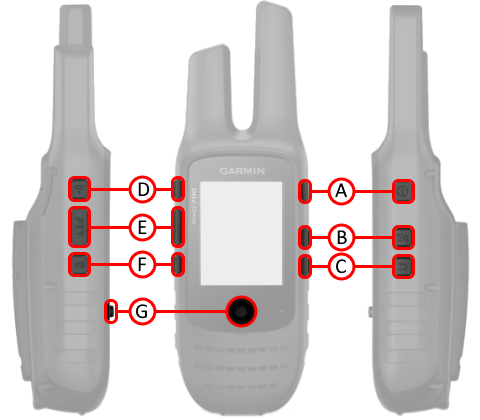
| A. |
 (Power) (Power) |
|
| B. |
 (Menu/Zoom)
 |
|
| C. |
 (Back)
 |
|
| D. |
 (Call)
 |
|
| E. | PTT (Push-To-Talk) | |
| F. |
 (Volume/Squelch)
 |
|
| G. |
 Thumb Stick (Enter) Thumb Stick (Enter) |
|
|
|
||
| A. |
(Power) |
|
| B. |
(Menu/Zoom) |
|
| C. |
(Back) |
|
| D. |
(Call) |
|
| E. | PTT (Push-To-Talk) | |
| F. |
(Volume/Squelch) |
|
| G. |
Thumb Stick (Enter) |
|
| A.
Power Button |
D.
Call Button |
|
| 1. Press and hold to turn unit on/off. | 1. Press and release to transmit an attention tone. | |
| 2. Press and release to open Status page, then | 2. Press and hold to send an Emergency Alert. | |
| press again to cycle display brightness 0% > 50% > 100%, | E. PTT Push-To-Talk Button | |
| move Thumb Stick (G) left or right to adjust display brightness. | 1. Press and hold to transmit audio over selected frequency (channel). | |
| 3. Press and hold while charging to enter power save mode. | F.
Volume/Squelch Button |
|
| B.
Menu/Zoom Button |
1. Press and release to open Volume/Squelch controls, then | |
| 1. Press once to open page option menu. | move Thumb Stick (G) up or down to select Volume or Squelch, and | |
| 2. Press twice to return to Main Menu. | move Thumb Stick (G) left or right to adjust Volume or Squelch. | |
| 3. Press and hold on Map page to open zoom controls, then | G.
Thumb Stick (Enter) |
|
| move Thumb Stick (G) up or down to adjust map zoom level. | 1. Press and release to confirm data entry or menu selections (Enter). | |
| C.
Back Button |
2. Press and release to select an item. | |
| 1. Press and release to loop through display pages. | 3. Press and hold to activate Mark Waypoint page. | |
| 2. Press and release to exit/quit a function. | 4. Move up, down, right or left to navigate menu selections or pan map arrow. |
 |
 |
 |
 |
 |
|---|---|---|---|---|
 |
 |
 |
 |
 |
 |
 |
 |
 |
 |
 |
 |
 |
 |
 |
 |
 |
 |
 |
 |