GPS Receiver
GPS1.) Who makes the GPS chipset for the Garmin Oregon?
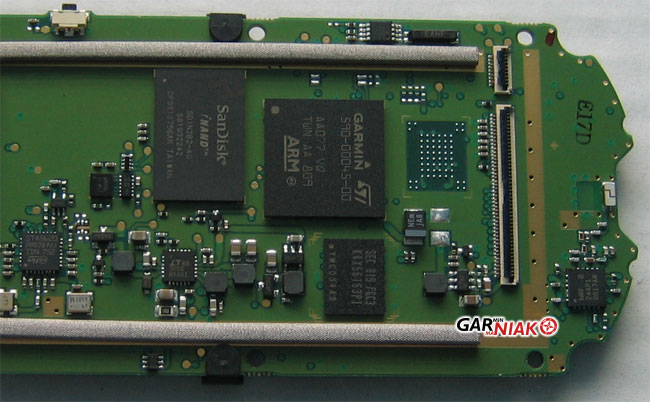
The Oregon uses the single chip STM Cartesio (ST2062) which Garmin is using on the new Nuvi 2x5 line.
A picture showing the Oregon 400t internals the GPS chipset from this Oregon review.
GPS2.) What is HotFix?
The Garmin Oregon supports a feature called HotFix which is a technology that improves satellite acquisition times under certain circumstances. GpsPasSion forums have a good discussion of this technology but what essentially happens is that the Oregon computes satellite locations several days in advance. Later when the unit is powered on it can use this data to very quickly locate satellites and acquire lock.
Verify: How much faster is acquisition on the OR vs. the CO or 60csx once the unit has built this ephemeris data and how many days of forward prediction does the unit have?
GPS3.) There is a little red "X" through the satellite bar and my GPS isn't working. What's going on?
You have put the Oregon in GPS demo (or simulation) mode. If you answer "No" to the "Continue searching for satellites?" query the unit generates when it is having trouble acquiring lock the unit is placed into demo mode until you power cycle or change the settings under System>GPS>Normal (or WAAS).
Issues
Bugs
- WAAS performance is very poor. Setup>System>GPS Mode>WAAS causes the Oregon to add WAAS satellites to the locate list and cycle through WAAS satellites but the Oregon takes a very long time to lock onto WAAS satellites. In the northeast when the Oregon is powered on (cold-start) it will initially try to locate and acquire satellite 51. The Oregon will display a white bar for a minute or two and then start cycling through satellites in this order 51, 33, 48, 35, 33, 34, 35, 36, 47, 48, 51. Eventually the Oregon may achieve WAAS lock but it can take 30 minutes or longer even if there is a clear view of the WAAS satellite. If the Oregon is power cycled (warm-start) the white bar for satellite 51 will display, drop and then come back again and finally lock as a green -- this takes about 4 minutes, whereas the 60csx lock within seconds under the same conditions. May have been some minor improvement in acquiring lock with open view of sky in 2.93, but Oregon still quickly loses WAAS under cover. (2.98)
- The Oregon reports and detects too much stopped time when being used at walking speeds. As compared to other Garmin high sensitivity receivers the Oregon periodically reports a Speed of 0 mph even though the unit is moving 2-3mph. Speed fluctuates significantly at low speeds and Stopped Time increments as a result. (2.98)
Missing features
New feature requests
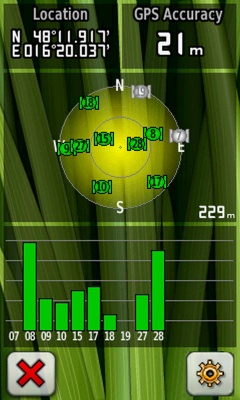
- On the GPS satellite page add an additional button for quick access to the GPS mode configuration (e.g. normal / WAAS / simulated GPS)
Resolved
- (3.2) (x50: 2.3) Added GPS firmware 3.70. GPS firmware is much more stable than previous release, fixes most drift and jitter issues in tracklogs. GPS receiver sometimes has significant drift (>100') for lengthy period of time (>10 minutes). (2.98, 3.10, 3.13)
- (2.98) Fixed not acquiring signal from all satellites in view.
- (2.98) Changed EPE to be more dynamic in changing conditions
- (2.98) No Garmin specific release note. Receiver accuracy is good but produces very noisy tracks. Trip odometer reports data that is higher than previous releases and other Garmin GPS devices (60csx). Related to GPS improvements in 2.93. (2.93)
- (2.93) Improved GPS reception. The Oregon trip odometer reports data that is consistently 6%-15% lower than the tracklogs it records. Similarly the trip computer records low as compared to other Garmin high sensitivity handheld receivers (60csx and Colorado). (2.6)
- (2.93) Improved GPS reception. GPS performance is very erratic with 2.86 software with sometimes large (100'-200') errors observed. Reported accuracy numbers have improved but actually accuracy is much more variable. Unit is more sensitive to movement although the "too much stopped time issue" seems to still be a problem. (2.86)
- (2.86) Improved GPS performance at slow speeds in tree cover. Changes have been made in this area but the general consensus among most users is that the unit has more error than before (prior to and including 2.86). The unit is more sensitive at slower speeds but maybe too sensitive with these changes.
- (2.6) Improved position accuracy calculation. GPS accuracy (aka EPE) is now much closer to the 60csx and Colorado.
- (2.6) Improved static position accuracy.
-
(2.3) Added ability to set position after pressing the go button when GPS is in Demo Mode. Oregon does not support the "Set Location on Map" feature that most Garmin receivers support for simulation of routes from a location other than the current location of the GPS (CO, 60csx) (2.2)
- Put GPS in demo mode Setup>System>GPS>Demo Mode and then WhereTo?>[search for a new location] or select location on a map and hit Go. There is a new option "Move to Location" which will move the GPS to the new location.
- (2.3) Improved GPS performance. Not clear what this improvement was (2.2)
