First Impressions
7/14/08
Well, its official I have a tracking number from GPSNOW.com. The OR 400t should be here by 10:30am EST on 7/15
7/15/08 Update #1 (10:30am)
It's here!
Some quick notes:
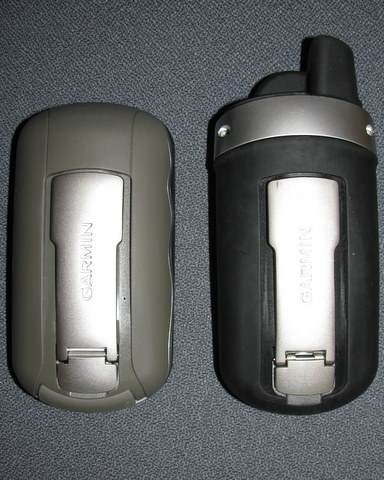
- Mounting bracket is the same as the Colorado
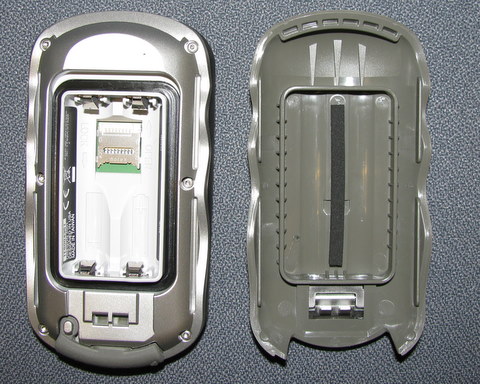
- Battery compartment and back shell removal is very different. Much easier than the Colorado. Flip up the latch and the whole back shell pops right off.
- The battery compartment and SD slot is like the 60csx. MicroSD is under the batteries, but from a water tight point of view this seems to be an improvement over the CO. One seal and it fits nice and tight
- NO external antenna connector
- USB is on the bottom of the device and is covered by and nice tight fitting rubber piece (see photo).
- Screen material is much less reflective than the CO and has a texture to it.
- The base seems to have some sort of recessed mount point that the Colorado doesn't (see photo)
- Software is version 2.1 and GPS Software is 2.42 (hmmmm!)
- Backlight settings seem to be remember across power cycles
- Map panning is done by dragging the map
- You can select points on the map with your finger
|
|

 |
| |
|
Oregon Open |
USB, cover, lanyard attachment |

7/15/08 Update #2 (11:30am)
- Screen lock is provided so that you can put it in a pocket without hitting buttons by accident
- 400t shows up as 3.72GB mass storage device with about 1G free. gmapprom.img looks identical to Colorado 400t
- Track manager looks like it has some interesting options to save partial, full, etc.
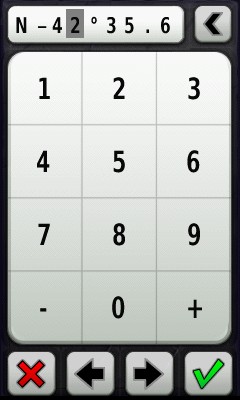
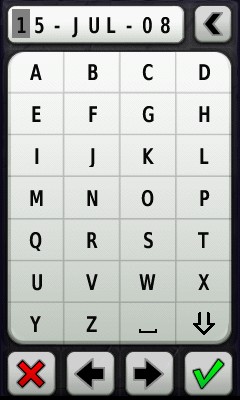
- Text entry is much easier (A-Z keypad style entry, not QWERTY)
- I'm not blown away with the map panning and map point selection performance. Pans/zooms seem slower than the Colorado. Selecting a point on the map is difficult with my (big) fingers. Certainly not something you will do with gloves on.
- Much of the user interface is similar but not exactly the same as the Colorado. There doesn't seem to be a way to get to the Colorado equivalent of the "Options" softkey. For example, on the map page you have to go back to Setup to change anything (i.e map selections).
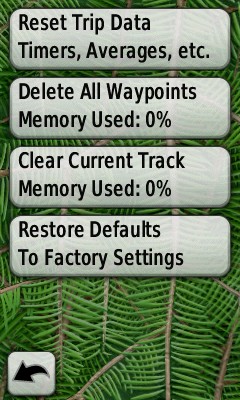
- There seems to be a new Reset tool that gives some nice data on memory used.
- New map called gmaptz.img (Time Zones?)
- I like the feel of the Colorado in my hand, I love the feel of the Oregon. It does feel very solid to me, very well balanced and it feels smaller.
My next update will include screen shots. Give me an hour or so.
7/15/08 Update #3 (12:30pm)
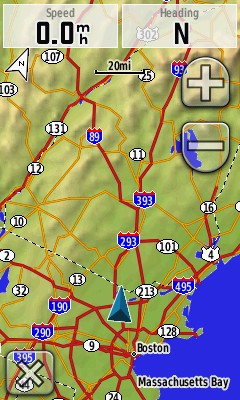
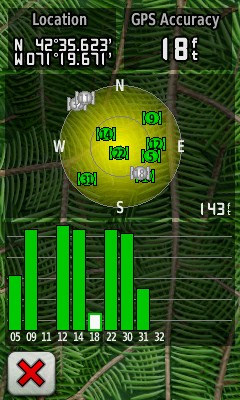
Some screen shots of the key points above. Many more to come.
- Screen capture is provided however it is a configurable option to use the power button on the side to either screen capture or show the summary screen (which looks different from the Colorado).
|
|
||||
|
|
|
|
7/15/08 Update #4 (2pm)
- Screen brightness with the backlight cranked all the way up on the Oregon seems better to me. I'm not sure it is as good as the Colorado running on 12V but it is good. Standing indoors with the backlight off standing indoors both are equally bad in my opinion. The only thing that might help the OR outside is that the the screen material is very textured and doesn't reflect nearly as much as the CO's screen.
- Geocaches now show up on the Recent Finds list.
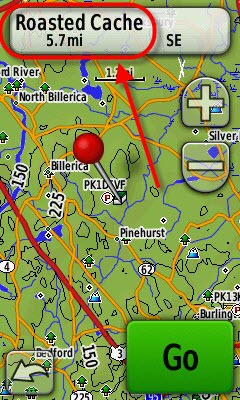
- Geocaching mode seems mostly unchanged although the work flow is a little different, The first time you go into Geocaching mode you can select a cache or switch between found and unfound lists. If you select a cache you will see it on a map page that can been panned, zoomed AND you can select points like nearby child waypoints -- a welcome change. If you select the cache you see the description only at this point and then you press "go". To get to the hints, logs, log attempt, etc you need to go back to the main screen and hit the geocache tool again -- this I'm not crazy about. Screen shots below walk through the steps. Geocaching mode, especially reading descriptions, seems very slow, hopefully 2.2 will fix this.
- SendToGPS just worked.
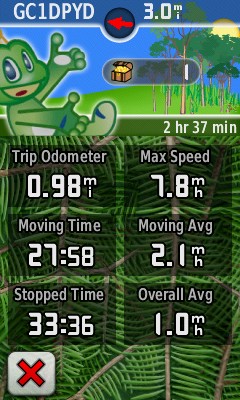
- They've added a nifty little geocache find counter on the odometer page -- Signal makes his appearance on the Oregon! (Photos below)
- Track management is for real on the Oregon. This was one of my biggest complaints on the Colorado. Lots of nice features to save entire tracks, partial tracks, reverse tracks, delete.
- Automatic time zone setting has been added. gmaptz.img contains the timezone map and you can select this from the configuration options under Setup->Time.
- Manatee points out that the "thing" on the bottom of the OR beside the USB connector is probably a lanyard attachment. There wasn't one in the box and I can't seem to get my camera lanyard through the hole, but it does go through. Another welcome addition to the line.
|
|
||||
|
|
||||
|
|
||||
|
|
|
|
||||
|


7/15/08 Update #5 (4pm)
- Upgrade to 2.2 went smoothly. The biggest differences I noticed were the boot time (much shorter) and the track manager now has the option to change track colors. With this update the Oregon boots at least 10 seconds faster than my Colorado. I do have City Nav loaded on the CO which isn't on the OR yet, but I don't think that explains the differences.
- To see the date on the "power button" screen just tap the time and you will toggle between date and time
- The altimeter remains roughly the same, with the same configuration options except, like everything on the Oregon, you need to exit the tool you are using, go to Setup and change the options. Same for the compass, odometer, map, etc. Garmin really needs to improve ability access configuration options that are available for the page you are currently viewing. This was bad on the Colorado, it is worse on the Oregon.
- During waypoint creation you have the option to View on Map which the Colorado doesn't support
-
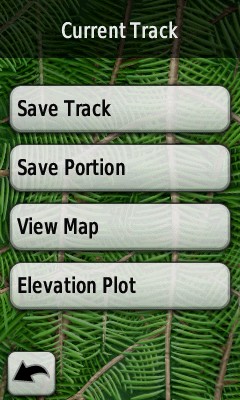
Some details on the Track Manager which is new on the Oregon:
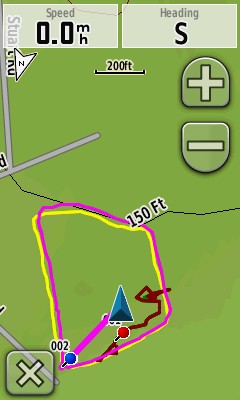
- You can view multiple tracks on the map page and they can have different colors as of 2.2! I hope that the Track Manager makes it over to the CO. I predict it will, it seems like it would be purely a software function.
-
On the Current track you have options to:
- Save Track
- Save Portion
- View Map
- Elevation Plot
-
On each saved track you have the options to:
- View Map
- Elevation Plot
- Hide/Show on Map
- Set Color (16 choices)
- Copy Reversed (creates a reversed copy of the track)
- Delete
- When you View on Map you have the option to Go to the track (or Tracback if it is the Current track, like the CO). When saving you have the ability to name the track but no ability to rename once you've created it. Each saved track seems to show up as a GPX file in [drive]:\Garmin\GPX
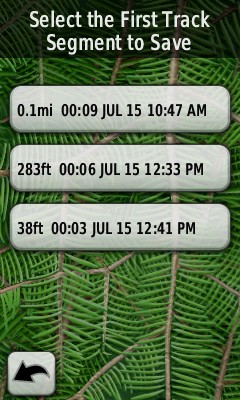
- Save Portion lets you pick a first and last segment in the Current track to include in a saved track. It's not clear exactly what a segment is but it looks like it roughly corresponds to when I power cycled the unit and new segments are created when a track is saved.
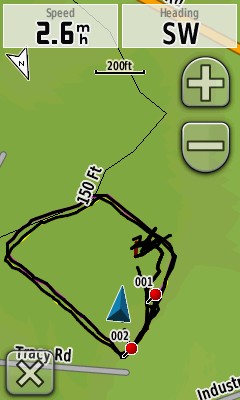
- The current track (track log) has a new option (I think!) to record but not show on the map. This is helpful because the tracks are wider on the Colorado, which makes them easier to see but they shadow the save tracks created from the current track. Photos below show the current track and two save tracks created from it in different colors on the map at the same time.
- The question still remains about the GPS Chipset. I still feel like it might be different that the CO. While I was recording tracklogs I compared to my Colorado and several things were different: 1) the OR failed to lock on one low satellite that the CO did lock, 2) the CO had more satellites at max strength and 3) the GPS accuracy of the OR was almost always 10' more than the CO. CO was in the low to mid-teens under completely open skies (typical) and the OR was in the low to mid twenties.
- I don't think the Oregon is as bright at the Colorado outdoors under direct sunlight at any backlight setting. The touch screen is not as reflective as the Colorado's.
|
|
||||
|
|
7/15/08 Update #6 (10pm)
A lot of people have been asking about the brightness of the Oregon screen. Here's a summary:
- Under dim/dark conditions the OR seems to have a brighter max backlight setting. I find it brighter than the CO and 60csx but all are readable.
- Outside in direct sunlight the 60csx is better than the CO which is better than the OR. My guess is that the reflectivity of the TFT in the CO and OR are similar but the texture on the OR's plastic screen cover causes some loss of light reflecting back through the screen. The backlight makes little or no difference in all three units under direct sunlight.
- Outside in indirect daylight with the backlight off the 60csx again stands out with the CO a close second. The OR looks very dim.
- Outside in indirect daylight with the backlight on the 60csx is still the best but the CO and OR look about the same.
What does all this mean? You'll be using the backlight outside with the OR -- probably maxed out and even then I don't think you will get the same performance as the CO and 60csx under bright sun. All units do well with the backlight on.
One final note, there is an increase in backlight when connecting the OR to an AC/DC adapter although it isn't as pronounced as the CO. I also noticed the right angle CO car adapter doesn't work with the OR (see photo below).
 |
|
Dim light max backlight
|
 |
|
Direct sun no backlight
|
 |
|
Indirect sun no backlight |
 |
|
Indirect sun backlight max |
 |
|
CO DC adapter doesn't work in the OR |
7/16/08 Update #1 (10am)
Last night and this morning I was able to take my OR 400t out into the field along side my 60csx and CO to do some comparison testing. Let me start by saying that the testing isn't very conclusive yet, more work is needed. Last night I ran with all three GPSs -- try that without dropping one! Over a 1.5-2 mile walk I found a lot of variation in all units, but the OR was definitely experiencing larger variations than the other two units. There was a lot of 40-50' variation and one up to about 80', but not big drifts like I sometimes see on the CO. However, I also saw a lot of variation in the 60csx and CO tracks relative to each other and a reference track that I've averaged over several months. In the end I decided to ignore this data because it didn't feel right.
This morning I took the 60csx and OR over the same exact 1 mile test course that I've used with the 60csx and CO many times. The results were better but I saw a lot of 30-50' drift with the OR and one similar drift with the 60csx -- which I hardly ever see, normally the 60csx is within 10-20' all the time.
At this point I'm not really ready to draw any conclusions, I need to go check PDOP and see if I can get a good clean run with my reference GPS (60csx) to make sure it isn't something that I'm doing wrong.
Other GPS observations:
- Track length of the OR seemed to be about the same as the 60csx on both tests BUT the odometer was about 12-15% lower. The CO and the 60csx were within 1-3% of each other (typical).
- The OR reported much more "Stopped Time" that it should have. At least on the CO that can be indicative of drift or reception problems.
- GPS accuracy on the OR is always in the high 20's and low 30's compared to the CO and 60csx which are in the teens and low 20's most of the time. GPS accuracy isn't a good way to compare across units because you have no idea what's going on internally but it does indicate some sort of difference between the CO and OR: GPS software, hardware, antenna, etc.
- The OR does seem to lock onto fewer satellites than the 60csx. It has a harder time with birds which are closer to the horizon.
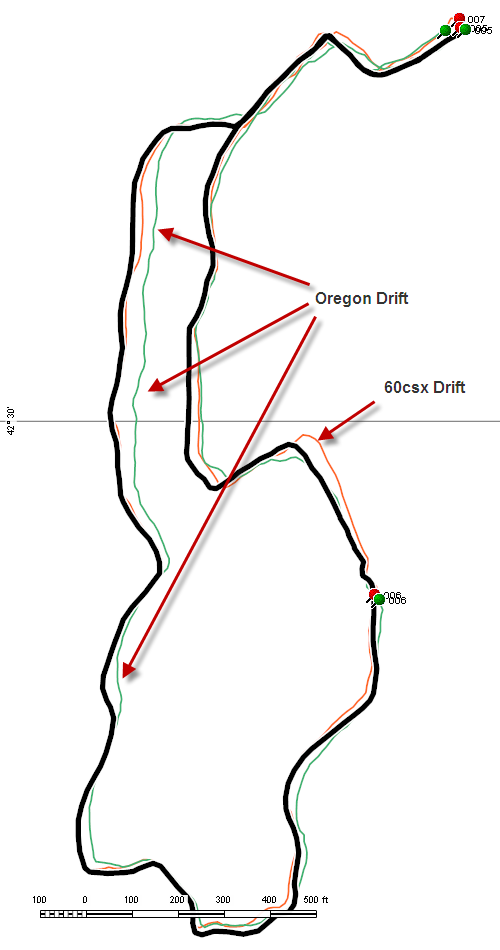
Track plot from this morning's comparison of the 60csx (red), OR (green) and reference track (black):
Some miscellaneous observations:
- The tracks logs are wider (in pixels) on the OR and as a result much easier to see on the map page.
- Boot time of the OR is 10 seconds as compared to the CO's 20 seconds. About 3-4 seconds is probably because the CO has to load City Navigator but there's a good 5-6 second improvement that I hope makes its way over to the CO.
- The OR has no equivalent of the CO's ability to mark a waypoint at your current location with a button push. You have to use the Mark Waypoint Tool on the Main page which means leaving, say, the Compass or Map page, marking the waypoint and returning. I was hoping there might be something like writing a giant "M" or "W" on the screen that might do something equivalent on the OR.
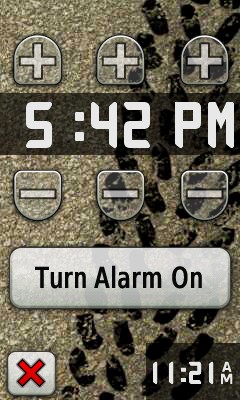
- Alarm is a little different layout on the OR and it has the ability to set to the exact minute (vs 5 minutes on the CO). The alarm works but is off by a minute!
- I'm surprised that with tones enabled that there isn't any key touch "click" noise when you tap the touch screen.
- No scientific calculator on the OR
- The timers and stopwatch don't run fast like the CO's, they perform similar to the 60csx timers.
- There in an option to calibrate the touch screen by pressing and holding the power button for 30 seconds when you turn the unit on. You'll end up on the typical "touch this dot" series of screens.
- Pressing and holding any up/down/left/right button activates a slow scroll
- Menus can be navigated by either pressing up/down arrows or dragging your finger up/down the menu.
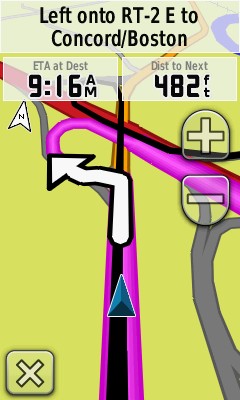
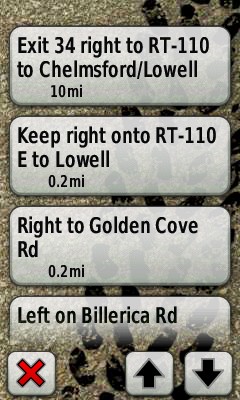
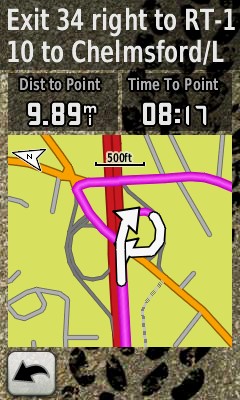
Last night I loaded City Navigator NA NT 2009 and used it on the way to work. Not much to report here. It works and looks similar to the CO. The OR does include a new option to disable display data fields on the map page unless you are navigating. The "Active Route" tool page looks a little different, it seems to have lost the little red turn arrows available on the CO. The beeper on the OR is about the same (low) level as the CO, no improvement that I can hear. I still don't hear the beeps if I have the radio turned up a even a little.
|
|
||||
|
|
7/16/08 Update #2 (1pm)
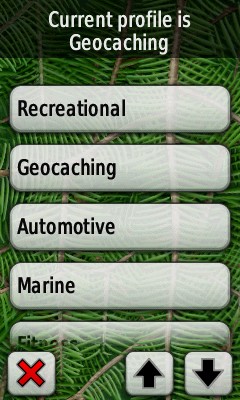
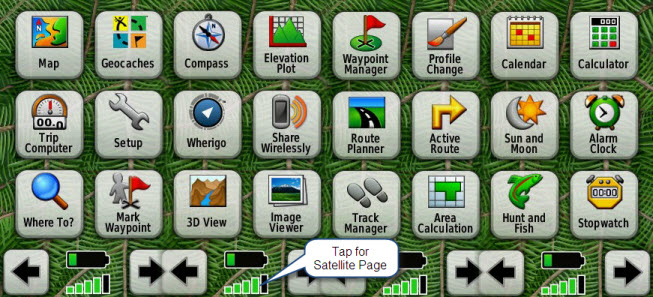
I realized that not much time has been spent on the Oregon's "Main Menu". It is sort of like Shortcuts for the Colorado -- based on your profile it has an ordered list of "Tools" (e.g. Maps, Compass, Altimeter) that you can select from based on the task you are trying to accomplish with the GPS. Unlike the CO, the OR's Main page has all the Tools listed but you can change the order under Setup->Main Menu. The order is important because you'll want the Tools you use most frequently up top, which means that they will show up immediately when you return to the Main Menu
Main Menu is divided into four pages each containing six Tools. The first page is prime real estate, its where you want your most frequently used tools for that profile. The second page can be reached with a single button press, so the next six most frequently used Tools should be placed here and so on. The left and right arrow moves you from page to page or you can drag the page left or right by putting down your finger on the touch screen and dragging it left or right. A single tap on a Tool icon opens that Tool.
The GPS signal meter which shows up at the bottom of every Main Menu page can be tapped to open the Satellite page. The battery meter is also visible on every page, tapping it does nothing.
The stitched picture below shows all four Main Menu pages together as they show up in my Geocaching profile -- I've made some modifications from the defaults.
 |
|
Oregon's Main Page |
7/17/08 Update #1 (6pm)
Unfortunately my day job is keeping me too busy to publish much on the OR. There has been some discussion the geocaching boards about the differences between geocaching support on the OR and the CO. The more I look at the OR the more I realize that there seem to be some fundamental differences and I wonder if this might be an area where the two will remain different. I don't see Garmin changing the way the Colorado works given that there are a fair number of users who are getting used to that interface.
Here's how geocaching works in detail on the Colorado.
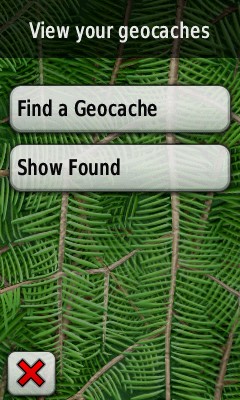
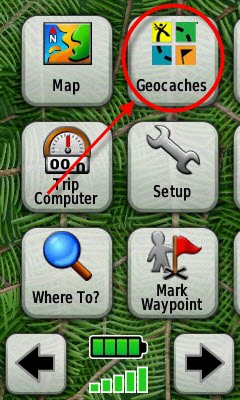
From the Main Menu you select the Geocache Tool, this brings you to a page where you can either select a cache from the unfound list, "Find a Geocache", or show the found list.
|
|
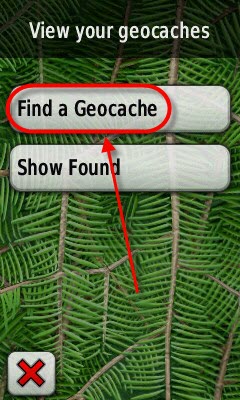
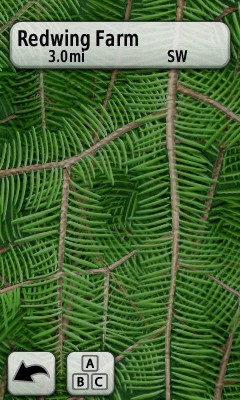
Once you are on the unfound geocache list page you have the option to spell-search the cache name using the "A,B,C button" or scroll and select a geocache directly from the list. The Oregon provides the option to Show/Search by GCID but it is a configuration option unlike the Colorado which can switch modes from this page, see photos below. Selecting a cache from the list brings you a page that displays the cache on the map. This map page can be panned and zoomed which lets you select nearby child waypoints, which is helpful if you are looking for nearby parking. Selecting the button up top brings you the cache description page.
|
|
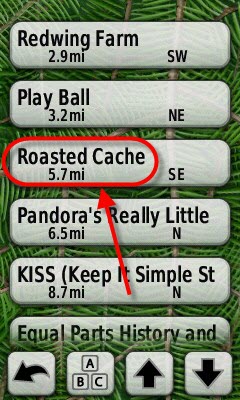
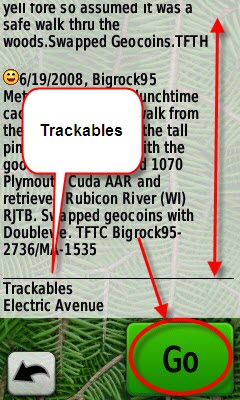
The cache description page is a little different from the Colorados in that it combines the description and the logs. You cannot read the hint at this point - you have to go to the cache first. There aren't any scroll buttons on the cache page so you need to "pull" page up and down with your finger.
|
|
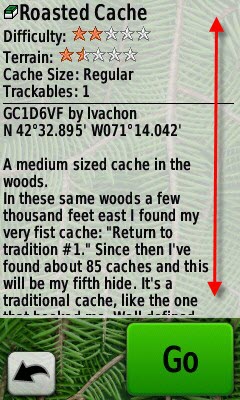
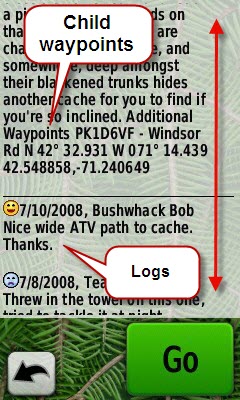
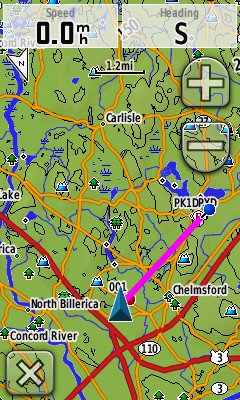
The Oregon also provides you the names of trackable items found it the cache at the very bottom of the description. At any point during this process you can hit the big green "Go" button to start navigation. This will also put you back on the map page with the familiar magenta goto line. At this point you are not in "Geocaching" mode like you would be on the Colorado. If you quit the map ("X" in lower left corner), you'll end up back on Main Menu where you can select all of the tools that are available to you when you navigate to a waypoint or POI.
|
|
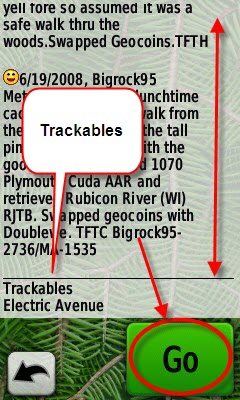
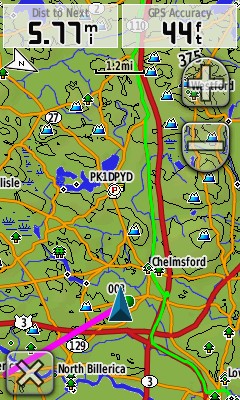
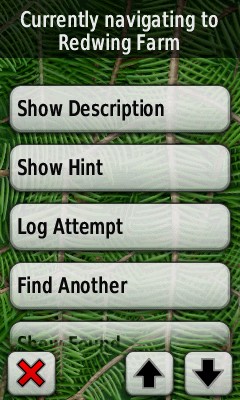
You might be asking, "How do I go back and read the description, log the cache, etc"? Simply go back to Main Menu and hit the Geocaches Tool again. Entering the Geocache Tool with an active navigation gives you an additional set of menu options:
- Show Description (works the same as above)
- Show Hint: Displays the hint for the cache if there is one
- Log Attempt: Logs the cache as found, not found, unattempted or needs repair
- Find Another: Search the unfound list
- Show Found: Search the found list.
|
|
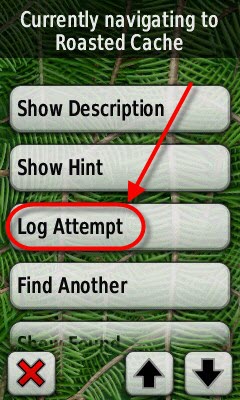
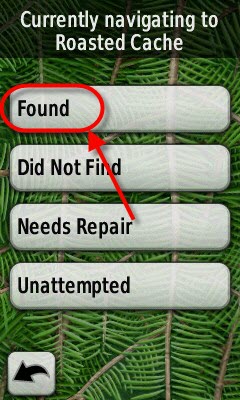
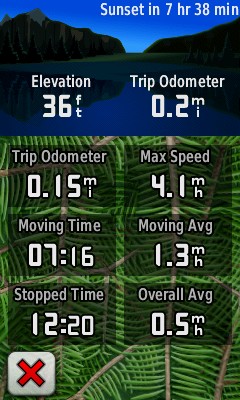
The Oregon offers a couple of other minor but glitzy features that I wouldn't be surprised to see show up on the Colorado. Setup->Geocaching allows you to set your find count and see it on the odometer dashboard. The Geocaching dashboard also includes distance and bearing to the nearest cache and the time since your last find was marked.
|
|
||||
|
|
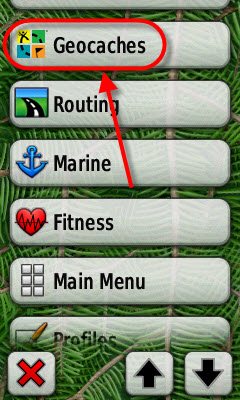
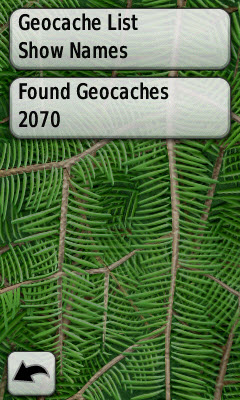
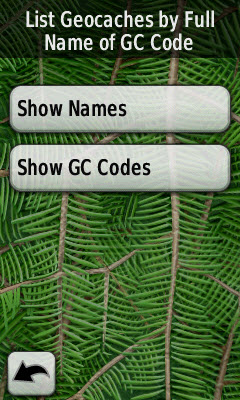
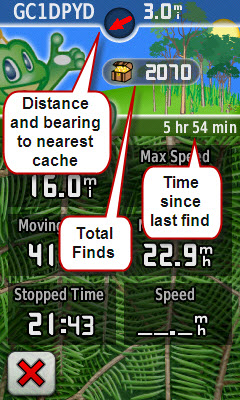
If I compare the Oregon to the Colorado I see advantages and disadvantages. On the plus side, geocaches seem to have the same "status" as waypoints where on the Colorado they are missing from many places like Recent Finds and Search Near. The Oregon interface enables you to find and navigate to child waypoints much more easily. I find myself constantly flipping in and out of geocaching mode on the Colorado to access things like the odometer and calculator, with the Oregon there really isn't a special mode.
The disadvantage of the Oregon is the loss of the geocaching mode screens that included a handy summary and provided quick access to the compass, map and cache descriptions. I also like having a dedicated Show Log button but it seems like this could easily be added to the Oregon.
7/17/08 Update #2 (10pm)
I was able to get a good side-by-side field comparison between my Oregon and 60csx this evening. The 60csx did what it normally does, it is still the most reliable GPS of the three. The good news: so far the OR has not experienced the big drifts that I've seen with the Colorado. However, the Oregon does spend a lot of time with errors in the 30'-50' range. It feels like my 60cs from that perspective, it holds lock better, but it has a lot of minor variation in the track. The odometer seems to consistently register about 13-15% lower than the trip odometer on the 60csx and CO. The track logs are also shorter than the 60csx by about 6-7%.
The basic test conditions:
- 1.11m test course, all narrow single track in a heavily forested area with both deciduous and/or coniferous cover.
- < 70' altitude change along track
- No large bodies of water, ledge, buildings or reflecting surfaces
- GPS's held vertically in different hands
- Tracklog every 3 seconds
- 1/2 backlight
- No compass
- No WAAS
- Fresh batteries (4 bars)
Below the reference track is black and is about 15'-20' wide. The reference track has been averaged from 50-60 individual tracks over the same course. The 60csx is red (you can't see much because it falls under the reference track) and the Oregon is green. Maximum error for the Oregon is around 50' down in the SW corner.
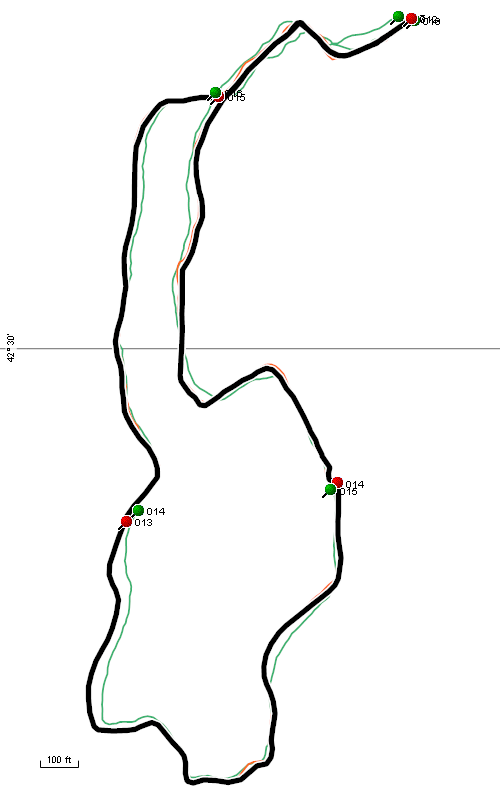
7/18/08 Update #1 (12pm)
Just a brief update this morning because the Colorado 2.6 Software has been keeping me occupied. Using the same test course as I did last night, I compared the Colorado and the Oregon this morning. During the test the Colorado had one of its usual 100-200' location drifts. The OR did not experience a similar drift. Similar to last night, I still see drift in the under 50' range when compared to the Colorado (when it is working) and the reference track. In the image below the OR is green, CO is blue and the reference track is black.
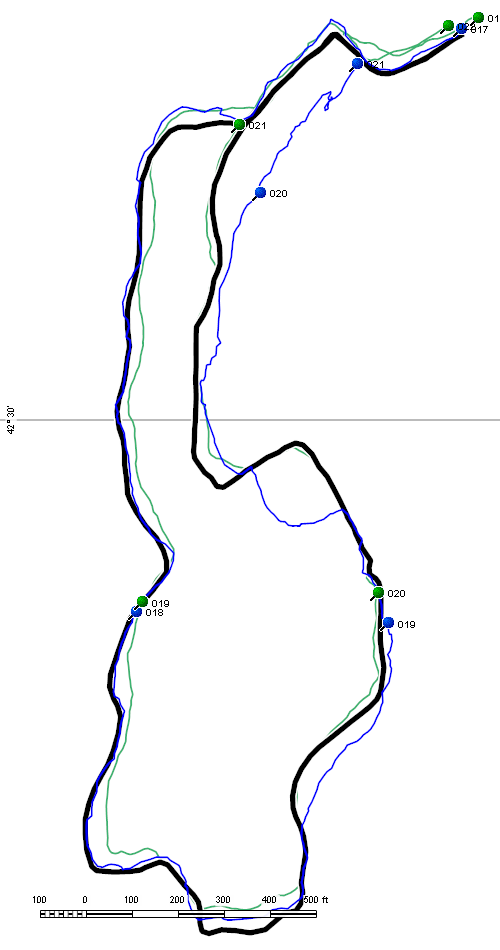
I'm beginning to suspect (as others have already pointed out) that the GPS chipset is probably different between the Colorado and Oregon, most are speculating that it is the single chip STM Cartesio (ST2062) which Garmin is using on the new Nuvi 2x5 line. Here are some reasons why I suspect this, however none are conclusive in my mind:
- GPS performance compared to the 60csx and Colorado feels different. The Oregon does not appear to have the big drift errors the Colorado experiences, nor does it have the high accuracy and stability that the 60csx does. Some of this could be explained if the unit has a patch antenna.
- GPS Accuracy numbers are very different on the Oregon (20's-30's) as compared to the 60csx and Colorado (teens and 20's). I would expect this if different hardware and different GPS software was in use.
- The Oregon manual indicates that the GPS receiver is "more than 12 channels". The Colorado and 60csx manuals list the receiver as 12 channel.
- The Colorado GPS software is visible in [drive]:\Garmin\RemoteSW, the Oregon does not have this directory or any other visible GCD file.
- The version number of Oregon GPS Software (2.42) has never been used by MediaTek in their public software releases on the Colorado or HCx. The Nuvi 2x5's are at GPS Software 2.31. If the Nuvis get upgraded to 2.42 in the near future we probably have a smoking gun.
7/20/08 Update #1
This weekend I enjoyed some serious playtime (geocaching and hiking) on my Oregon 400t along side my Colorado.
- After getting used to the touch screen I think it very easy and fast to get around. The CO feels more cumbersome after using the OR for several days. I just keep wishing that more setup and configuration options were accessible directly from the Tools pages rather than having to go to Setup all the time. Text entry, searching, navigating menus, map panning/scroll is just so easy. Garmin gets big kudos for the UI design.
- There's no question in my mind that the Oregon has the dimmer screen as compared to the Colorado. Like the Colorado I'm living with it by running backlight all the time but in bright sun it is really hard to see.
- I noticed a piece of dirt got wedged in between the screen cover and the case. I wonder if this is going to be a problem with the design -- it seems like a large gap and a place where dirt could collect. Something to keep an eye on.
- Under light rain the touch screen worked but I thought it felt "sticky" since your finger doesn't slide as well.
- The GPS receiver didn't seem to have any major "events" like the Colorado but I did pull the Colorado out a few times when I was under difficult tree cover and found that the Colorado was more reliable (assuming it isn't drifting). There was one geocache (out of 20) I would not have found if I didn't bring the CO.
- The Colorado updates faster on the map page when you are moving. When I'm moving slowly the Oregon takes longer to detect my movement and reorient the map -- its usable but I notice a difference.
- Although I haven't really measured it, battery life seems better than the Colorado. Not as good as the 60csx but I'm guessing I'm getting 12-14hrs on a set of NiMH 2700mAh's.
After using the Oregon for a week I feel that once again Garmin does not have a "slam dunk". I'm particularly disappointed by the screen brightness in sunlight and to a lesser extent the GPS accuracy, although I'm hoping the later improves with some GPS software updates. On the flip side I'm very happy with the usability of the touch screen interface and physical design of the unit -- time will tell if I like it the winter.
7/23/08 Update #1
This will probably be the last of my first impressions! I'm trying to put more effort into getting the FAQ, Issues list and hopefully some sort of review in place based on the material presented here.
Miscellaneous notes:
- I tried pilotsnipes Nuvi POI loader that works very well on Colorado version 2.6 and it works on the Oregon as well.
- This morning I took a walk with the Oregon in my gloved hand. It was a heavy fleece glove that I wear down to about 15F. I have heavier gloves but this one covers me for 80% of my winter activities. I'll have to say that once again I was pleasantly surprised with how well I could get around the touchscreen. The only place I had problems was with the data fields on the top of the map page. They are narrow and I had a hard time getting my glove to hit that close to the top edge of the screen.
 |
|
Gloved use |
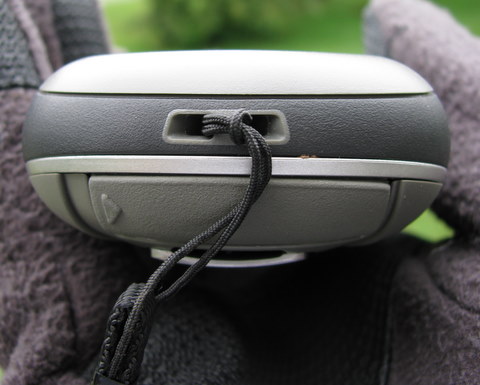
- My 60csx lanyard fits on the lanyard attachment -- it took a little work to thread it on but I'm happy to finally have a lanyard on the unit.
 |
|
Lanyard attached |
- The Oregon creates a lot of track segments -- this is in order to improve the ability save partial tracks I'm guessing. I'm trying to understand all of the cases where a new segment gets created but at a minimum every time you change profiles, power cycle and reset the odometer a new segment is created. If you download tracks you'll see lots of segments as compared to the Colorado.
- The Oregon does not support temperature (air) as a data field or as an extension in the tracklog data. Garmin must have got sick of the calls about the Colorado's temp sensor not working.
- The WhereTo? menu makes a lot more sense to me on the Oregon. Once navigation has started the Stop Navigation button shows up under WhereTo? and the new "Recalcuate Off/On Road" toggle feature is great for doing short caches where you really don't need to change the profile. Unfortunately the OR doesn't include a Detour feature like the Colorado but hopefully that'll get added in a future release.
- This unit locks fast when it is outside. Definitely faster than the 60csx and the Colorado, combine that with a fast boot time and the unit feels much snappier than the Colorado starting up.
- I wish Garmin would spend some time making the archive of current.gpx faster. It seems to take forever if you choose not to archive your track logs.
- The move left and move right arrows should gray out when you've reached the left/right most page.
- During my head to head comparisons with the 60csx the odometer is always off by 15% (lower) and the tracklogs over the same course are lower by about 6-7%. This definitely feels like another low speed GPS chipset issue. If I watch when I'm walking the speed frequently drops to zero and the "Time Stopped" counter is sometimes 70-100% higher than the 60csx stopped time counter over the same walk. I'm beginning to wonder if this is a MediaTek chip and they are just running an older version of the GPS software on the Oregon (the older software versions on the HCx were known to have problems with the odometer at slow speeds before the drift issue was introduced in 2.6).
- Still no major drift events although someone on the groundspeak board described a big drift on the Oregon that sounded exactly like the Colorado.
