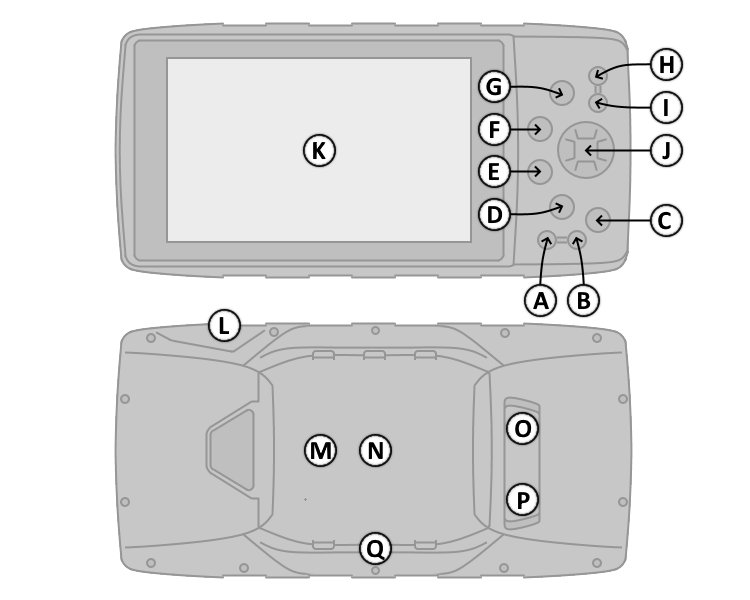
| A. POWER Button |
|
E.
ENTER (MARK) Button |
|
1. Press and hold to power unit on/off. |
|
1. Press and hold to save current
location as a waypoint. |
|
2. Press and hold to enter sleep mode (in powered mount). |
|
2.
Press once to make menu selections or
acknowledge notifications. |
|
3. Press once to
access Backlight and Volume adjustments. |
|
3. Press once on Map page to toggle Declutter mode. |
| B. FIND Button |
|
F. QUIT Button |
|
1. Press once to open the search menu. |
|
1.
Press once to cancel or return to the previous menu or page. |
|
2. Press twice to set current location to HOME waypoint. |
|
2.
Press and release to loop through display pages in reverse
order. |
|
3. Press and
hold to open Recent Finds page. |
|
G. PAGE Button |
| C.
NAV (MOB) Button |
|
1.
Press and release to loop through display pages. |
|
1. Press once to open navigation options. |
|
2. Press
and hold to cycle between Automotive and Marine modes. |
|
2. Press and hold to activate: |
|
H. OUT Button |
|
A. Man Overboard function (Marine Mode). |
|
1.
Press to zoom out on the Map page. |
|
B. Next Turn page with voice prompt (Automotive Mode). |
|
I. IN Button |
| D.
MENU Button |
|
1.
Press to zoom in on the Map page. |
|
1. Press once to open the active page option menu. |
|
J. D-PAD Button |
|
2. Press twice to open the main menu. |
|
1.
Navigate menu selections, pan the
map, or move the arrow/cursor. |